
Killing Floor sandbox (custom game) settings
These settings are in KillingFloor.ini, in the [KFmod.KFGameType] section.
 A horde of specimens shambling out of the dark.
# Core parameters
- KFGameLength — number of waves:
0— 4 waves;1— 7;2— 10;3— custom wave count - StartingCash — starting cash when joining the map (only used when
KFGameLength=3) - MinRespawnCash — minimum cash when respawning after death (only used when
KFGameLength=3) - bUseEndGameBoss —
trueenables the Patriarch at the end of the game,falsedisables it - LobbyTimeout — delay (seconds) in the menu before the map starts
- bEnemyHealthBars —
trueshows mob health bars for all players (only used whenKFGameLength=3) - MaxZombiesOnce — maximum number of mobs on the map at once (only used when
KFGameLength=3) - InitialWave — wave configuration index where the game starts (only used when
KFGameLength=3) - FinalWave — wave configuration index where the game ends (only used when
KFGameLength=3) - FriendlyFireScale — damage dealt between players. Express percentages as numbers, e.g. 100% =
1.0, 10% =0.1
# Extra keys when KFGameLength=3
# MonsterClasses
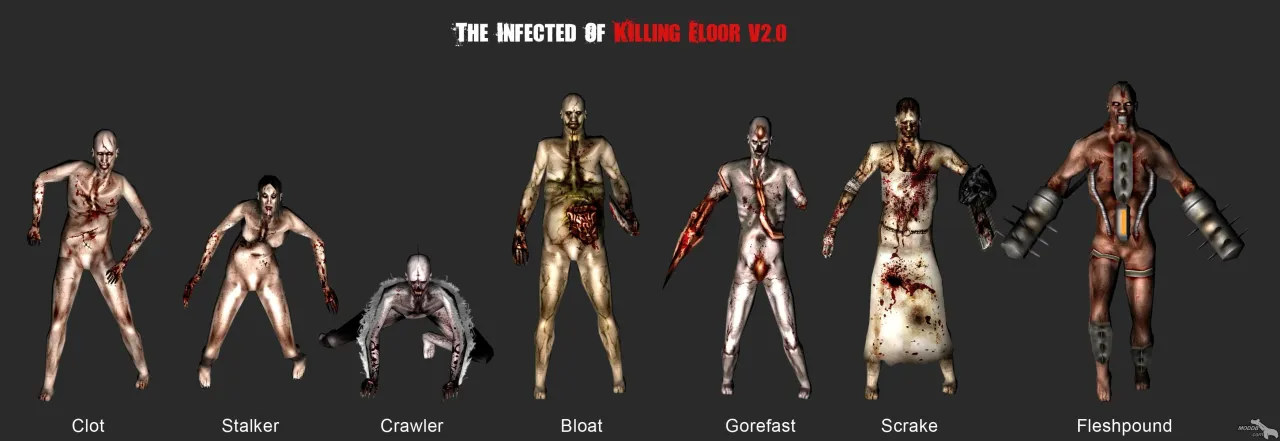 Specimen lineup from the original Killing Floor mod: Clot, Stalker, Crawler, Bloat, Gorefast, Scrake, Fleshpound.
MonsterClasses=(MClassName="KFChar.ZombieClot",Mid="A") — each line describes one monster type that can appear in the game:
- MClassName — the mob’s “name”. See the relevant section (“Mutants”) for details
- Mid — letter index (case-insensitive), shorthand for that mob in the rest of the config (see below)
# MonsterSquad
MonsterSquad=4A1G — mobs spawn in squads. Each line defines one squad’s composition. For example, 4A1G means four mobs with index “A” and one with index “G”.
# Waves
Waves[0]=(WaveMask=196611,WaveMaxMonsters=20,WaveDuration=255,
WaveDifficulty=0.000000) — each line defines one wave’s settings.
- [0] — wave number. Referenced by
InitialWaveandFinalWave - WaveMaxMonsters — number of mobs per player in that wave
text
MonsterSquad=4A
MonsterSquad=4A1G
MonsterSquad=2B
text
0 MonsterSquad=4A
1 MonsterSquad=4A1G
1 MonsterSquad=2Btext
110Treat that as a binary number and convert it to decimal to get the WaveMask for this wave.
You can use the Windows calculator:
- Open it and switch to Scientific mode
- Set the base to binary (Bin) and enter
110 - Switch to decimal (Dec) to get
6— that is the value to put in WaveMask
Example: Fleshpounds in the first wave
A walkthrough by v_e_r_s_u_s from the killingfloor.ru forum ("Sandbox setup" thread, 2011). In the stock list, the Fleshpound appears in only one squad, MonsterSquad=1F, the 24th. To spawn it in a wave, that squad has to be in the wave's WaveMask. Mark the squads you want with ones (the first squad is the rightmost digit): squad 1 4A (four Clots) and squad 24 1F. That gives binary 100000000000000000000001, which is 8388609 in decimal:
Waves[0]=(WaveMask=8388609,WaveMaxMonsters=20,WaveDuration=255,WaveDifficulty=0.000000)The first wave then spawns only Clots and Fleshpounds at 4:1. If Fleshpounds disappear after switching on the sandbox with a mutator such as FakedPlayers, check that the 1F squad bit is in the masks of the waves you want.
WaveMask via powers of two and other tips
From the killingfloor.ru forum threads "Гейм Тайп или почему бы не воспользоваться поиском", "Песочница на Дедике" and "Песочница":
- Calculating WaveMask. Number the
MonsterSquadlines from zero, like an array. For every squad that should spawn in the wave, take 2 to the power of its number and add them up. For example, to spawn only squads 0, 3, 4 and 7 in the first wave: 2^0 + 2^3 + 2^4 + 2^7 = 153, soWaves[0]=(WaveMask=153,WaveMaxMonsters=20,WaveDuration=255,WaveDifficulty=0.000000). The stock first-wave mask196611= 2^0 + 2^1 + 2^16 + 2^17, i.e. squads 0, 1, 16 and 17. According to siriushard, the stock config allows only 32 squads. - In
MonsterSquad=4Athe number is how many zeds are in the squad and the letter is theMidfromMonsterClasses. Symbols such as$or&can be used instead of letters. - Enabling it on a dedicated server. In WebAdmin open Default > Game and set Game Length to custom: custom is what turns the sandbox on. Click Accept and restart the server. The sandbox itself is configured in
killingfloor.ini; WebAdmin just mirrors those settings. - No Husks. By default the Husk may be missing from the sandbox
MonsterClasseslist; add it yourself:MonsterClasses=(MClassName="KFChar.ZombieHusk",Mid="I"). - Custom game type. If you move the settings from a client to a dedicated server and the waves are not read (while zeds and squads are), check the section: with your own game type the settings must go into its section, not into
KFGameType(Flame's advice, which solved the problem). - No [KFMod.KFGameType] section in the ini. From the killingfloor.ru forum thread "Количество волн - как увеличить ?": a server's
KillingFloor.ini(andDefault.ini) had noKFGameLengthline and no[KFMod.KFGameType]section at all. According to Flame, a server downloaded with SteamCMD under Linux has this section inDefault.ini, but under Windows it may be missing; the fix is to add the section with the needed lines (KFGameLength,FinalWave,Waves[...]and so on) toKillingFloor.iniyourself. In the same thread: if you need more waves than the sandbox allows (about 15), try the Survival Endless mutator. - Sandbox from client to server. From the "Хорошие хардкорные настройки песочницы" (Good hardcore sandbox settings) thread: set up the sandbox in the game via server creation, then find the
[KFmod.KFGameType]section in the client'skillingfloor.ini(KFGameLength=3,WaveStartSpawnPeriod,StartingCash,MinRespawnCash,bUseEndGameBoss, theMonsterSquad=...lines and so on) and use it to replace the same block in the server config (-SR-'s advice). The in-game menu does not allow more than 9 zeds of one type in a squad; edit the ini for more. - Squad order.
MonsterSquad=4E2Gis a squad in which 4 zeds with index E and 2 with index G appear at once and head for the players. A wave's squads spawn in order from top to bottom, starting with the first (top) one; once all have spawned, it starts again from the first (Proton). - One squad for a big wave, and your own spawning. From the "Ограничение групп\монстров\оружия" thread: if a wave has, say, 200 zeds but the squads list holds just one squad of 5 clots, that squad keeps respawning until all 200 are killed (Dr_Killjoy). kok-s warned that spawning 100-200 clots at once from one spawn will crash the game with an error. If you want full control over zed spawning, Dr_Killjoy's advice is to decompile
KFMod, findkfgametype.uc(the class for the game type, zed spawning lives there too) and make your own game type based on it, where you write how zeds spawn yourself; then the sandbox isn't needed. The new game type goes into the server's batch file as the game type instead of the old one. - The Brute and other added zeds on version 1046. Because of the new respawn system, mutators that add zeds to the classic game stopped working: according to Dr_Killjoy, the Brute can now only be added through the sandbox. In the "Не возможно поставить custom мобов на v1046" (Cannot add custom zeds on v1046) thread, a new class entered in the sandbox through the menu did not appear in the list for adding to squads; Titanishu added the zed through
KillingFloor.ini: it still did not show in the sandbox settings, but everything worked. Dr_Killjoy also suggested the MonsterConfig mutator.
Sandbox during events
During seasonal events (for example Halloween 2013), stock zeds listed in the sandbox as KFChar.Clot and so on were not swapped for the event models. The killingfloor.ru forum used the HalloweenFixMut.HalloweenFixMut mutator (Flame) for this: leave the sandbox classes as they are, KFChar.Clot included.
Christmas zeds can be switched on and off at any time by listing their classes in the sandbox in the server's KillingFloor.ini (in the System folder) (killingfloor.ru forum, "Старый Новый год в KF" thread). The Christmas classes:
MonsterClasses=(MClassName="KFChar.ZombieClot_XMas",Mid="A")
MonsterClasses=(MClassName="KFChar.ZombieCrawler_XMas",Mid="B")
MonsterClasses=(MClassName="KFChar.ZombieGoreFast_XMas",Mid="C")
MonsterClasses=(MClassName="KFChar.ZombieStalker_XMas",Mid="D")
MonsterClasses=(MClassName="KFChar.ZombieScrake_XMas",Mid="E")
MonsterClasses=(MClassName="KFChar.ZombieFleshpound_XMas",Mid="F")
MonsterClasses=(MClassName="KFChar.ZombieBloat_XMas",Mid="G")
MonsterClasses=(MClassName="KFChar.ZombieSiren_XMas",Mid="H")
MonsterClasses=(MClassName="KFChar.ZombieHusk_XMas",Mid="I")
To get the regular zeds back, drop _XMas from the class names (KFChar.ZombieClot, KFChar.ZombieCrawler and so on).
During the Christmas event the same problem looked like this (killingfloor.ru forum, "Problem starting the sandbox" and "Sandbox" threads): when a wave began, the server log filled with ZombieClot playanim with no mesh! lines and the server then crashed, or the zeds did not spawn at all (on a test map they appeared invisible and could not attack). It was fixed by installing the XMASZombieFixMut mutator on the server (in the "Sandbox" thread together with KFCharFix). The author of the first thread saw no conflicts with other mutators and warned that if you add it to a game with standard zeds, Christmas zeds will appear on top of them.
Starting cash and trader time without the sandbox
From the thread "Настройка сервера" (Server setup, killingfloor.ru forum, 2013).
In the regular mode (not the sandbox), starting cash, minimum cash on respawn, and the time between waves are set separately for each difficulty:
StartingCashBeginner=300
StartingCashNormal=250
StartingCashHard=250
StartingCashSuicidal=200
StartingCashHell=100
MinRespawnCashBeginner=250
MinRespawnCashNormal=200
MinRespawnCashHard=200
MinRespawnCashSuicidal=150
MinRespawnCashHell=100
TimeBetweenWavesBeginner=90
TimeBetweenWavesNormal=60
TimeBetweenWavesHard=60
TimeBetweenWavesSuicidal=60
TimeBetweenWavesHell=60
To set your own values without the sandbox, Flame wrote the CashConfigMut mutator (CashConfigMut.CashConfigMut). The values go into CashConfigMut.ini and apply on any difficulty:
NewStartingCash- starting cash;NewMinRespawnCash- minimum cash on respawn;NewTimeBetweenWaves- trader time.
The mutator changes the values in Tick: setting them through default does not work because KFGameType reads these variables from the ini, and the ini takes priority. The author tested it on a dedicated server and warned that it will probably not work in single-player.
class CashConfigMut extends mutator Config(CashConfigMut);
var globalconfig int NewStartingCash,NewMinRespawnCash,NewTimeBetweenWaves;
event Tick(float delta)
{
 if (
 KFGameType(Level.Game)!=none ||
 KFGameType(Level.Game).StartingCash>0 ||
 KFGameType(Level.Game).MinRespawnCash>0 ||
 KFGameType(Level.Game).TimeBetweenWaves>0
 )
 {
 KFGameType(Level.Game).StartingCash=NewStartingCash;
 KFGameType(Level.Game).MinRespawnCash=NewMinRespawnCash;
 KFGameType(Level.Game).TimeBetweenWaves=NewTimeBetweenWaves;
 Disable('Tick');
 }
}
defaultproperties
{
 NewStartingCash=300
 NewMinRespawnCash=250
 NewTimeBetweenWaves=90
 GroupName="KF-CashConfig"
 FriendlyName="CashConfigMut"
 Description="CashConfigMut"
 bAddToServerPackages=True
}
If the server runs ServerPerks and you want a custom starting amount, Flame suggested another route: set it in the perk classes (SRVet* or SRVeterancyTypes), in the AddDefaultInventory function, with a line such as P.PlayerReplicationInfo.Score=2013;.
Ammo on the map is not a server setting. Ammo boxes (KFMod.KFAmmoPickup) are placed by the map author in the editor. During a game, depending on difficulty, some boxes are randomly hidden (put into the Sleeping state), and their visibility is re-evaluated periodically.
