
Killing Floor Workshop Upload Guide - SDK Route
This is the minimal route for getting a Killing Floor 1 Workshop item uploaded through the official SDK tooling.
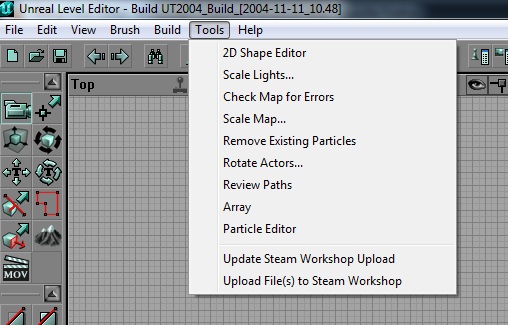 The KF Editor Tools menu: Check Map for Errors and the Steam Workshop upload entries.
Required Tool
Install Killing Floor SDK from Steam:
- Open Steam.
- Go to Library.
- Switch the library filter to Tools.
- Find and install Killing Floor SDK.
- Start the SDK.
steam://run/1260/Upload Flow
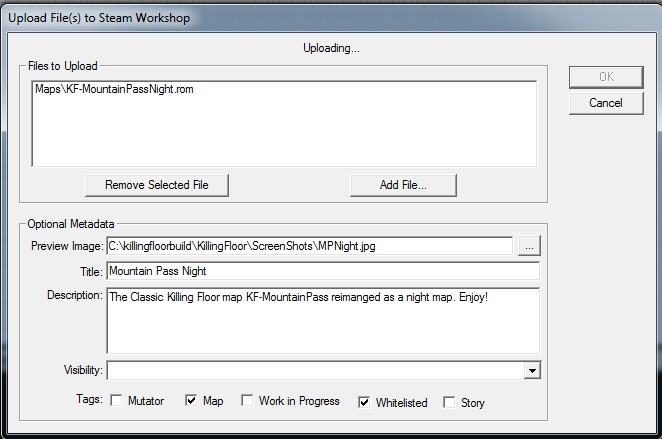 The Workshop upload dialog: files, preview image, title, description and tags such as Whitelisted.
- Prepare your map, mutator, texture replacement, or other content.
- Confirm the package works in a local game.
- Start Killing Floor SDK.
- Use Tripwire's Workshop uploader flow.
- Add a structured title, description, tags, preview image, credits, and compatibility notes.
- Publish privately or friends-only first if you still need testing.
- Test subscription and extraction from a clean client.
Tripwire's Workshop documentation:
Publishing Checklist
| Check | Why it matters |
|---|---|
| Clear description | Players need to know what the upload does. |
| Correct tags | Tag spam makes Workshop search worse. |
| Credits | Missing credits create conflict and distrust. |
| Compatibility | Server admins need package and mutator class names. |
| Manual download | Workshop extraction can fail, so direct files help. |
| Whitelist status | Players care whether perk progression works. |
