
Exporting Monsters and Weapons to Custom Mutators
Everything written below will be repeatedly corrected and formatted...
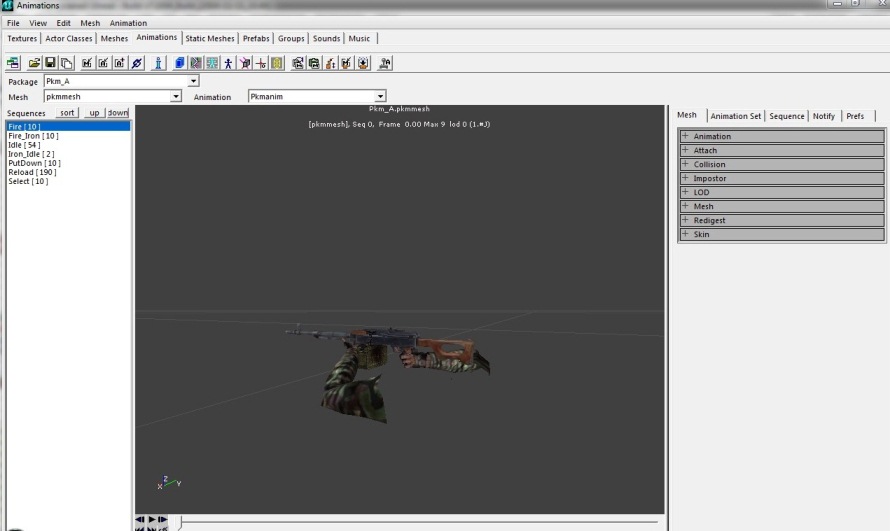 A weapon mesh opened in the Animations browser of the KF Editor.
Some time ago it was described how to transfer weapons or monsters from mutator to mutator.
Transferring Weapons from Mutator to Mutator
Let's consider a situation using the example of NovaSix from hiyokomod, when we don't want to extract animation, textures, static meshes and sounds from hiyokomod packages and insert them into our own packages.
Looking at the contents of NovaSix\*.uc files, we see that we're also missing AntiSirenNade.uc and DamTypeAcid.uc.
Step 1: Copying Files
Take these 9 files and put them, for example, in ServerPerksV5 (for simplicity, we'll consider a situation where everything is in 1 folder, as in versions before 5.10).
Step 2: Replacing Package Prefixes
Now in all these 9 files we replace hiyokomod. with ServerPerksV5. (actually we'll need to replace in 6 files).
Step 3: Configuring Perk Dependencies
unrealscript
function projectile SpawnProjectile(Vector Start, Rotator Dir)
{
	local KFPlayerReplicationInfo KFPRI;
	KFPRI = KFPlayerReplicationInfo(Instigator.PlayerReplicationInfo);
	if (KFPRI != none)
	{
		if (KFPRI.ClientVeteranSkill == Class'hiyokoPerksScientist')
			ProjectileClass=Class'ServerPerksV5.NovaSixProj';
	}
	else
		ProjectileClass=Class'KFMod.M79GrenadeProjectile';
	return Super.SpawnProjectile(Start,Dir);
}
Here we shoot either a NovaSix grenade or a regular M79 grenade depending on the perk. Since ServerPerks doesn't have a Scientist perk, we can make it so that a medic can shoot from NovaSix, and for others the shot would be M79 grenades.
unrealscript
function projectile SpawnProjectile(Vector Start, Rotator Dir)
{
	local KFPlayerReplicationInfo KFPRI;
	KFPRI = KFPlayerReplicationInfo(Instigator.PlayerReplicationInfo);
	if (KFPRI != none)
	{
		if (KFPRI.ClientVeteranSkill == Class'SRVetFieldMedic')
			ProjectileClass=Class'ServerPerksV5.NovaSixProj';
	}
	else
		ProjectileClass=Class'KFMod.M79GrenadeProjectile';
	return Super.SpawnProjectile(Start,Dir);
}
unrealscript
function projectile SpawnProjectile(Vector Start, Rotator Dir)
{
ProjectileClass=Class'ServerPerksV5.NovaSixProj';
return Super.SpawnProjectile(Start,Dir);
}Step 4: Adding to Shop
TraderInventory=3:ServerPerksV5.NovaSixPickup(let 3 be the medic category, for example)
If we want - we add it to SRVet\*.uc files for corresponding perks.
Transferring Monsters
Simple Monster (BloatEX)
Decompile hiyokoZombiesMut, copy ZombieBloatEX.uc to ServerPerksV5 and that's it.
MonsterClasses=(MClassName="ServerPerksV5.ZombieBloatEX",Mid="P")Monster with Own Controller (NinjaPat)
Copy NinjaPat.uc, HardPatController.uc and BossPlasmaProj.uc to our mutator.
In addition, we'll also need:
DamTypeHHGren.ucHHGExplosion.ucDamTypeExpBullet.uc
Replace hiyokomodZombie4th and hiyokomod with ServerPerksV5.
unrealscript
WeaponClass=Class'ServerPerksV5.HolyGrenade'
(otherwise we'll have to transfer the holy grenade to our mutator as well)
unrealscript
#exec OBJ LOAD FILE=godpatvoice.uax
at the top of NinjaPat.uc, otherwise it won't find it.
Working with Resources Not Contained in Standard Files
We'll consider a situation when there are large resource files (animation, textures, static meshes and sounds) and we need to extract resources for a specific monster from them.
Everything will be done without third-party software, only KFEd.
Extracting Textures
- Open KFEd, open the desired texture package
- Find the needed textures
- Use the Rename function to rename textures with the new package name
- Make sure all textures are renamed correctly
- Save in a new package
Extracting Static Meshes
- Open KFEd, open the desired static mesh package
- Find the needed meshes
- Rename meshes with the new package name
- Save in a new package
Extracting Animations and Sounds
- Open KFEd, open the desired animation package
- Find the needed animations
- Rename animations with the new package name
- If there are sounds in notifications, you need to:
- Select the desired animation
- Rename AnimationSet
- Link animation and mesh
- Add Notify, selecting type
AnimNotify_Script - Make sure all references are updated
- Save in a new package
Important Notes
- When transferring meshes and animations, you need to delete notifications and recreate them, assigning the previous settings
- Simply moving sounds with animations won't work
- After moving an animation and saving it in a new package, references to the old package will remain
- In all other cases everything works perfectly, but with sounds, when using them in notifications, simple moving doesn't work and problems will arise
Result
After completing all steps, the weapon or monster is transferred to your mutator and ready to use.
Your own boss variant, custom zed damage and event classes
From the killingfloor.ru forum threads "modify the BOSS abdominal tentacles", "Хард Патриарх для версии 1046 и выше" (Hard Patriarch for version 1046 and later), "Помогите с дамагом моба." (Help with a zed's damage) and "Ивентовские мобы" (Event zeds).
Your own Patriarch without editing KFChar. KFMod and KFChar should not be modified. Instead, Flame advised copying the boss into your own package (in the example, into the ServerPerksV5 sources), renaming it and deriving it from ZombieBoss with the values you need. The tentacle and attack parameters can be seen in KFMod.ZombieBossBase:
class ZombieNewBoss extends ZombieBoss;
defaultproperties
{
 ClawMeleeDamageRange=85.000000
 ImpaleMeleeDamageRange=45.000000
 MeleeDamage=75
}
Then replace the boss in the game settings: in killingfloor.ini, section [KFMod.KFGameType], change EndGameBossClass=KFChar.ZombieBoss to EndGameBossClass=ServerPerksV5.ZombieNewBoss, or add this to the mutator's PostBeginPlay() (anywhere after KFGT = KFGameType(Level.Game);):
KFGT.EndGameBossClass = string(Class'ZombieNewBoss');Dr_Killjoy's notes on other monster properties: bMeleeStunImmune means the monster cannot be interrupted by a melee hit (the state where the zed throws its head back and cannot attack for about a second but can still move); the long stun with the head lowered is controlled by KFMonsterController(Controller).bUseFreezeHack and triggered by the FlipOver() function, and the Patriarch and some zeds cannot be put into it. CrispUpThreshhold is how many burn hits must remain when the zed starts to crisp up: with a value of 6, an ignited zed takes fire damage 10 times and starts crisping up when 6 remain (after 4 seconds). bFatAss, judging by the code comment (// HACK for pathfinding), is a pathfinding hack, but the variable is not used anywhere in KFMod or KFChar.
HardPat and other ZombieBoss subclasses after patch 1044. Since version 1044 the ZombieBoss defaultproperties contain these lines:
 EventClasses(0)="KFChar.ZombieBoss"
 EventClasses(1)="KFChar.ZombieBoss"
 EventClasses(2)="KFChar.ZombieBoss_HALLOWEEN"
 EventClasses(3)="KFChar.ZombieBoss_XMAS"
and KFMod.KFGameType.AddBoss replaces the boss with the event variant from this array when spawning it. That is why HardPat, which derives from ZombieBoss, was turned into a stock boss. Flame suggested clearing the array, for example in the KFHardPat mutator's PreBeginPlay:
class'KFHardPat.HardPat'.default.EventClasses.Length=0;(or with a separate mutator that has the same line in PostBeginPlay, or by not deriving the boss from KFChar.ZombieBoss). For Aleksandra in the thread this did not work and only a separate game type helped, but for Flame both variants worked.
A custom zed deals no damage. MeleeDamage in defaultproperties is not enough. Damage is dealt from the animation: in the editor you place an AnimNotify_Script on the right animation at the right moment and enter the damage function, which for the Shiver is ClawDamageTarget (3xzet's answer). A separate Zombie...Base class is not required for a custom zed (Dr_Killjoy).
Event zeds. According to LLIePLLIeHb, the event zeds were cut in version 1032, and for them you need all the files from version 1031: animations, meshes, textures, code and sounds. Dr_Killjoy explained that they no longer exist in KFChar (and KFChar must not be modified), which is why the game crashes; you need to make copies of them and put them in your own package.
Article by Flame
