
KF2 Server Workshop Log Spam - Causes and Workarounds
A server administrator's note on a problem seen in late 2017 and early 2018: a Killing Floor 2 dedicated server subscribed to many workshop items logs a line with all subscribed item numbers over and over. The guide's update says the bug was fixed by the 27 March 2018 patch (update 1062: "Fixed a code bug with dedicated servers where logs were being generated that consumed a lot of CPU after a period of time"), but the workarounds are still good examples of dealing with runaway logs. See also Dedicated server optimization.
The problem
The more workshop items your server subscribes to, the worse it gets. On the author's server with more than 300 maps, a single log line contained every item ID and it was written every second, 24/7. This causes noticeable I/O and CPU usage after a while and huge useless log files.
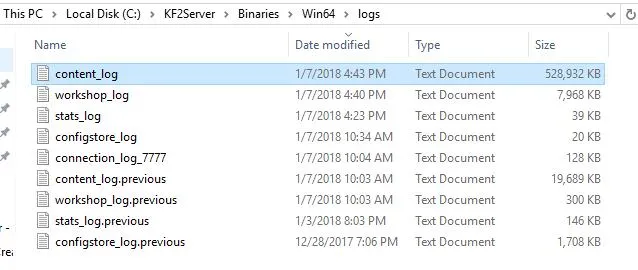 Log files after only a few hours of running.
Workaround 1: run the Steam client first
Starting the Steam client before the server prevents the logging (and possibly workshop updates on the server).
Workaround 2: deny permission on the log files
Probably the most practical. In \kf2server\Binaries\Win64\logs deny the server's user account write, append and delete rights on content_log.txt and workshop_log.txt:
- Right-click the file, Properties, Security tab, Advanced.
- Change Permissions, Add, type the user name that runs the server.
- Tick Deny for Create files / write data, Create folders / append data and Delete.
- Confirm all dialogs.
Workaround 3: hex-edit steamclient64.dll
Symlinking the files to NUL did not work well on Windows. What worked was changing the log file names to invalid ones, so the files are created (with only the first part of the name) but nothing is written:
- Back up
Binaries\Win64\steamclient64.dll. - Open it in a hex editor and search for
content_log. - Replace the underscore with a colon.
- Do the same for
workshop_log.
Workaround 4: remove steamclient64.dll
Rename it (for example to steamclient64.dll.orig) so it is easy to undo. This will almost certainly break workshop item updating on the server.
Linux
Create symbolic links to the null device:
cd <log directory>
ln -sf /dev/null content_log.txt
ln -sf /dev/null workshop_log.txt
(The original guide lists the arguments in the opposite order; ln -sf TARGET LINKNAME takes the target first.)
Suppress regular log noise
In the [Core.System] section of PCServer-KFEngine.ini add:
Suppress=NetComeGo
Suppress=Log
NetComeGo spams the main Launch.log (KFGame\Logs) with update checks for every workshop item, while Log is a generic tag used for checking each item's state when loading. The author also suppresses DevOnline on his test server. Suppression rules are handy for readable logs when debugging mods.
FAQ
- Was the workshop logging bug fixed?
- Yes. Update 1062 (27 March 2018) fixed a dedicated-server bug where logs consuming a lot of CPU were generated after a while.
- Where are the logs that grow too large?
- content_log.txt and workshop_log.txt in the Binaries/Win64/logs directory of the server.
