
Changing weapon characteristics
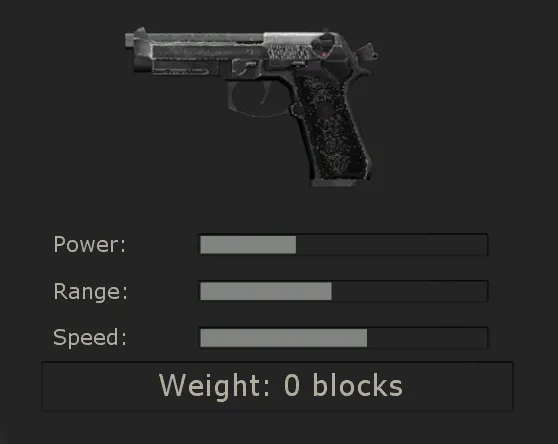 The starting 9mm pistol in the Trader menu.
class AlteredWeaponMut extends Mutator;
function PostBeginPlay()
{
class'Single'.default.ItemName = "Handgun";
}
defaultproperties
{
GroupName="KFAlteredWeaponMut"
FriendlyName="Altered Weapon Mutator"
Description="Пример мутатора, который демонстрирует, как изменить существующее оружие."
}
This guide covers most of the essential attributes that can be changed.
Class semantics
Weapon is a weapon class in the inventory that contains general information. For example, when an item should appear in inventory, its name and weight. Contains relevant references to the WeaponPickup, WeaponAttachment and FireMode classes. This class is also responsible for how weapons will be displayed from 1st person. An example of this class is 'Single'.
WeaponPickup – The displayed weapon model when it (the weapon) is located somewhere in the game world, outside the player’s inventory (this also applies to the merchant). Contains information about the name of the weapon, how much ammunition (and its quantity) is consumed when firing, etc. An example of this class is 'SinglePickup'.
WeaponAttachment – Responsible for how the weapon is displayed from the 3rd person (and how other players from the side will see it). An example of this class is 'SingleAttachment'.
FireMode - The class is responsible for what fire mode the weapon has, what ammunition it uses, what damage it does, and similar related things. A weapon can have two fire modes and not necessarily one of them can be offensive (for example, the alt fire of a Beretta 9mm (by default it is RMB) includes a flashlight). An example of this class is 'SingleFire'.
Ammo - The class is responsible for how much ammo the weapon can carry, how much it initially contains, and how much ammo you receive when you pick up an ammo box. An example of this class is 'SingleAmmo'.
AmmoPickup – Used to indicate how much ammo a particular type of ammo box picks up (for example, 9mm ammo lying on the ground). An example of this class is 'SingleAmmoPickup'.
Projectile - Used to indicate the type of ammunition used by the weapon (shot, crossbow bolt, rocket, etc.), and also describes the speed of the projectile, the damage it causes, and other information. An example of this class is 'CrossbowArrow'.
Weapon name change
In order to rename a weapon, you need to change several variables located in different places:
class'Single'.default.ItemName = "9mm Tactical";9mm Tactical will be the name of the weapon that is displayed in the HUD.
class'SinglePickup'.default.ItemName = "9mm Pistol";9mm Pistol will be the name of the weapon that will be displayed in the store.
class'SinglePickup'.default.ItemShortName = "9mm Pistol";9mm Pistol will be the short name of the weapon that will be displayed in the player's inventory (including the store).
Shooting modes
class'SingleFire'.default.bWaitForRelease = true;If the value is set to true, then to shoot you will need to press the button, otherwise (value flase) - just hold down the button to shoot.
Damage
Damage is determined depending on what type of charge the weapon uses - an instant shot (for example, a shot from any pistol) or a projectile (for example, a shot from a crossbow):
class'SingleFire'.default.DamageMax = 32;32 – maximum damage indicator (excluding multipliers).
class'CrossbowArrow'.default.Damage = 300;300 is a constant damage indicator (i.e. without taking into account multipliers).
class'BoomStickBullet'.default.HeadShotDamageMult = 1.5;1.5 – damage multiplier from a shot hitting the head.
class'CrossbowArrow'.default.HeadShotDamageMult = 6.0;6.0 – damage multiplier for head bolt hits.
class'DamTypeM14EBR'.default.HeadShotDamageMult = 2.0;2.0 – headshot damage multiplier, specified by the DamTypeM14EBR class.
Fire rate
Consists of two variables that you can change:
class'SingleFire'.default.FireRate = 0.5;class'SingleFire'.default.FireAnimRate = 1.5;1.5 indicates that the speed is higher than normal, but not double.
Recoil
If you change the rate of fire, then also pay attention to changing the recoil value:
class'SingleFire'.default.RecoilRate = 0.07;class'SingleFire'.default.MaxVerticalRecoilAngle = 300;The higher the value, the more recoil can push the scope upward.
class'SingleFire'.default.MaxHorizontalRecoilAngle = 50;The higher the value, the more the sight will move to the sides when shooting.
Accuracy
Two variables affect a weapon's accuracy. In KF, the bullet spread is designed so that the first shot is always very accurate:
class'SingleFire'.default.Spread = 0.015;0.015 - spread value of the first bullet.
class'SingleFire'.default.MaxSpread = 0.12;Basically, this value does not change for each weapon (as it is set in the base class) and applies to all weapons (however, there are weapons that can calculate the maximum spread value using their own formula, ignoring the value of this variable)
Aiming
You can aim from absolutely any weapon (through the front sight or through the built-in/attached sight). The following variables affect the intensity of the crosshair (that is, the effective ability of the crosshair to move closer to the screen and the ability to change the power of the crosshair):
class 'single'.default.bHasAimingMode = true;If the value is true, then it is possible to adjust the sight magnification. Otherwise (i.e. the value is false) this option will not exist.
class 'single'.StandardDisplayFOV = 70.0;class 'single'.ZoomedDisplayFOV = 65.0;class 'single'.PlayerIronSightFOV = 75.0;Ammunition
Several variables are used to determine ammunition capacity:
class 'SingleAmmo'.default.MaxAmmo = 240;class 'SingleAmmo'.default.InitialAmount = 120;class 'SingleAmmo'.default.AmmoPickupAmount = 30;class 'SingleAmmo'.default.AmmoAmount = 20;Selection message
class 'SingleAmmo'.default.PickupMessage = You got another 9mm Handgun.When picking up a weapon, the following text will appear at the bottom middle of the screen - You got another 9mm Handgun.
Merchant
Here is a list of important variables used in the store (trader menu):
class'SinglePickup'.default.Cost = 1000;1000 - the cost of a certain weapon.
class'SinglePickup'.default.AmmoCost = 10;class'SinglePickup'.default.BuyClipSize = 30;In addition, there are three variables showing the statistics of weapons in the store (maximum value is 100). It is important to remember that weapon statistics may not be accurate and may not correspond to reality:
class'SinglePickup'.default.PowerValue = 20;class'SinglePickup'.default.SpeedValue = 50;class'SinglePickup'.default.RangeValue = 35;Inventory information
Even though these are far from the most important variables, it wouldn’t hurt to write about them:
class'Single'.default.InventoryGroup = 2;1 - Melee weapons; 2 - Pistols; 3 - Main weapon; 4 - Special (often quite powerful and heavy); 5 - Tools at hand (things that are not always used as weapons for destruction, but find their use to support the team); When creating a weapon, try to choose a category so that during the game it will be convenient to get it (the weapon) and does not cause confusion in the players' inventory.
class'Single'.default.Priority = 3;Priority sets which weapon in the group is drawn first: the higher the value, the earlier (see the correction from the forum discussion below).
class'Single'.default.GroupOffset = 1;1 - General priority of a given item.
class'Single'.default.Weight = 0;0 indicates that the weight of the item is zero.
class'Single'.default.bKFNeverThrow = true;If value = true, then the item cannot be thrown away or sold. Otherwise (i.e. = false) - it can be sold or thrown away.
Additions
Based on the thread "[Guide] Changing weapons" on the killingfloor.ru forum.
Priority. Priority decides which weapon is drawn first when you press that weapon group's key: the higher the value, the earlier it is drawn. Example from the thread: the Deagle has priority 120 and the revolver 70, so within the pistols group (2) the Deagle comes out before the revolver. The value is a byte, from 0 to 255.
Inventory chain. All of a player's weapons form a chain: Pawn has an Inventory variable, and every inventory item has its own Inventory variable pointing to the next item:
Pawn.Inventory->Pawn.Inventory.Inventory->Pawn.Inventory.Inventory.Inventory->...->NoneA weapon is added to the chain with AddInventory and removed with DeleteInventory.
Tick vs WeaponTick. Tick runs for as long as the weapon exists, while WeaponTick runs only when that weapon is selected and in the player's hands.
Useful Pickup class variables:
- AmmoCost and BuyClipSize set the ammo price: AmmoCost is the price of the amount of ammo given in BuyClipSize (BuyClipSize is often equal to MagCapacity, the magazine size).
- CorrespondingPerkIndex is the index of the perk the weapon belongs to. To find the perk of weapon W:
W.PickupClass.default.CorrespondingPerkIndex- AmmoAmount and MagAmmoRemaining store the ammo of a dropped weapon. If you drop an AA12 holding 20 rounds, 5 of them in the current magazine, AmmoAmount[] holds 20 and MagAmmoRemaining holds 5.
- Weight exists in both Weapon and WeaponPickup. Weight in WeaponPickup is checked when you try to pick up or buy the weapon; Weight in Weapon is the actual weight while it is in your hands. Keep the values identical; if the variable is not set in defaultproperties, it defaults to 10.
- bDropped shows how the Pickup appeared on the map: true means a player (or a monster) dropped it, otherwise it spawned on its own. This matters because KFGameType has a mechanism that removes weapons lying on the ground.
A package's weapon list is stored in its ucl file, for example KFMod.ucl.
CheckCanCarry in a Pickup class restricts who can pick the weapon up. With this code only a Support above level 10 can pick it up:
function bool CheckCanCarry(KFHumanPawn P)
{
 local KFPlayerReplicationInfo KFPRI;
 KFPRI = KFPlayerReplicationInfo(P.PlayerReplicationInfo);
 if (KFPRI != none)
 {
 if (
 KFPRI.ClientVeteranSkill.Name=='SRVetSupportSpec'
 && KFPRI.ClientVeteranSkillLevel > 10
 )
 return Super.CheckCanCarry(P);
 }
 return false;
}
Changes have no effect. If nothing changed in game after you edited the stats, delete the .u and .ucl files before compiling: packages that are already built are not recompiled. You can keep the .ucl when you only edit existing weapons, but when adding a new weapon delete both files, because the .ucl must get a line for the new weapon.
A mutator to change the price of stock weapons
From the killingfloor.ru forum, "Изменение цены оружия." (Changing weapon prices) thread. To change the price of a stock weapon without editing the weapon itself, Flame suggested a small mutator (example: MAC10 for 200 instead of 500):
class ModifyWeaponCost extends Mutator;
simulated function PostBeginPlay()
{
 class'KFMod.MAC10Pickup'.default.cost = 200;
}
defaultproperties
{
 GroupName="KF-ModifyWeaponCost"
 FriendlyName="ModifyWeaponCost"
 Description="ModifyWeaponCost"
 bAddToServerPackages=True
 bAlwaysRelevant=True
 RemoteRole=ROLE_SimulatedProxy
}
The mutator is loaded as ModifyWeaponCost.ModifyWeaponCost. For other weapons, add similar lines to PostBeginPlay (class'KFMod.AA12Pickup'.default.cost = ... and so on). For building the package, see compiling and decompiling mutators.
On a ServerPerks server, perk discounts come from the GetCostScaling function in the perk class: for example, if ( Item==class'MAC10Pickup') return 0.4; gives that weapon a discount. To remove all discounts, the thread advises decompiling ServerPerksP and deleting this function from the perks; according to eXes1ze`, without ServerPerks this is not possible, because all the bonuses are defined in it (BAHO thought it could in principle be done without it, but gave no method). More on perk bonuses: ServerPerks perk coding.
Perk, projectile damage, muzzle light and scopes
From the killingfloor.ru forum threads "Вопрос по модификации оружейных мутаторов." (Question about modifying weapon mutators), "подскажите как поменять значёк класса оружия в магазине" (How to change a weapon's perk icon in the shop), "Требуется помощь с мутатором "Паук" из Doom3 мода" (Help with the Doom3 mod "Spider" mutator), "Не идет дмг по оружию" (Weapon damage does not count), "Помогите" (Help), "Огонь вокруг персонажа" (Fire around the character), "Изменение отображения оптического прицела." (Changing how the scope is displayed) and "Помогите с оружием" (Help with a weapon).
Perk icon. The perk icon in the shop comes from CorrespondingPerkIndex in the defaultproperties of the pickup class; CorrespondingPerkIndex=3 is the Commando. If you only change the DamageType in the Fire class (in the thread the SA80 was switched to M14 damage), headshots start counting for another perk, but the icon and aiming do not change.
Perk progress from your own weapon. Copy the stat-awarding functions from the DamageType of a weapon of the wanted perk into your weapon's DamageType. For the Commando:
static function AwardKill(KFSteamStatsAndAchievements KFStatsAndAchievements, KFPlayerController Killer, KFMonster Killed )
{
 if( Killed.IsA('ZombieStalker') )
 KFStatsAndAchievements.AddStalkerKill();
}
static function AwardDamage(KFSteamStatsAndAchievements KFStatsAndAchievements, int Amount)
{
 KFStatsAndAchievements.AddBullpupDamage(Amount);
}
According to offutt, a simpler option to try is giving the bullet the Commando weapon's damage type, MyDamageType=Class'KFMod.DamTypeBullpup'. To make damage level two perks at once (fire and assault rifles), Flame derived the DamageType from KFWeaponDamageType (otherwise the compiler does not know bDealBurningDamage) and called both functions in AwardDamage:
static function AwardDamage(KFSteamStatsAndAchievements KFStatsAndAchievements, int Amount)
{
 KFStatsAndAchievements.AddFlameThrowerDamage(Amount);
 KFStatsAndAchievements.AddBullpupDamage(Amount);
}
The AwardKill signature must match the declaration in KFWeaponDamageType: static function AwardKill(KFSteamStatsAndAchievements KFStatsAndAchievements, KFPlayerController Killer, KFMonster Killed );. An extra parameter (for example int Amount) gives the error Redefinition of 'function AwardKill' differs from original in KFWeaponDamageType. For your own ServerPerks stat, Flame says you need to edit the SRStatList, ClientPerkRepLink, ServerStStats and StatsObject classes.
Projectile weapon damage. The M99 from IJCWeaponPack has no MaxDamage or MinDamage: the damage is dealt by the bullet, and in M99Bullet.uc it is Damage=770.000000 and HeadShotDamageMult=4.000000.
Impact marks and tracer. To make a bullet leave white dots on walls, Flame advised deriving it from ShotgunBullet (instead of Projectile) and setting DrawScale=1.000000. A tracer can be a subclass of KFTracer:
class M99Tracer extends KFTracer;
defaultproperties
{
 mLifeRange(0)=4.500000
 mLifeRange(1)=4.500000
 mColorRange(0)=(B=0,G=0,R=255)
 mColorRange(1)=(B=0,G=0,R=255)
}
spawned in the bullet's PostBeginPlay with Trail = Spawn(class'M99Tracer',self); and Trail.Lifespan = Lifespan;. If the bullets glow (bDynamicLight=True), set LightType=LT_None so they do not light up the surfaces they fly over.
Melee weapons since version 1046. KFMeleeFire now uses MeleeDamage instead of damageConst and maxAdditionalDamage (Freddy's answer). Old mutators produce warnings like Missing IntProperty IntProperty KFMod.KFMeleeFire.damageConst.
Sword swing speed (killingfloor.ru forum "Speeding up the berserker's weapon..." thread). Lowering DamagedelayMin and DamagedelayMax makes the sword hit faster, but the swing animation lags behind: that is the damage delay. LLIePLLIeHb advised lowering FireRate in the fire class instead (for the Claymore, ClaymoreSwordFire), and the same on other weapons; animations are better left alone if you have no experience with them. Animation speed multipliers (FireAnimRate, ReloadAnimRate, SelectAnimRate and others) go into the defaultproperties of the weapon code: above one is faster, below one is slower (3xzet). The power, speed and range bars in the shop are only a description; they are set in the pickup class (ClaymoreSwordPickup.uc, ChainswordPickup.uc: PowerValue, SpeedValue, RangeValue) and do not affect the stats. The damage itself is changed in the fire classes of the primary and alternate attack (ChainswordFire.uc and ChainswordFireB.uc, ClaymoreSwordFire.uc and ClaymoreSwordFireB.uc) with the maxAdditionalDamage= line (before version 1046, see above).
Muzzle flash lighting up everything around the shooter. The light on firing is switched on by the WeaponLight function in KFWeaponAttachment: in first person it sets LitWeapon.bDynamicLight = true, in third person bDynamicLight = true. Lexass overrode it in his own Attachment class with false in both places and LightBrightness=0.000000 in defaultproperties:
simulated function WeaponLight()
{
if ( (FlashCount > 0) && !Level.bDropDetail && (Instigator != None)
&& ((Level.TimeSeconds - LastRenderTime < 0.2) || (PlayerController(Instigator.Controller) != None)) )
{
if ( Instigator.IsFirstPerson() )
{
LitWeapon = Instigator.Weapon;
LitWeapon.bDynamicLight = false;
}
else
bDynamicLight = false;
SetTimer(0.15, false);
}
else
Timer();
}
Scope. The texture scope is set in the weapon class, for example for the SVD: ZoomMat=FinalBlend'svd-c_T.SVDScopeFB' and ScriptedTextureFallback=Texture'svd-c_T.alpha_lens_64x64'. LLIePLLIeHb tuned scope zoom and field of view like this:
 scopePortalFOVHigh=10.000000 // Зум сложного прицела
 scopePortalFOV=10.000000 // Зум упрощенного прицела
 PlayerIronSightFOV=32.000000 // Зум текстурного прицела
 ZoomedDisplayFOVHigh=55.000000 // FOV сложного прицела
 ZoomedDisplayFOV=55.000000 // FOV упрощенного прицела
(The comments say: complex scope zoom, simplified scope zoom, texture scope zoom, complex scope FOV, simplified scope FOV.)
If tracers fly out of the point of the first shot while scoped, Lexass advised adding a DoFlashEmitter function to the Attachment class that attaches the flash to the Muzzle bone with AttachToBone(mMuzFlash3rd, 'Muzzle');, or setting FlashBoneName="Muzzle" in the weapon class (for AnRouge, pointing it at his silencer bone helped).
Weapon animations. The Weapon class has the variables IdleAnim, RestAnim, AimAnim, RunAnim, SelectAnim and PutDownAnim; drawing the weapon uses SelectAnim, putting it away PutDownAnim. Default names such as Idle and Select are expected. If the animations in your package are named differently, set their names, otherwise the weapon may vanish from the hands after switching and only reappear when firing (CompJ's advice).
Firing light without losing the sound, pipe bombs and grenades
Based on the killingfloor.ru forum threads "Поправка света (вспышек) от оружия", "Правка HUD'а и правка кода взрывчатки", "Граната не наносит урон двери" and "PipeBomb".
Firing light: leave LightBrightness alone. In the "Поправка света (вспышек) от оружия" thread Lexass later refined his recipe: override WeaponLight as shown above, but put only these two lines in defaultproperties:
LightType=LT_Pulse
LightRadius=0.000000
LightRadius is the flash radius and LightBrightness its brightness. Do not set LightBrightness=0.000000: the author noticed that on many stock guns it removes the firing sound. You can remove the flash selectively, for example keeping it on heavy guns and shotguns.
The pipe bomb slot stays after the last throw. To keep the pipe bomb in the inventory after the last throw, like the Molotov, 3xzet suggested trying to comment out the weapon's destruction in the timer of PipeBombFire.uc:
function Timer()
{
 Weapon.ConsumeAmmo(ThisModeNum, Load);
 DoFireEffect();
 Weapon.PlaySound(Sound'KF_AxeSnd.Axe_Fire',SLOT_Interact,TransientSoundVolume,,TransientSoundRadius,,false);
 if( Weapon.ammoAmount(0) <= 0 && Instigator != none && Instigator.Controller != none )
 {
 // Weapon.Destroy();
 Instigator.Controller.ClientSwitchToBestWeapon();
 }
}
The blinking light on a placed pipe bomb is an ordinary shader plus an emitter: replace the shader with a plain texture and comment out the emitter.
A pipe bomb that explodes when stepped on. Flame suggested dropping the detection timer (function Timer() {}) and tracking touches in the bomb's ProcessTouch. For players:
if (
 KFHumanPawn(Other.Instigator)!=None
 || KFHumanPawn(Other)!=None
 )
{
 Explode(Location, vector(Rotation));
 Destroy();
}
The Other.Instigator check is needed because a Pawn sometimes touches the bomb not with itself but with a wrapper class. Flame's version for zeds used the same kind of check for monsters with Mass>400. You may need to experiment with CollisionRadius=10.000000 and CollisionHeight=5.000000 in defaultproperties.
A grenade that does not damage doors. In the door's TakeDamage function, damage that is not from monsters or welding only gets through if the door has bSmallArmsDamage set or the damage type is exactly the DamTypeFrag class (and the damage is at least DamageThreshold):
if (!instigatedBy.IsA('KFMonster') && damageType != class'DamTypeWelder' && damageType != class'DamTypeUnWeld')
{
 if(!bSmallArmsDamage && damageType != class'DamTypeFrag' || Damage < DamageThreshold )
 return;
}
The check is for the exact class, so giving the grenade a different damage type is enough. Flame did it with a mutator, without touching Nade (the alternative is your own copy of Nade and changing GetNadeType in the SRVet* classes):
class DoorSafeNadeMut extends Mutator;
function PostBeginPlay()
{
 class'KFMod.Nade'.default.MyDamageType=class'DamTypeDoorSafeFrag';
}
Here DamTypeDoorSafeFrag is your own damage type class.
Additions
Recoil. In the "M4 Ris (Tactical)" thread Flame suggested reducing recoil by setting maxVerticalRecoilAngle and maxHorizontalRecoilAngle, even to 0; Atlan considered RecoilRate=0 more useful. Lexass replied that he already had zeros there, but the sight still moved because of the firing animation itself.
Name in the shop. In the "Туррель из RPG мода" (Turret from the RPG mod) thread the turret showed up at the trader with a broken name. prototype22 suggested that the name is set by lines in the ...Pickup.uc file, which the turret lacked, and that they need to be added:
ItemName="турель"
ItemShortName="турель"
Dropping the weapon spawns the old one. In the "Заклинивающее при стрельбе оружие" (Weapon that jams when firing) thread on the killingfloor.ru forum, a new gun based on the AK47 turned into a plain AK when thrown. Dr_Killjoy: the weapon still had the old PickupClass, so dropping it creates the pickup of the original weapon. The author thanked him for the hint and changed the PickupClass.
Spawning an item in front of the player, not inside him. In the "Немного про мины и аптечки" (A bit about mines and medkits) thread on the killingfloor.ru forum, a medkit for the Medic was being built from the pipe bomb projectile. Dr_Killjoy advised spawning a pickup instead (see FirstAidKit for the healing condition), and not inside the Medic, or he picks it up at once. He computed a point in front of the player like this (SpawnLoc.X is the distance forward):
local vector SpawnLoc;
SpawnLoc.X = 100;
SpawnLoc = SpawnLoc >> Instigator.Rotation;
SpawnLoc = SpawnLoc + Instigator.Location;
An action on the right mouse button. In the "Взрыв турелей Портал, Дум и т.д. по нажатию ПКМ" (Exploding Portal, Doom etc. turrets on right click) thread on the killingfloor.ru forum, people wanted to blow up a Portal turret on right click via FireModeClass(1). Flame corrected them: FireModeClass(1) is the middle mouse button, not the right one. His advice: the explosion spawn and the turret's destruction can go into ToggleIronSights in the turret's code.
---
This guide is a free translation of an article by Benjamin, to whom many thanks are due.
Author: Kiyo
