
Creating a mutator. Features and Settings
To understand the following text well enough, it is important to have at least basic knowledge of OOP and the UnrealScript language in particular.
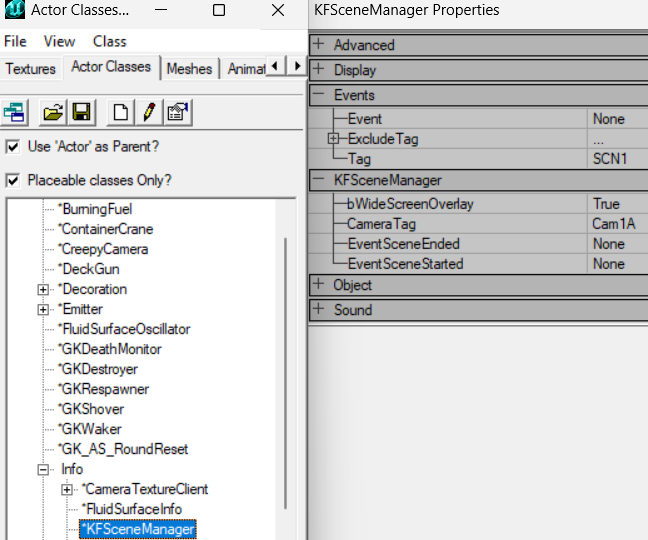 Class tree and default properties of an actor in the KF Editor.
The mutator actor (class) provides several functions that allow you to notify about certain events. For example, when an actor appears or a player enters the current game, the mutator is allowed to change the behavior (variables) and attributes (methods) of other actors at the appropriate time. In addition, the mutator inherits all the functions of the actor (from which the mutator is derived), some of which are quite useful for writing even a simple mutator.
Basic functions
PostBeginPlay
Standard actor function, called after the mutator appears. Among other things, this function is useful for initializing variables, spawning necessary actors, and setting the initial value of a timer. At this stage, there is no guarantee that the player will exist, so the function does not depend on being able to access it.
function PostBeginPlay()
{
    // Initialization logic
}
Tick
Another standard actor function. Called after a certain game time cycle. At 60 fps, it will be called 60 times per second (or once every ~16 milliseconds). This function is often used by other actors, allowing them to continuously perform tasks (updating variables, etc.) on a frame-by-frame basis. The delta argument indicates how many seconds it took the last loop to complete the task (for example, at 2 fps the value of the argument should be ~0.5 since it will take half a second to take a frame.
function Tick(float Delta)
{
    // Per-frame mutator logic
}
Timer
Another important function of actors called by the script (script). The SetTimer() function declaration will schedule the call for the specified delay, which can optionally be repeated after some period of time.
function PostBeginPlay()
{
    SetTimer(0.5, False); // Once after 0.5s; False = do not repeat
}

function Timer()
{
    // Timer callback logic
}
Specific functions
ModifyPlayer
The function is called after the player has entered the game. It (the function) allows you to make changes to the player before he appears. For compatibility with other mutators, it is necessary to point to a superclass implementing this function, which will allow other mutators to process this request.
function ModifyPlayer(Pawn Other)
{
    Other.GiveWeapon("KFMOD.SCARMK17AssaultRifle");
    Super.ModifyPlayer(Other);
}
Mutate
This function is useful for both debugging and practical use. It is called when the player enters mutator <argument string> into the console. In a multiplayer game, it will be called regardless of whether the mutator is running on the client machine or not. As with the function above, you must send this call to other mutators in the chain (calling the superclass implementing this function will handle this for you).
function Mutate(string MutateString, PlayerController Sender)
{
    if (Caps(MutateString) == "HYPER")
        Sender.Pawn.Health = 999;
    Super.Mutate(MutateString, Sender);
}
CheckReplacement
The function is called whenever an actor spawns (this only applies to those whose bGameRelevant attribute is set to false - this function is not called for client-side actors, such as local effects). The function allows you to change/replace the actor. This is useful when you need to make changes to an actor after it has appeared so you don't have to worry about making changes later. Unless you are an advanced user, always return with a call to the superclass implementing this function.
function bool CheckReplacement(Actor Other, out byte bSuperRelevant)
{
    if (KFMonster(Other) != None)
        KFMonster(Other).Health = 1;
    return Super.CheckReplacement(Other, bSuperRelevant);
}
Adding mutator settings
FillPlayInfo
This function is called when the game needs to get a list of required parameters. You must declare a superclass implementing this function before doing anything, as it will allow your customizations to be added to the game.
static function FillPlayInfo(PlayInfo PlayInfo)
{
    Super.FillPlayInfo(PlayInfo);
    PlayInfo.AddSetting(
        default.RulesGroup,
        "variableName",
        "settingDescription",
        0,
        0,
        "settingType");
}
As you can see above, to add a setting to the game you must call PlayInfo.AddSetting() and pass the settings as arguments. The variableName property must match the name of the variable needed to be designated. The settingDescription property allows you to provide a short description that is directly displayed next to the input field. The settingType property describes settings that can be displayed as text (string or numeric data), logical check (true/false), selection string (drop-down list box). When using the Text type, you can specify the length of the string and/or the range of accepted values as an additional argument after settingType.
PlayInfo.AddSetting(default.RulesGroup, "bEnabled", "Enabled?", 0, 0, "check");
PlayInfo.AddSetting(default.RulesGroup, "HealthMax", "Maximum Health", 0, 0, "text");
PlayInfo.AddSetting(
    default.RulesGroup,
    "HealthMax",
    "Maximum Health",
    0,
    0,
    "text",
    "3;100:200"); // max 3 chars; value clamped 100–200
When using selectType, you must specify the settingType of the argument in the following format: "Value1;Text1;Value2;Text2".
PlayInfo.AddSetting(
    default.RulesGroup,
    "StartWep",
    "Starting weapon",
    0,
    0,
    "select",
    "0;Deagle;1;Bullpup;2;LAR"); // dropdown: value;label pairs
GetDescriptionText
static function string GetDescriptionText(string SettingName)
{
    switch (SettingName)
    {
        case "ExampleVar":
            return "This is the 'long' description for the setting.";
    }
    return Super.GetDescriptionText(SettingName);
}
defaultproperties values from an ini file
From the "Изменение defaultproperties через ини файл" (Changing defaultproperties via an ini file) thread on the killingfloor.ru forum. Only variables declared as config/globalconfig can be edited through an ini, so, for example, a Clot's health cannot be changed from an ini directly. The working approach, which Flame called ideal: keep the setting in the mutator's config and overwrite the monster class's default values in PostBeginPlay.
class ZClot extends ZombieClot_XMas;
defaultproperties
{
}
class ZDay extends Mutator config(ZDay);
var globalconfig int HealthC;
function PostBeginPlay()
{
SaveConfig();
class'ZDay.ZClot'.default.Health=HealthC;
class'ZDay.ZClot'.default.HealthMax=HealthC;
Super.PostBeginPlay();
}
defaultproperties
{
HealthC=1000;
GroupName="ZDay"
FriendlyName="ZDay"
Description="ZDay"
bAddToServerPackages=True
}Without an ini file the zed has 1000 health; with one (SaveConfig() creates it automatically on the first run) it has whatever the file says. The mutator is added as ZDay.ZDay, the zed goes into the sandbox as ZDay.ZClot. For different monsters it is handier to use differently named variables (Clot_Health, Bloat_Health and so on). The config can also be created by hand: for Gwyn, an AngryClot.ini file in the System folder with the section [AngryClotMut.AngryClot] and the line HealthOFClot=20 worked.
From the "Как отцепить ini файл?" (How do I detach the ini file?) thread on the killingfloor.ru forum: the config file is set in the class declaration (Config(KFPortalTurret)), and var() globalconfig variables are written to it. If the ini is created automatically, the code most likely calls SaveConfig(); to stop the file from being created, remove that call (Flame). To get several differently configured copies (turrets, in the thread), Gwyn suggested subclassing with a config of its own, for example class myTurret extends PortalTurret config(MyTurret);, or making copies with renamed classes, files and configs (untested, by his own words).
Flame's warning about PreBeginPlay: in the Mutator class this is where the mutator is added to ServerPackages when bAddToServerPackages is set:
event PreBeginPlay()
{
 if ( !MutatorIsAllowed() )
 Destroy();
 else if (bAddToServerPackages)
 AddToPackageMap();
}
If you override PreBeginPlay and forget Super.PreBeginPlay(), the mutator will not load on clients by itself, no matter how you set bAddToServerPackages=true. Dr_Killjoy added that it is advisable to call Super in almost every overridden function.
Small mutator examples
Respawning every ammo box at the start of each wave (Flame, killingfloor.ru forum, "Мутатор для респавна патронов" thread). Map ammo boxes (KFAmmoPickup) "sleep" after being picked up; the mutator wakes all sleeping boxes when a wave starts. It cannot spawn boxes on a map that has none. Flame also pointed to KFMod.KFGameType.SetupPickups for how the game handles them.
Class SpawnAllAmmoAfterTraderMut extends Mutator;
var bool bTimeToSpawnAmmo;
function PostBeginPlay()
{
 SetTimer(1.0,true);
 bTimeToSpawnAmmo=true;
}
function Timer()
{
 if(bTimeToSpawnAmmo && KFGameType(Level.Game).bWaveInProgress)
 {
 ReSpawnAmmoPickups();
 bTimeToSpawnAmmo=false;
 }
 if(!bTimeToSpawnAmmo && !KFGameType(Level.Game).bWaveInProgress)
 {
 bTimeToSpawnAmmo=true;
 }
}
function ReSpawnAmmoPickups()
{
 local KFAmmoPickup AmmoPickupBox;
 foreach DynamicActors(class'KFAmmoPickup', AmmoPickupBox)
 {
 if(AmmoPickupBox.bSleeping)
 AmmoPickupBox.GotoState('Pickup');
 }
}
defaultproperties
{
 GroupName="KF-SpawnAllAmmoAfterTraderMut"
 FriendlyName="SpawnAllAmmoAfterTraderMut"
 Description="SpawnAllAmmoAfterTraderMut"
}
It is loaded as SpawnAllAmmoAfterTraderMut.SpawnAllAmmoAfterTraderMut.
Blocking console commands ("Отловить консольные команды" thread). Console commands such as ChangeCharacter, CreateCameraEffect or GetWeapon are exec functions of the player controller, so they are overridden in a controller subclass. Essence showed how to do it with a separate mutator, without editing ServerPerks:
class ConComMut extends Mutator;
function PostBeginPlay()
{
 Level.Game.PlayerControllerClass=Class'ConComMut.SRPlayerController';
 Level.Game.PlayerControllerClassName="ConComMut.SRPlayerController";
 Super.PostBeginPlay();
}
defaultproperties
{
 bAddToServerPackages=True
 GroupName="KF-ConComMut"
 FriendlyName="Console Commands Mutator"
 Description="Redefines console commands."
}
class SRPlayerController extends KFPlayerController;
exec function ChangeCharacter(string newCharacter, optional string inClass);
exec function CreateCameraEffect(class<CameraEffect> EffectClass);
exec function GetWeapon(class<Weapon> NewWeaponClass);
defaultproperties
{
}With ServerPerks the same overrides go into KFPCServ (Flame). tor1980's example of blocking name changes from the console:
exec function SetName(coerce string S)
{
 ClientMessage("No way :)");
}
Flood of xTeamRoster ... Accessed None 'PlayerReplicationInfo' warnings in the server console (thread "xTeamRoster Floods into console"). Flame's fix: take the last class in your roster's inheritance chain (for example TeamInfo -> UnrealTeamInfo -> xTeamRoster -> KFStoryRoster), copy the AddToTeam functions of its parents into it under new names, call them instead of Super, and add PlayerReplicationInfo==none checks. The entry point looks like this:
class KFStoryRoster extends xTeamRoster;
function bool AddToTeam( Controller Other )
{
 if(Other.PlayerReplicationinfo == none)
 {
 return false;
 }
 return AddToTeamFromUnrealTeamInfo(Other);
}
In the copied AddToTeamFromTeamInfo, the checks if(Other.PlayerReplicationInfo==none) return false; and P.PlayerReplicationInfo!=none in the loop over Level.ControllerList are added. For your own game type (extending KFGameType), Essence explained how to plug it in: create KFStoryRoster.uc with this code in your game type's package and add DefaultEnemyRosterClass="MyPackage.KFStoryRoster" to the game type's defaultproperties, where MyPackage is that package. The thread author confirmed it works. The warnings themselves are harmless, but in that case they caused lag spikes when players connected.
ZED Time and the camera for map events (the "Парочка нестандартных вопросов" (A couple of unusual questions) thread, killingfloor.ru forum). To emphasize an event on a map (for example, a falling lift), Freddy suggested having a trigger at the right spot call the slowdown on touch and briefly focus the camera on the trigger; the same trigger can be attached to a button or a door. The slowdown is a single function call, DramaticEvent; an example of taking over the camera is in the Patriarch class, and starting movement at the beginning of a map is done in the stock maps where a helicopter flies away at the start.
Speeding up the Berserker in ZED Time (the "Берс в Zed-time" thread). Flame did not know how to remove the slowdown for a single player: ZED Time changes the speed of the whole game. It is started by KFGameType(Level.Game).DramaticEvent(1) (the 1 is the chance of triggering), which calls SetGameSpeed(ZedTimeSlomoScale) from Engine.GameInfo. The defaults are ZEDTimeDuration=3.000000 (3 seconds of slowdown) and ZedTimeSlomoScale=0.200000 (5 times slower). Movement parameters can be changed, though. An example is the special Berserker katana from the WTF mutator (WTFEquipKatana.uc): the right mouse button triggers the slowdown (no more than once per 120 seconds, at a cost of 20 HP), and in WeaponTick, when bZEDTimeActive changes, it speeds up the Berserker and weapon switching:
if (KFGameType(Level.Game).bZEDTimeActive)
{
 KFHumanPawn(Instigator).InventorySpeedModifier=500; //it is an INT
 Instigator.AccelRate=100000.0;
 KFHumanPawn(Instigator).ModifyVelocity(dt, Instigator.Velocity);
}
else
{
 ResetMovement();
}
The perk check in that code is KFPRI.ClientVeteranSkill != Class'SRVetBerserker'.
Darkening the map from the second wave (Flame, killingfloor.ru forum, "Мут гасящий освещение" thread). The first version zeroed AmbientSaturation, KFOverlayColor and DistanceFogColor on every ZoneInfo on the server, and no difference was visible: lighting has to be changed on the client. The working version runs only when Level.NetMode==NM_Client and fires once WaveNumber > 0:
class ZoneInfoMut extends Mutator;
simulated function PostBeginPlay()
{
 if( Level.NetMode==NM_Client )
 {
 SetTimer(2,true);
 }
}
simulated function Timer()
{
 local ZoneInfo zi;
 local KFGameReplicationInfo KFGRI;
 local PlayerController PC;
 if( Level.NetMode==NM_Client )
 {
 PC=Level.GetLocalPlayerController();
 KFGRI = KFGameReplicationInfo(PC.GameReplicationInfo);
 if(KFGRI.WaveNumber > 0)
 {
 foreach AllActors(class'ZoneInfo',zi)
 {
 zi.AmbientSaturation=0;
 zi.KFOverlayColor.B=0;
 zi.KFOverlayColor.G=0;
 zi.KFOverlayColor.R=0;
 zi.DistanceFogColor.B=0;
 zi.DistanceFogColor.G=0;
 zi.DistanceFogColor.R=0;
 }
 SetTimer(0,false);
 }
 }
}
defaultproperties
{
 GroupName="KF-ZoneInfo"
 FriendlyName="ZoneInfoMut"
 Description="ZoneInfoMut"
 bAddToServerPackages=True
 bAlwaysRelevant=True
 RemoteRole=ROLE_SimulatedProxy
}
It is added as ZoneInfoMut.ZoneInfoMut. Nevma suggested also zeroing zi.AmbientHue and zi.AmbientBrightness, and LightBrightness, LightHue and LightSaturation on light sources (Sunlight extends Light).
Semi-transparent HUD crosshair (killingfloor.ru forum, "KF Crosshair v0.1 alpha" thread). Transparency did not work in the author's crosshair mutator. Flame's fix: use Canvas.Style=5 (STY_Alpha) instead of Canvas.Style=3 (STY_Translucent), and set ColorModulate.W back to 1.0 after drawing so the console does not turn transparent too:
function PostRender( canvas Canvas )
{
 Canvas.SetPos(Canvas.SizeX*xPos, Canvas.SizeY*yPos);
 Canvas.Style=5;
 Canvas.ColorModulate.W = 0.5;
 Canvas.SetDrawColor(0,255,0);
 Canvas.DrawColor.A = 100;
 Canvas.DrawLine(3, 5.000000);
 Canvas.DrawLine(1, 5.000000);
 Canvas.DrawLine(2, 3.000000);
 Canvas.DrawLine(0, 3.000000);
 Canvas.ColorModulate.W = 1.0;
}
Flame also noted there: if PreBeginPlay contains AddToPackageMap("KFCrossH"), bAlwaysRelevant=True is not needed, and the tick can be switched off with Disable('Tick') after AddInteraction.
Temporary effect on a player through Inventory (Flame, killingfloor.ru forum, "[IDEA] POWERUPS in Killing Floor" thread). This is how the rocket of his Patriarch slows a hit player to half speed for 12 seconds:
class shZombieBossSlowItem extends Inventory;
var Pawn LuckyHuman;
function GiveTo(Pawn Other, optional Pickup Pickup)
{
 if(Other == None)
 {
 Destroy();
 return;
 }
 LuckyHuman = Other;
 SetTimer(12.0,false);
 Super.GiveTo(Other);
}
function Tick(float delta)
{
 if(LuckyHuman == None)
 {
 Destroy();
 }
 else
 {
 LuckyHuman.GroundSpeed = LuckyHuman.default.GroundSpeed * 0.5;
 }
}
function Timer()
{
 Destroyed();
 Destroy();
}
defaultproperties
{
 bOnlyRelevantToOwner=False
 bAlwaysRelevant=True
 bReplicateInstigator=True
}
Inside the rocket code:
Item=spawn(class'shZombieBossSlowItem');
Item.GiveTo(Pawn(Victims));
For health and speed bonuses, Flame and dosche4kin also suggested looking at the code of the slot machine (roulette) and the edo_Chute parachute mutator.
Per-player data on the server via LinkedReplicationInfo (Flame, killingfloor.ru forum, "Настройка слота и приоритета оружия игроком" thread). To pass data from a client's ini file to the server (many players, one server), you do not have to edit ServerPerks' SRPlayerReplicationInfo or attach odd objects to the player. LinkedReplicationInfo, like PlayerReplicationInfo, extends ReplicationInfo, exists on both server and client, and clearly belongs to a player. The attach mechanism is the CustomReplicationInfo variable in PlayerReplicationInfo and the NextReplicationInfo variable in LinkedReplicationInfo, which gives a chain:
PlayerReplicationInfo->PlayerReplicationInfo.CustomReplicationInfo->PlayerReplicationInfo.CustomReplicationInfo.NextReplicationInfo->...Anyone running ServerPerks already has such a chain: ClientPerkRepLink is a LinkedReplicationInfo too. There are no ready-made attach/find functions; you add your object to the end of the existing chain, and the mechanism can be borrowed from ClientPerkRepLink. To change a weapon's priority and group (slot) before it enters the inventory (SRHumanPawn.AddInventory; after that it is too late), intercept the weapon's creation in the mutator's CheckReplacement, which runs before AddInventory. Priority and group are set in the weapon's defaultproperties. Built this way, Flame's mutator ended up no longer depending on ServerPerks.
This article is a translation of an article by Benjamin, to whom many thanks are due.
Author: Kiyo
