
KF2 Storage Crates via Steam Achievement Manager Stats (Risky)
Two short Russian-language guides, from the same community, describe a way to rapidly get storage crates in Killing Floor 2 by editing two statistics with the Steam Achievement Manager (SAM) tool. This page documents what they say. It is a statistics edit, which can affect your account data, and the authors themselves warn about side effects, so use caution and understand the risk before you try anything similar.
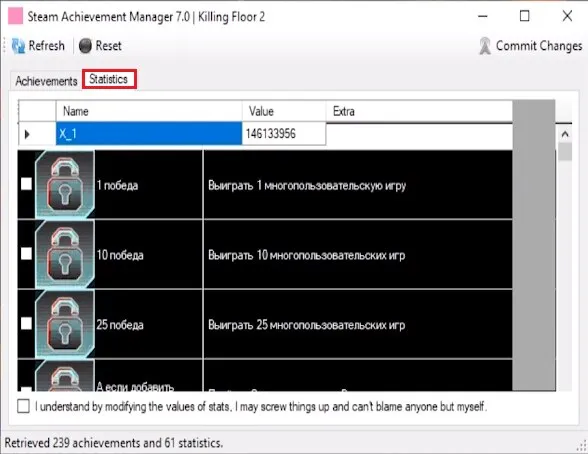 The Statistics tab in Steam Achievement Manager.
Steps described
- Download Steam Achievement Manager (one guide links it from GitHub, the other from a file host).
- Run
SAM.Game.exeand choose Killing Floor 2. - Open the Statistics section.
- Find the values
1_400and1_401and set each to a very large number (1999999999 in one guide, 2143999999 in the other). - Press Commit Changes.
- Launch the game and open storage, then check your Steam inventory.
One guide adds that for more items you can press Reset and enter the number again, but warns that Reset clears all of your progress.
Notes
- The tool shows a warning that modifying values can break things and that you cannot blame anyone else.
- Both guides are community posts and Steam removed one of them for violating its guidelines.
- This does not affect only the crates; manipulated stats may be detected or reset by the game, so no results are guaranteed.
For legitimate drops see Item drop system.
FAQ
- Which statistics are changed?
- The values named 1_400 and 1_401 in the Statistics tab of Steam Achievement Manager for Killing Floor 2, set to a huge number such as 1999999999 or 2143999999.
- Is this safe?
- No guarantee. The tool itself warns that modifying stats can break things, and one author notes that using Reset wipes your progress. Treat it as a risk to your account data.
- Can I get more items afterwards?
- One guide says you can press Reset and enter the value again each time, but the reset removes all of your progress.
