
KF2 BugSplat Crash: Delete the My Games Folder
This page is a translation of a short Spanish guide for the "BugSplat" error, the crash reporter window that appears when Killing Floor 2 fails to start or closes on launch. The author says the method worked for them and for friends they passed it to.
The fix
- Close the game completely.
- Open
Documentsand then theMy Gamesfolder.
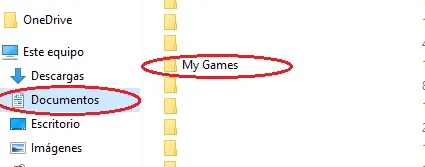 Documents, My Games: here you will find a Killing Floor 2 folder.
- Delete the entire
Killing Floor 2folder, then start the game again.
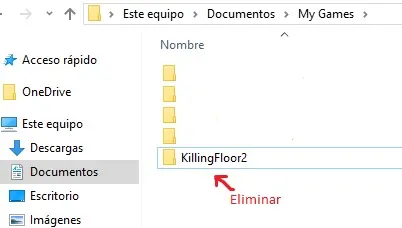 This folder only contains your configuration, not the game installation.
Do not worry: this is not the folder where the game is installed. It is the one that stores your settings and config files, and the game rebuilds it automatically.
Things to know
- If you had a skin equipped on a weapon, you may need to equip it again from the inventory.
- Several commenters confirmed that only wiping the configuration was enough for them.
- Some readers also fixed the same error by installing DirectX (version 11), and one reported it helps to install the game on an SSD if the error keeps returning.
- The error can appear on a fresh install on a new PC, so it is not always a sign of corrupted files.
For other causes and fixes see BugSplat launch crash fix with launch options and BugSplat error: config delete and driver rollback.
FAQ
- Is it safe to delete the Killing Floor 2 folder in My Games?
- Yes. It is not the install folder. It holds your configuration, and the game recreates it on the next launch.
- What do I lose by deleting it?
- Your settings go back to defaults, and in some cases you need to re-equip weapon skins from the inventory.
