
KF2: Play With Original English Voice-Over in the Russian Client
When Killing Floor 2 runs in Russian, the in-game voices (perk characters, Zeds, trader, announcer) are the Russian dub. Some players prefer the original English voice-over. The short community guide behind this page shows a simple file swap that keeps the Russian interface text and only changes the audio.
What to do
Copy the contents of the English(US) folder into the Russian folder in:
Steam\steamapps\common\killingfloor2\KFGame\BrewedPC\WwiseAudio\Windows\
Overwrite the files when asked. The game reads the Russian audio folder as usual, but now contains the English sound banks.
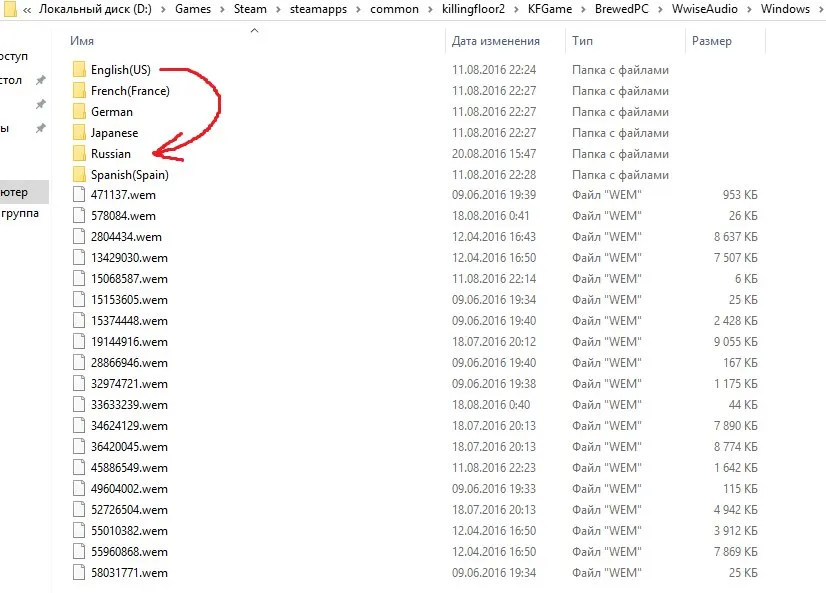 The WwiseAudio language folders: copy English(US) into Russian.
Notes
- Make a backup of the Russian folder first if you want to go back.
- Updates or a Steam file verification can restore the original Russian files, so repeat the copy if the dub comes back.
- The author also recommends a quality community text localization (the interface, items and colors were fully translated at the time and the pack was updated within 2 to 5 hours after a game patch), so you can combine Russian text with the English voices.
 The text localization pack mentioned in the guide.
For related Russian-language tips see Killing Floor Russian localization fonts.
FAQ
- Where is the audio folder?
- In the Steam install: steamapps\common\killingfloor2\KFGame\BrewedPC\WwiseAudio\Windows\, with a subfolder per language.
- Will Steam overwrite my change?
- Game updates or a file verification can restore the original files, so you may need to repeat the copy afterwards.
