
KF2 More FPS on Any PC: Config Tweaks for Low-End Computers
This guide targets players who want to run Killing Floor 2 on a very weak machine and are willing to trade looks for frames. Killing Floor 2 is built on Unreal Engine 3, so nearly every aspect can be tweaked in the ini files. The values are written as "default then new value". For a modern high-VRAM approach see large server FPS tweaks and less annoying settings.
Back up your configs first
Copy (do not move) everything in Documents\My Games\KillingFloor2\KFGame\Config to a safe place. Change settings gradually and launch the game every few minutes to catch crashes early. Set tweaked files to read-only or the game wipes them: in testing only KFSystemSettings and KFEngine revert. Do not set KFGame or KFInput read-only unless you accept re-applying skins, cosmetics and controls every session. Deleting any config file makes the game create a fresh one.
The usual advice
Set every in-game option to low or off (resolution is your call: lower resolution means more FPS but a blurrier image; gamma does not affect speed).
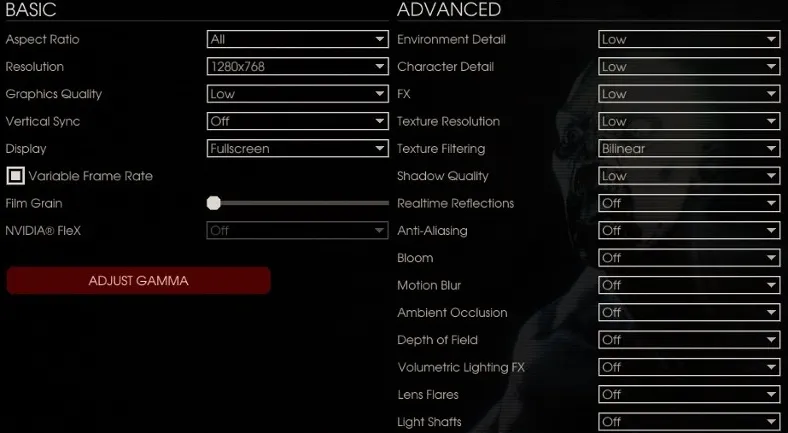 Video options set to their lowest values.
- Close CPU-hungry programs such as antivirus.
- Update graphics drivers.
- Disable the Steam overlay (more FPS and fewer crashes in any game for the author).
- In Windows Advanced System Settings, Performance, choose the performance profile to free RAM.
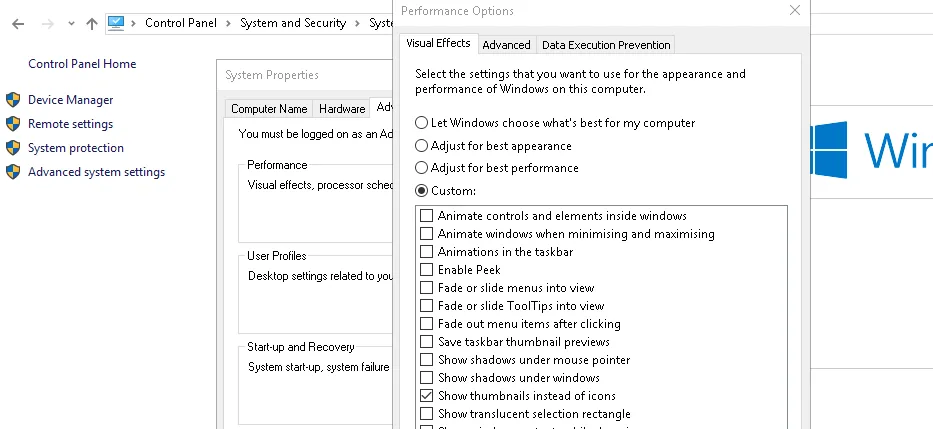 Windows Performance Options.
- Defragment drives (HDD) and move the page file to a spare drive.
- Set the KF2 process to High priority in Task Manager (a .bat below does it).
- Clear
%temp%.
Basic tweaks
Use stat fps in the console to see the frame rate. Edit in Notepad or Notepad++ and use Ctrl+F.
KFSystemSettings.ini (change as many as you like):
StaticDecals=False,DynamicDecals=False(bullet holes),UnbatchedDecals=FalseDropParticleDistortion=False(explosion blur),SpeedTreeLeaves=False,SpeedTreeFronds=FalseOnlyStreamInTextures=True(removed stutter on 8 GB RAM)FogVolumes=False(a big CPU cost),FloatingPointRenderTargets=False,AllowRadialBlur=FalseAllowImageReflections=False,AllowImageReflectionShadowing=False,bAllowHighQualityMaterials=FalseMaxDrawDistanceScale=0.8(lowering it far enough helps FPS a lot, but lets you see enemies and ammo through walls)ScreenPercentage=90(reduces resolution without blurring the UI; very effective)bAllowFracturedDamage=False(no breakable glass),UseComputeSSR=False,ImageGrainScaler=0(reverts without read-only),AllowBooleanPreshadows=False,UseNewDOF=False,DistanceFog=FalseMotionBlurStaticScale=0,MotionBlurDynamicScale=0
KFEngine.ini:
ImageReflectionTextureSize=512,bStaticDecalsEnabled=False,bDynamicDecalsEnabled=FalsebUseTextureStreaming=False(helps some players, test it)MaxFluidNumVerts=1,MaxParticleVertexMemory=1(disables bullets, fire and explosion particles; you may skip this)MipFadeInSpeed0=0.0,MipFadeOutSpeed0=0.0,MipFadeInSpeed1=0.0,MipFadeOutSpeed1=0.0bSmoothFrameRate=FALSE,MinSmoothedFrameRate=30,MaxSmoothedFrameRate=60(your monitor's refresh rate),MinDesiredFrameRate=60RequestedDirectXVersion=10plus the Steam launch option-dx10(DirectX 10 is known to crash less)BoostPlayerTextures=0.0,ParticlePercentage=80(0 disables particles for a big boost)
KFGame.ini: DecalLifeSpan=0.0, MaxImpactEffectDecals=0, ShellEjectLifetime=0.5.
Texture sizes
KFSystemSettings.ini lines such as TEXTUREGROUP_Creature(MinLODSize=1,MaxLODSize=4096,LODBias=3,MinMagFilter=Linear.. define texture size; by default textures load up to 4K. Lower MaxLODSize to 2048 or 1024 (half and quarter resolution) and change MinMagFilter=Linear to Point. A value of 1 gives the biggest boost but makes textures colorless and blocky. LODBias runs from -1 (highest detail) to 10 (lowest); the author is unsure how it works exactly, so experiment.
Do not lower UI, ColorLookupTable or Bokeh below 256 (they affect the menu and HUD; at 1 they become grey squares but give a boost if you are desperate). Do not lower TerrainHeightMap and TerrainWeightMap below 256 because of ground and foliage texture bugs. The lowest recommended value overall is 16, because some entries set to 1 cause a texture bug on Black Forest and Zed Landing.
Advanced tweaks for low-end PCs
These trade visuals for large gains. Save each file and set it read-only.
Shadows (KFSystemSettings.ini): DynamicShadows=False, MinShadowResolution=1, MinPreShadowResolution=0, MaxShadowResolution=1, MobileShadowTextureResolution=1, MaxWholeSceneDominantShadowResolution=1, ShadowFadeResolution=0, PreShadowFadeResolution=0, ShadowTexelsPerPixel=0, bAllowHardwareShadowFiltering=False, GlobalShadowDistanceScale=0.0, AllowBooleanPreshadows=False, MaxPrimBoundsForPerObjectShadows=0.0.
Lights (KFSystemSettings.ini): DynamicLights=False, LightEnvironmentShadows=False, CompositeDynamicLights=False, SHSecondaryLighting=False, DirectionalLightmaps=False, MaxOverlappingLights=0, AllowLightOcclusionQueries=False, VolumetricLightingMode=0. In KFEngine.ini: bShouldGenerateSimpleLightmaps=FALSE and bUseNormalMapsForSimpleLightMaps=FALSE.
Gore: in KFSystemSettings.ini AllowPersistentSplats=False, AllowSecondaryBloodEffects=False. In KFGame.ini set to 0 or false: MaxExplosionDecals, BloodPoolDelay, GoreFXLifetimeMultiplier, BodyWoundDecalLifetime, BloodSplatterLifetime, BloodPoolLifetime, GibletLifetime, MaxBodyWoundDecals, MaxBloodSplatterDecals, MaxBloodPoolDecals, BloodSplatSize, BloodPoolSize, MaxDeadBodies, MaxBloodEffects, MaxGoreEffects, AllowBloodSplatterDecals, PersistentSplatTraceLength, MaxPersistentSplatsPerFrame, GoreLevel.
Particles (bullets, explosions, fire). KFEngine.ini: MaxFluidNumVerts=1, MaxParticleResize=532, MaxParticleResizeWarn=0, MaxParticleVertexMemory=64, ParticlePercentage=0. KFGame.ini: MaxFluidNumVerts=64, MaxParticleResize=532, MaxParticleVertexMemory=64, ShellEjectLifetime=0.0.
Launching with a .bat file for high priority
Create KF2.bat (save as "All files") with:
start steam://rungameid/232090
timeout 45
wmic process where name="KFGame.exe" CALL setpriority "high priority"
wmic process where name="Steam.exe" CALL setpriority "low"
Launching from this file starts the game and sets it to high priority. If desperate, add taskkill /F /IM explorer.exe on a new line, which disables the taskbar and volume buttons; to restore, press Ctrl+Alt+Delete, open Task Manager, Run new task and enter explorer.
Low config pack and autoexec
The author's ready-made low config (not updated since 2018, "do not recommend") lowers everything to the minimum: low textures, removed particles, reduced draw distance, lower screen percentage and a tweaked FOV. Files go in the Config folder and KFEngine.ini and KFSystemSettings.ini must be read-only.
An autoexec adds fewer fog, lower textures and bloom: create a text file exec in Steam\steamapps\common\killingfloor2\Binaries with the lines texturepoolsize 1, fogdensity 0, postprocessAAtype 0, RawInputUpdateTest true and BloomSize 0, then add -exec.txt to the launch options.
Other safe reductions
In KFSystemSettings.ini: SkeletalMeshLODBias=1, ParticleLODBias=1, MaxDrawDistanceScale as low as 0.20 "should end your FPS problems" and ShadowFilterRadius and the whole-scene shadow distances only if shadows are disabled. The author also lists PhysX Apex values, relevancy checks and procedural building and terrain entries in KFEngine.ini that can be reduced, but warns that he cannot test the NVIDIA ones.
Console commands that boost FPS
Type enablecheats in the console (solo only), then: showpostprocess removes post processing, showlevelcoloration removes level coloration, showfog removes fog (very noticeable on Farmhouse), clearcorpses removes dead bodies and clearsplatters removes blood splatters. To clear corpses on every reload, run setbind R clearcorpses and set your in-game reload key back to R.
FAQ
- Why do my KF2 config edits reset?
- The game rewrites KFSystemSettings.ini and KFEngine.ini on launch unless you set them to read-only. KFGame.ini and KFInput.ini are best left writable.
- How do I see the frame rate in KF2?
- Open the console and type stat fps.
- How do I undo all changes?
- Delete the edited config files; the game creates fresh ones at the next start. Keep a backup copy before you begin.
