
KF2 Fixes: Can't Join Servers or Game Won't Start (Russian Client)
This short troubleshooting note was written for Russian-speaking players of Killing Floor 2 and covers two problems that kept people out of the game: being unable to join servers, and a game that silently refuses to start.
Cannot join servers
If the game will not connect to servers, change the game's language in Steam from Russian to English. Right-click Killing Floor 2 in your library, open Properties, go to the Language tab and pick English.
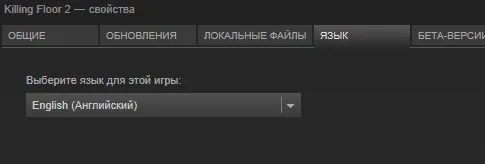 Steam game properties: the language setting is switched from Russian to English.
Nothing happens when you start the game
If you click Play and nothing appears, go to the install folder, for example C:\Steam\steamapps\common\killingfloor2\Binaries\Win64, and grant administrator rights to the KFGame executable (right-click, Properties, Compatibility, run as administrator).
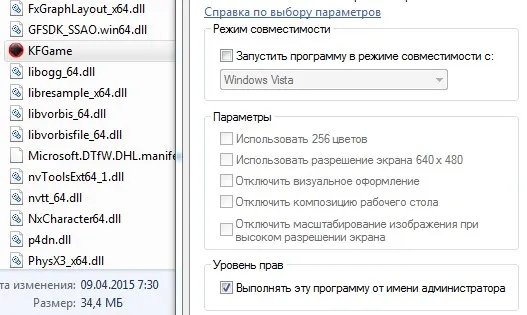 KFGame in the Win64 binaries folder: enable the run-as-administrator option.
Other problems mentioned in the comments
Readers of the original guide reported several other issues without a confirmed fix there: black screen with music only, missing map previews, character models replaced by the default model, crash prompts on launch, no music in matches, and the tutorial not starting (which blocks online play). The author's answer to one of them was that such problems were fixed on the developers' side long ago, so a clean reinstall and up-to-date drivers are sensible next steps.
For performance problems see also the DX10 launch option guide.
FAQ
- Why can't I join servers in Killing Floor 2 with a Russian Steam client?
- The guide reports that the game can fail to connect when its language in Steam is set to Russian. Changing the game language in Steam properties to English fixed it for the author.
- The game does nothing when I click Play. What can I try?
- Open the Binaries\Win64 folder inside the killingfloor2 install directory and set KFGame.exe to run as administrator.
- Do these fixes still apply to the current version?
- The guide dates from the early days of the game. Commenters had other problems (black screen, missing map previews, no music), and the author said many old problems were fixed by the developers, so treat these as first things to try.
