
KF2 Magicked Admin: Server Chat Bot, Stats and Commands
KF2 Magicked Admin is a scripted management, statistics and chat-bot tool for Killing Floor 2 dedicated servers. It talks to the server only through the web admin, so it does not alter a ranked or custom server's status. It offers in-game commands for players and admins, tracks per-player kills, dosh, deaths and play time, shows live leaderboards on the welcome screen, greets players, and can run commands automatically on a timer, on a wave, when the trader opens or when someone joins. It can run on the server itself or remotely and can manage several servers at once. This page covers version 0.1.5 (released 25 October 2019). If you still need a server, start with the SteamCMD server guide.
Features at a glance
- Real-time leaderboards on the welcome screen and in chat.
- Statistics for kills, dosh, deaths and play time.
- 18 player commands and 24 administrator commands.
- Automatic commands by time, wave, join or trader state.
- Reads in-game player messages from your desktop.
- Works in weekly, survival and endless modes (endless and weekly need a small web admin patch, see below).
Downloads and running
A Windows executable is published on the project's GitHub release page. On Linux and macOS the author recommends running from source: install the requirements with pip3 install -r requirements.txt and start it with python3 -O magicked_admin/magicked_admin.py.
- Extract the zip anywhere.
- Run the executable and follow the first-time setup.
- To repeat the setup, delete
conf/magicked_admin.conf.
A Docker image exists as well. Mount a config folder at /magicked_admin/conf, expose port 1880, let the container exit once so it can write the default config, edit it and run the container again.
Using commands
Chat commands start with !. Inside scripts or chained commands leave the ! out. Parameters are matched by closest match, so biotics finds kf-biotics-lab. Every command accepts -h for help, -q to suppress output and -p to pad the output so the username line is hidden. In messages \n makes a newline and \t a tab.
Player commands
| Command | Purpose |
|---|---|
| !commands | List commands available to players |
!stats, !kills, !dosh <user> | General, kill and dosh statistics for a user (yourself if omitted) |
| !map, !record_wave | Statistics for the current map and its highest wave |
| !top_kills, !top_dosh, !top_time | Global leaderboards |
| !top_wave_kills, !top_wave_dosh | Who killed or earned most this wave, usually used with !start_trc |
| !server_kills, !server_dosh | Server totals |
| !scoreboard (!sb) | Full scoreboard, handy above six players |
| !game, !maps (-a), !player_count | Game info, map cycle, player count |
Administrator commands
| Command | Purpose |
|---|---|
!op / !deop <user> | Give or remove admin rights |
!say <message> | Echo a message into chat |
| !players, !kick, !ban | Player details, kick or ban (the web admin has a bug that keeps bans after deletion, so there is no unban) |
| !length, !difficulty | Set length or difficulty for the next game |
| !game_mode, !load_map, !restart | Change mode or map immediately, or restart |
| !password [--set] on/off | Toggle or set the game password |
| !start_jc / !stop_jc | Run a command every time a player joins |
| !start_wc / !stop_wc | Run a command on a given wave; negative numbers count back from the boss wave |
| !start_tc / !stop_tc | Run a command after a delay, optionally repeating with -r |
| !start_trc / !stop_trc | Run a command when the trader opens |
| !silent | Suppress chat output while still applying commands |
!run <script> | Execute a script from conf/scripts |
| !marquee, !enforce_dosh, !update_motd, !reload_motd | Chat marquee, kick players above a dosh limit, refresh or reload the welcome screen |
Join-command tokens include %PLR (username), %KLL (kills), %DSH (dosh), %BCK ("back" for returning players), %DRK and %KRK (ranks), %TME (play time), %TRK and %SES (sessions).
Welcome screen leaderboards
Write conf/server_name.motd with pairs of %PLR and %SCR, plus %SRV_K and %SRV_D for server totals. Refresh it with !update_motd kills|dosh|time, ideally on a timer such as !start_tc 300 -- update_motd dosh. This overwrites your existing welcome message, and !reload_motd reloads the template without restarting.
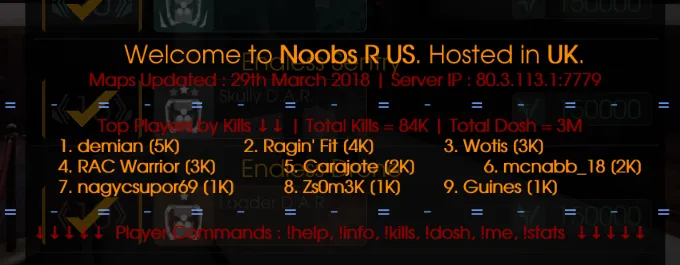
A suicidal survival server welcome screen showing the generated leaderboard.
Scripts
Scripts chain commands in order, and lines starting with ; are comments. An init script named server_name.init in conf/scripts runs when the bot starts for that server; other scripts are run on demand with !run. Useful examples from the guide:
- Show the wave's top dosh earner at trader time and refresh the leaderboard every five minutes:
start_trc -- top_wave_doshandstart_tc 300 -- update_motd dosh. - Advertise a group on the boss wave:
start_wc -w -1 -- say Join our steam group. - Remind players that a bot is present:
start_tc -rt 800 -- say I'm a bot, type !commands. - A one-command private lobby: silent, set a password, set difficulty and length, load a map.
Configuration
Each server has a section such as [server_one] in conf/magicked_admin.conf with address (web admin URL with scheme), username, password and game_password. Create a separate admin account for the bot because its name shows in chat.
Renaming the chatbot (multi-admin)
- Open
KF2-Server\KFGame\Config\Config\KFWebAdmin.ini. - Under
[WebAdmin.WebAdmin]addAuthenticationClass=WebAdmin.MultiWebAdminAuth. - In the web admin a new Administrators section appears; choose Create Administrator and enter a login name.
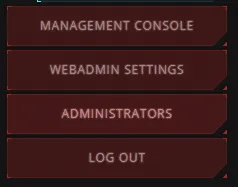
The Administrators entry appears in the web admin sidebar once multi-admin is on.
- Give the account a display name (shown in chat), a password and enable it.
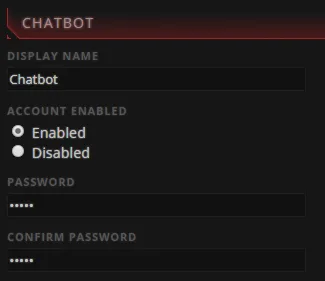
Account form: display name, password and enable flag.
- Leave Access Order as Deny/Allow with no patterns, save, and put the credentials in the config. Logins are case-sensitive, a common cause of failed sign-ins.
Endless and weekly modes
Outside survival the web admin pages differ, so only a limited feature set works. A web admin patcher from the project fixes that, but it needs stock files in KF2Server/KFGame/Web/ServerAdmin. If you edited them, validate the server files with app_update 232130 validate first, or apply the diffs by hand. Run the patcher in the GUI or headless with --target /path/to/kf2/server.
Several servers, renaming and resetting
Copy the whole [server_one] block for each additional server and change address, username and password. To rename a server, change the section name and rename server_one.motd and server_one.init to match. To reset stats, delete the matching conf/*.sqlite file.
Known issues and plans
!difficultyand!lengthcan be forgotten by the web admin; use!restartimmediately afterwards.- Planned for 0.1.6: command aliases and Lua scripting. A translation effort runs on Crowdin.
- The project is open source (MIT), written by th3-z with several contributors.
FAQ
- Does Magicked Admin change my server's ranked or custom status?
- No. It runs entirely through the web admin, so a ranked server stays ranked. It works with weekly, survival and endless modes.
- Can one install manage several servers?
- Yes. Copy the [server_one] section of conf/magicked_admin.conf for each extra server and change the address, username and password.
- How do I reset the statistics?
- Delete the conf/<server name>.sqlite file for that server and start the tool again; a fresh database is created.
- Why do !difficulty and !length sometimes not stick?
- The web admin forgets those changes after certain other changes. Run !restart right after them as a workaround.
