
KF2: How to Opt Into the Preview Beta and Why Play It
This is a paraphrase of a short community guide written during a KF2 preview beta, explaining how to join it and why the author thinks you should. The branch names and contents have changed over time, so treat it as a how-to for the Steam beta mechanism rather than a statement about any specific build.
Switching to the beta
- Open your Steam Library and find Killing Floor 2.
- Right-click it; a small list opens.
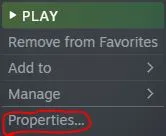
Choose the last option, Properties.
- In the window that opens, click the Betas tab.
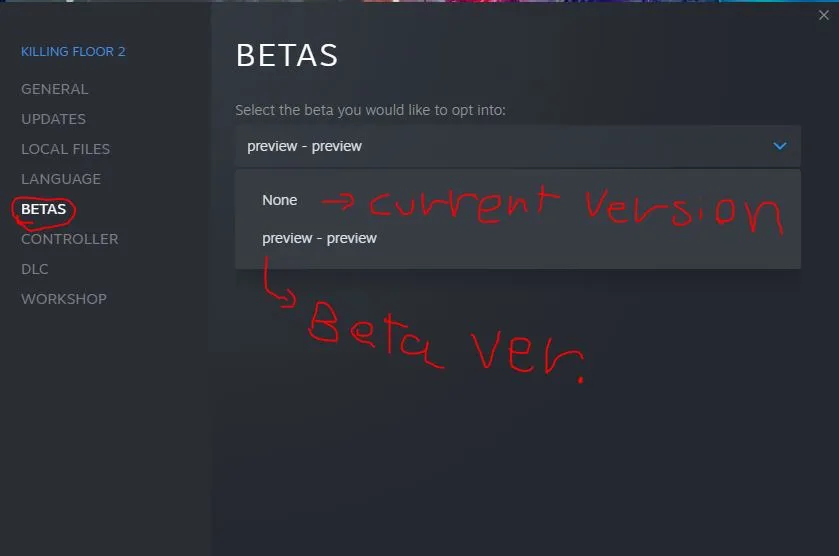
The Betas option in game properties.
- Use the dropdown on the right to pick a beta. If you never used a beta it probably says "None", which is the normal version.
- Change "None" to "preview - preview", the beta at the time of writing, then let the game update.
- When the update finishes, start the beta.
Why the author suggests playing it
- All EXP you earn in the beta is kept, even when you go back to the normal version or after the official release.
- The same goes for items, achievements and seasonal challenges. Note that if you open your inventory in the normal version after getting a beta item, it shows an empty slot and cannot be used; it works only in the beta and after the official release.
- You can try new buffs, weeklies and weapons early and use them to your advantage.
- The author, unsure whether it was a bug, also noticed that the new DLC weapons could be tried without cheats or the armory pass.
- More players in the beta keep multiplayer lively.
- Feedback shared during the beta can influence the next beta and the official release.
Going back
If you do not like the beta, repeat the same steps and change "preview - preview" back to "None".
FAQ
- Is my progress saved in the beta?
- Per the guide, EXP, items, achievements and seasonal challenges earned in the beta are kept, even if you return to the normal version or after the official release.
- How do I go back to the normal version?
- Repeat the process and switch the beta selection from preview back to None.
