
Play Killing Floor With Friends Over Hamachi
The simplest way to play Killing Floor with friends without port forwarding is a virtual LAN such as Hamachi. One player hosts a normal listen server, the others connect to the host's Hamachi address as if everyone sat on the same home network. This page follows a short Steam guide on the method.
What you need
- Killing Floor on every PC.
- Hamachi (LogMeIn) installed on every PC, and all players in the same Hamachi network. The host creates the network, the others join it by name and password.
Host
- In the Killing Floor main menu, click Host Game.
- Choose the game mode.
- Pick the map, difficulty and other settings.
- Click the big LISTEN button in the bottom right. You go to the lobby and wait for your friends.
Join
- Make sure you are connected to the same Hamachi network as the host.
- In the main menu, click Multiplayer, then Internet Games.
- Right-click the empty area under the Server Name column and choose Open IP.
- Type the host's IP as shown in Hamachi (the
25.x.x.xaddress, not their home IP).
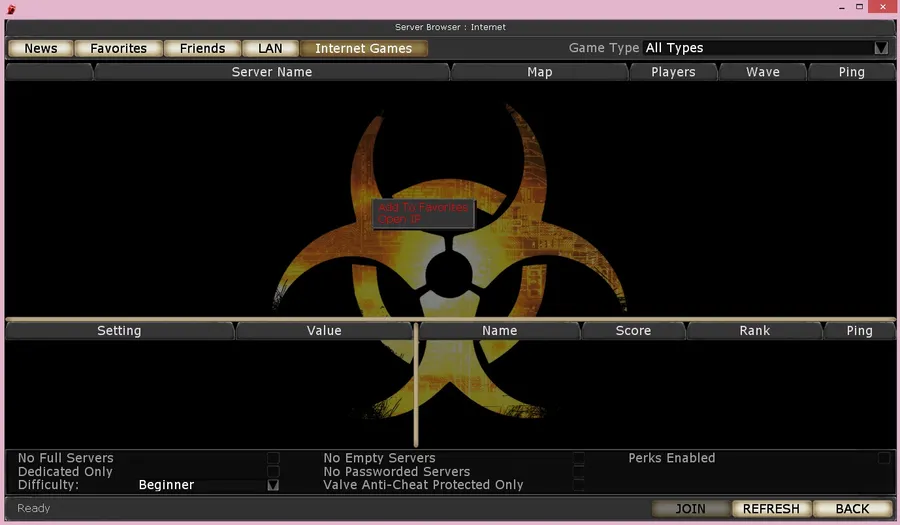 Right-click in the empty server list to get Add To Favorites and Open IP. Screenshot from the original guide.
Alternatively, open the LAN tab: with Hamachi running, the host's game often shows up there.
If it does not work
| Problem | What to try |
|---|---|
| The LAN tab is empty | Use Open IP with the Hamachi address. LAN discovery over Hamachi is not always reliable |
| Connection times out | Check that Hamachi shows the host online (green). Allow Killing Floor through the Windows firewall on both PCs |
| "Package version mismatch" or missing files | Everyone must run the same game version. Clear the Cache folder and try again |
| Hamachi itself is down or unwanted | Other virtual LANs (Radmin VPN, ZeroTier) work the same way. Or set up a proper dedicated server with port forwarding |
A listen server runs on the host's PC, so if the host leaves, the game ends for everyone. For a group that plays regularly, a dedicated server is the better long-term choice.
Do you need Hamachi at all? From the killingfloor.ru forum thread "Hamachi": according to Proton, Hamachi is only needed when every player has a "grey" (non-public) IP. Otherwise the player with a "white" (public) IP creates the server right from the game, and the others connect to him directly through the console. Over Hamachi you can also connect from the console with open and the host's Hamachi IP. To check your address, look at the IP of your active network connection: addresses from 10.0.0.0/8, 172.16.0.0/12 and 192.168.0.0/16 are local (private) ranges that do not face the Internet directly; then compare it with the address an Internet speed test or IP check site shows. If they match, your IP is public.
