
KF2 Best Graphics Settings for FPS: Setup and SSD Tip
This page paraphrases a Russian community guide on getting more performance out of Killing Floor 2 without losing much visual quality. The author's system was a Ryzen 5 2600, RTX 2060 and 16 GB DDR4. With all settings maxed, the average FPS in a six-player Hell on Earth fight was 60 to 80; with his optimized preset it rose to 120 to 160 with no more stutters. For INI-based tweaks see KF2 graphics INI.
Move the game to an SSD
The type of SSD (SATA or M.2) does not matter; the game just does not work well with HDDs. On an HDD the average launch took 5 to 8 minutes, on an SSD about a minute, and maps and server connections load faster. The game is simply large.
Settings screen
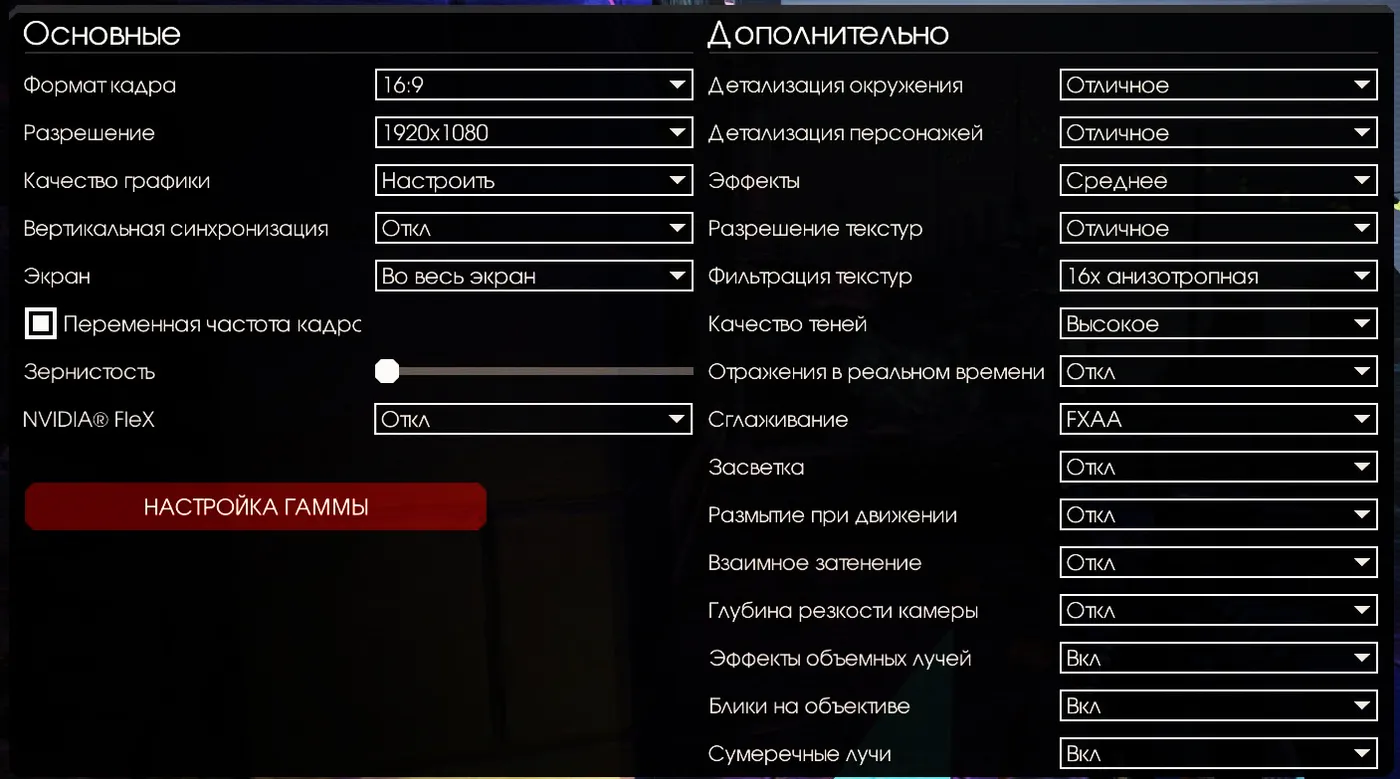 The author's graphics settings screen.
- V-Sync: off. It is supposed to remove tearing, but it limits performance.
- Fullscreen: on. It raises the game's priority and FPS.
- Variable frame rate: on. It removes the 60 FPS cap, though the menu name hides this.
- Film grain: optional. It does not affect FPS, but the author finds the noise unattractive.
- Nvidia FleX: off. It adds physical blood, explosions and gibs, but it is very heavy and causes freezes in big fights.
- Environment and character detail: excellent or as you wish.
- Effects: medium or lower; high settings drop frames in big fights, and the author sees no difference between medium and excellent.
- Texture resolution: excellent if the system allows.
- Shadow quality: high; there is almost no difference to excellent.
- Real-time reflections: off. It is a moderate GPU load with no noticeable visual difference.
- Anti-aliasing: FXAA, which costs practically no performance.
- Bloom (light haze): off; the author could not see a visual difference.
- Motion blur: off; it spoils the look and the gameplay and loads the GPU.
- Ambient occlusion (SSAO): off; no visible difference in this dark game but it costs performance.
- Depth of field: off; it adds blur and noise.
- Volumetric light rays, lens flares, twilight rays: optional; they hardly affect performance.
FAQ
- How do I remove the 60 FPS cap in KF2?
- Enable the option called variable frame rate (smooth frame rate) in the graphics menu; it removes the 60 FPS lock.
- Which setting causes the most stutter?
- Nvidia FleX particle physics for blood, explosions and gibs; the guide says to turn it off because it causes freezes in big fights.
- Should I install KF2 on an SSD?
- Yes. The author measured about 5 to 8 minutes to launch on an HDD versus roughly 1 minute on an SSD, with faster map and server loading.
