
KF2 Clear, Simple Graphics via .ini and Quick-Turn Key Bindings
This guide shows how to edit KFSystemSettings.ini so that creatures, worlds, vehicles, weapons and effects look flat and simple. Heads become easy to see and there is less visual noise during long sessions. It also includes two input tweaks for KFInput.ini. Always back up an .ini file before editing it. For general ini locations see Killing Floor ini file location; for server-side tuning see large server FPS ini tweaks.
Opening the file
Open KFSystemSettings.ini in a text editor:
- Windows 7 or older:
C:\Users\[YourName]\My Documents\My Games\KillingFloor2\KFGame\Config\ - Windows 10:
C:\Users\[YourName]\OneDrive\Documents\My Games\KillingFloor2\KFGame\Config\
To comment a line out, put # at its start; the game skips it when loading. This is handy for testing.
Scenery draw distance
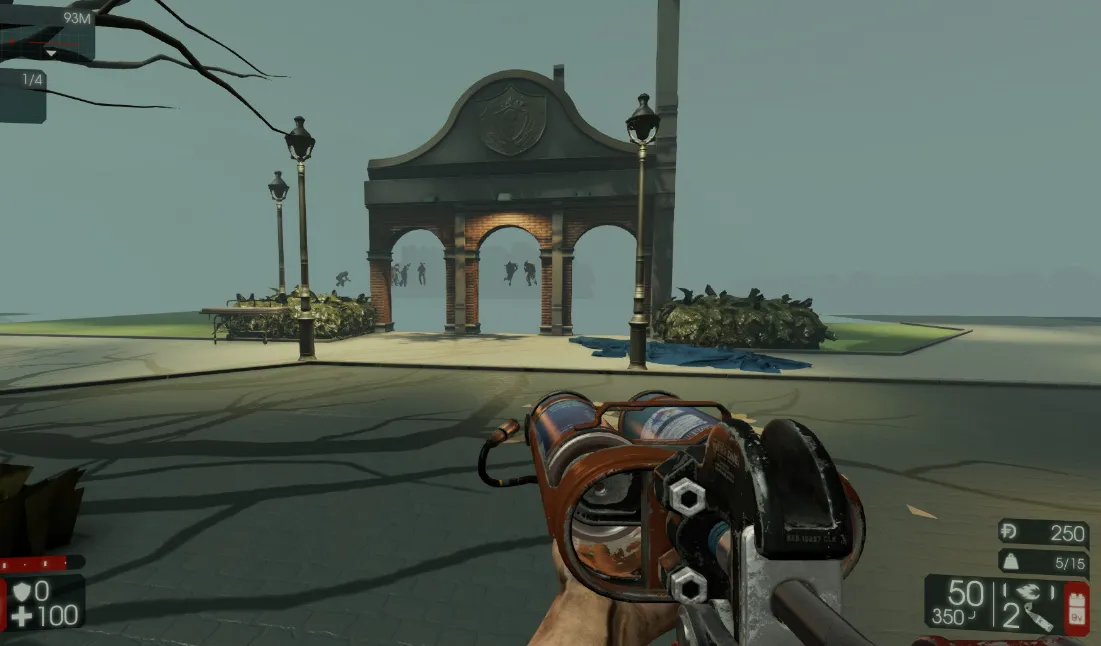 Ashwood Asylum with MaxDrawDistanceScale=0.2, the extreme case.
Around line 49 is the rendering distance setting. Some objects (ammo packs, background boards) are independent of it. Lower MaxDrawDistanceScale from 1.0 to a value between 0 and 1, for example MaxDrawDistanceScale=0.600000.
Texture groups
Each texture group has MinLODSize and MaxLODSize. The author sets three MaxLODSize values per category from 4096 to 1 (texture, normal map for wrinkles/bumpiness, specular for light reflection). If the result looks too poor, keep the NormalMap at a moderate value such as 64, 128, 256 up to 4096.
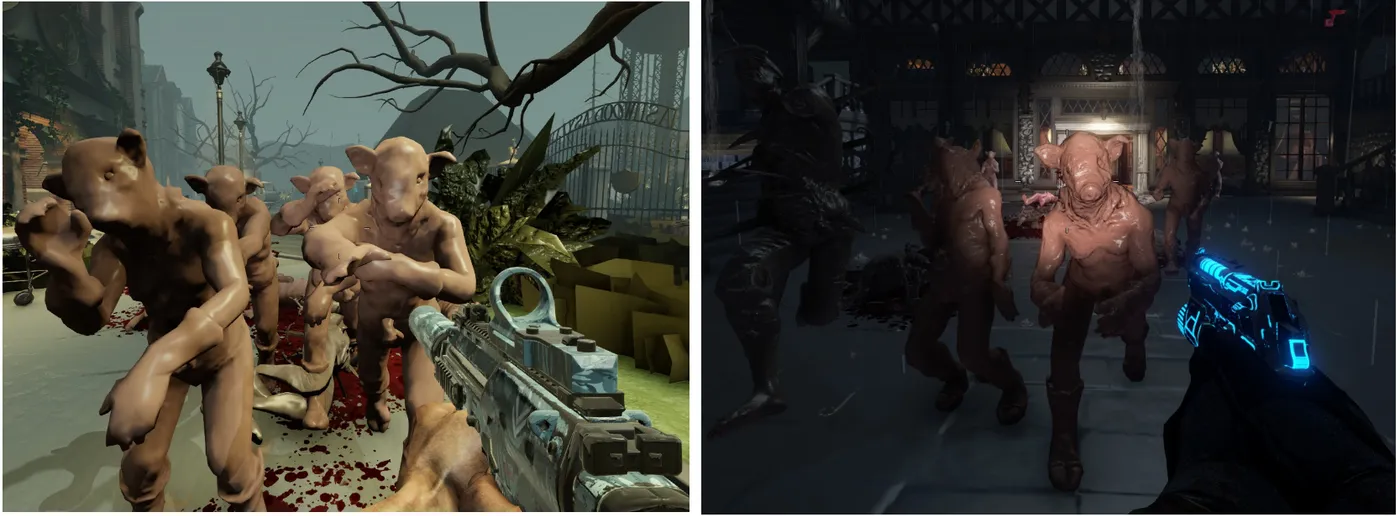 Creatures with reduced texture detail.
| Category | Approx. line | Groups |
|---|---|---|
| Creatures (ZEDs) | ~265 | TEXTUREGROUP_Creature, CreatureNormalMap, CreatureSpecular |
| World (static objects like ground, floors, desks) | ~181 | World, WorldNormalMap, WorldSpecular |
| Vehicles (static, e.g. wrecked truck) | ~190 | Vehicle, VehicleNormalMap, VehicleSpecular |
| Weapons | ~187 | Weapon, WeaponNormalMap, WeaponSpecular |
| Other (third person) weapons | ~269 | Weapon3rd, Weapon3rdNormalMap, Weapon3rdSpecular |
| Effects (flames, healing smoke, poison cloud, headshot SFX) | ~194 | Effects, EffectsNotFiltered (e.g. MaxLODSize=256) |
| UI (perk and item icons) | ~264 | UIWithMips (64), UIStreamable (512) |
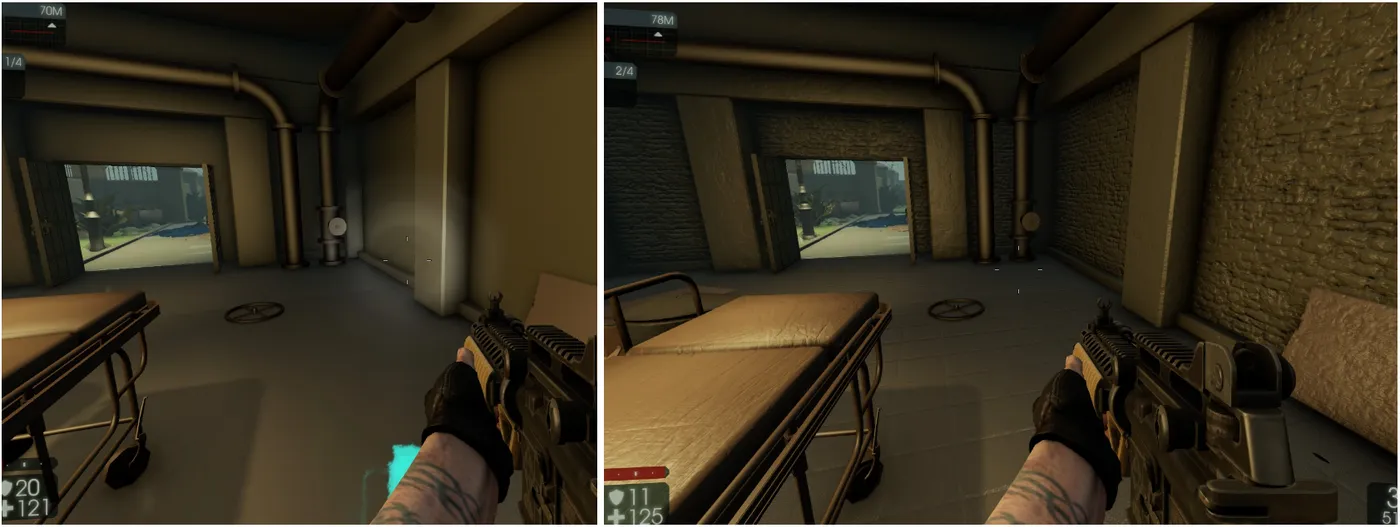 Low versus high WorldNormalMap (MaxLODSize 1 versus 4096) on an untextured surface.
Example line format: TEXTUREGROUP_World=(MinLODSize=1,MaxLODSize=1,...
LodBias (unverified)
The author suspects LodBias controls detail and works counter-intuitively: a lower value gives higher quality (range +2 to -2 in Unreal Engine, +1 to -1 in KF2). The game sometimes resets it to default, possibly because players are not meant to change it.
Quick-turn key bindings
Gamepads have a quick-turn button; the same works for keyboard and mouse. Add these lines to the very end of KFInput.ini to bind X and Z to a very fast turn right and left:
Bindings=(Name="GBA_TurnLeft",Command="Axis aBaseX Speed=-1600.0 AbsoluteAxis=100",Control=False,Shift=False,Alt=False,bIgnoreCtrl=False,bIgnoreShift=False,bIgnoreAlt=False)
Bindings=(Name="GBA_TurnRight",Command="Axis aBaseX Speed=+1600.0 AbsoluteAxis=100",Control=False,Shift=False,Alt=False,bIgnoreCtrl=False,bIgnoreShift=False,bIgnoreAlt=False)
Bindings=(Name="X",Command="GBA_TurnRight",Control=False,Shift=False,Alt=False,bIgnoreCtrl=False,bIgnoreShift=False,bIgnoreAlt=False)
Bindings=(Name="Z",Command="GBA_TurnLeft",Control=False,Shift=False,Alt=False,bIgnoreCtrl=False,bIgnoreShift=False,bIgnoreAlt=False)
Separate alt-fire and fire mode
You can bind "Switch Fire Mode" and "Alt Fire" separately. For example with a Vermint Rifle or AK-12 in 3-round burst mode, left click fires a burst and the mouse wheel down fires a single shot, so you never need to switch modes:
Bindings=(Name="MouseScrollDown",Command="GBA_AltFire",Control=False,Shift=False,Alt=False,bIgnoreCtrl=False,bIgnoreShift=False,bIgnoreAlt=False)
Bindings=(Name="MiddleMouseButton",Command="GBA_SwitchFireMode",Control=False,Shift=False,Alt=False,bIgnoreCtrl=False,bIgnoreShift=False,bIgnoreAlt=False)
Note that stripped textures give an edge in precision play but make the game look much plainer; use it only if that suits you, and keep to server rules on modified files.
FAQ
- Where is KFSystemSettings.ini?
- In Documents\My Games\KillingFloor2\KFGame\Config. On Windows 10 with OneDrive it may be under OneDrive\Documents.
- How do I disable a line in an .ini file?
- Put a # at the start of the line so the game skips it while loading.
