
KF2: Stop the Spanish n Key From Opening the Console
Players with a Spanish keyboard hit an annoying bug in Killing Floor 2: pressing the key for the letter n-tilde opens the console instead of typing it in chat. This guide (originally written in Spanish) offers a temporary fix by moving the console to another key.
The fix is temporary because Tripwire's updates tend to overwrite configuration files. It works until the next game patch; after downloading an update you have to repeat the steps.
Steps
- Open your Documents folder (the exact name depends on the Windows version; it opens easily from the Start menu).
- Go into
My Games\KillingFloor2\KFGame\Config. "My Games" is named in English.
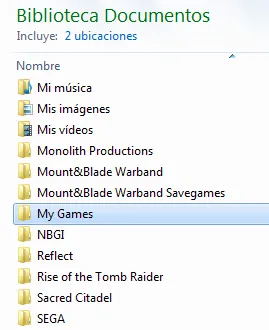 The Config folder contains the game's .ini files.
- Find the text file
KFInput.ini, right-click it and open it with any text editor (Notepad++ or plain Notepad both work).
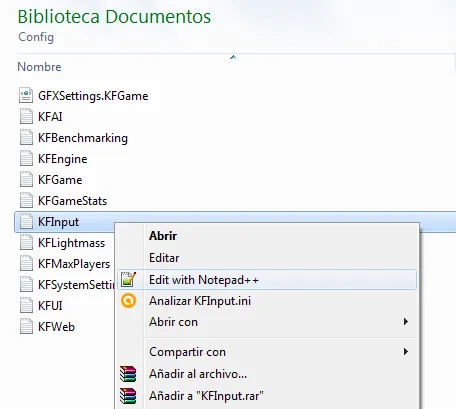 Open KFInput.ini in a text editor.
- Use the editor's search (Ctrl+F in Notepad++, Ctrl+B in the Spanish Notepad) to find
[Engine.Console]. - On the line just below, you will see
ConsoleKey=Tilde. ReplaceTildewith the English name of any key you want, for exampleConsoleKey=F11.
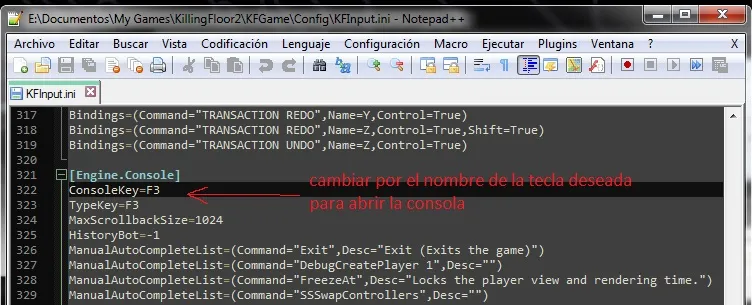 Replace Tilde with the key of your choice.
- You can also change the next line,
TypeKey=F3, which is a secondary key that opens the console. - Save the file and start the game. In a match press T to open chat and check that the n-tilde now types correctly.
That is all. If the problem returns after a patch, edit the file again. See also other config tweaks.
FAQ
- Why does the console open when I press the n-tilde key?
- The default console key is Tilde, which on Spanish keyboards sits on the same key used to type the n-tilde character, so chat typing triggers the console.
- Is the fix permanent?
- No. The game can overwrite the config file during a patch, after which the steps must be repeated.
