
KF2 Dedicated Server: Complete Guide to Ports, WebAdmin, Maps and Mutators
This is a rewrite of a very large Brazilian Portuguese guide to hosting Killing Floor 2 dedicated servers, built partly on the earlier English guide by zachjd (used with permission and credited by the author). It covers installing, port forwarding, running several servers, WebAdmin, multiple admins, custom maps from the Workshop or a redirect, mutators and game types, settings and many tips. The Windows path is the main one. For other takes see dedicated server with SteamCMD, server secrets and fixes and the 2025 Workshop issue.
Before you start
- The server is cross-platform: a server you build serves both Steam and Epic players.
- The original has a networking basics part (how the internet works, TCP vs UDP, HTTP vs HTTPS, IPv4 vs IPv6, double NAT, firewall). It is optional but useful. KF2 servers cannot use IPv6 at the moment. Documenting every network change (port, protocol, date) is good practice.
- If you run two routers, forward ports on both, or put the ISP router in bridge mode to avoid a double NAT.
- The guide rates difficulty by setup complexity: vanilla server is easiest, adding custom maps a bit more, several servers with maps more again, and heavy customization (admins, mutators, welcome screen) the most.
- Tip: turn on file extensions in Windows Explorer (View, File name extensions) so you know which file you edit.
Ports to open
| Port | Number | Protocol | Purpose |
|---|---|---|---|
| Game | 7777 | UDP | Main port for game connections |
| Query | 27015 | UDP | Communication with Valve's master server |
| WebAdmin | 8080 | TCP | Web administration |
| Steam | 20560 | UDP | Steam port |
| NTP | 123 | UDP | Weekly mode only: checks the week's mode |
Open them in the Windows Firewall (inbound rule, specific local ports, allow, domain and private profiles) and in the router; with DMZ on and the firewall off you would not need to, but leaving it that way is risky. The host needs a static IPv4 address. Test ports with a checker such as canyouseeme.org.
Diagnosing: a game port that is not forwarded properly can hide the server from both the LAN tab and the public browser; a bad query port can hide it from the public browser but show it in the LAN tab; a bad WebAdmin port means no WebAdmin (or you forgot to enable KFWeb.ini). Other fixes: check for typos and restart the router; try a different game port such as 7780; temporarily enable DMZ to test (then remove it); ask your ISP whether it blocks ports; check antivirus or firewall software that blocks the server (an AVG feature fully blocked the author's servers); uncheck "No custom servers" in the game's server browser if you run mutators; restart the router; start the server before the game when hosting on your own PC; a strict or unavailable NAT type limits hosting.
Installing the server
- Get SteamCMD and extract it to a folder such as
C:\SteamCMD. Run it and let it update, then run it again. - Since late 2021 the order matters: first
force_install_dir c:\KF2Server\, thenlogin anonymous, thenapp_update 232130 validate. Wait forSuccess! App '232130' fully installed.and typequit. - Linux users should follow the SteamCMD and KF2 wiki Linux instructions and need to emulate
.batfiles. - Run the server once so it creates its config files, then close it.
Configure it in C:\KF2Server\KFGame\Config:
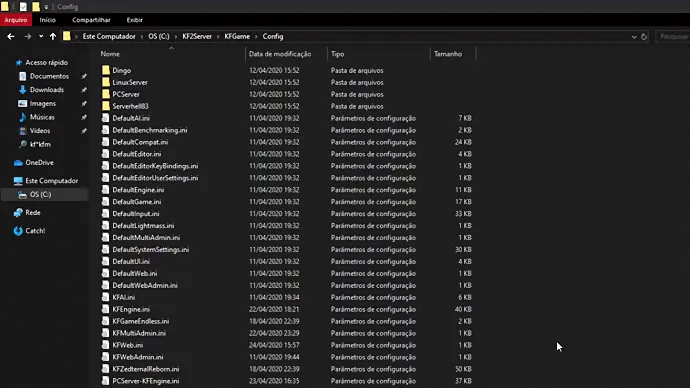 The server Config folder; the multi-server example subfolder Serverhell83 is also visible.
KFWeb.ini: setbEnabled=true(it ships as false) to use WebAdmin.PCServer-KFGame.ini: setServerName=to your name.
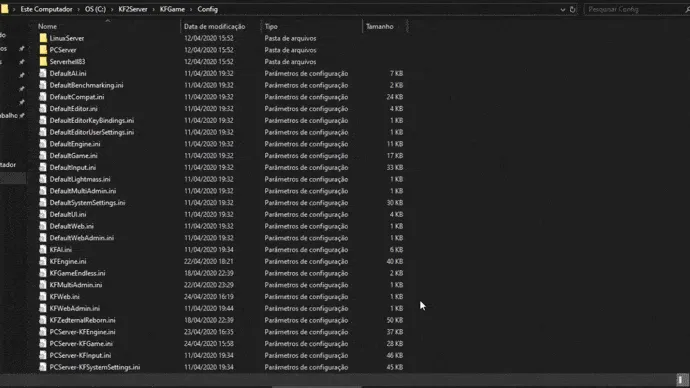 Change ServerName.
Check ports: PCServer-KFEngine.ini should show Port=7777 and KFWeb.ini ListenPort=8080 (both default). You can also add switches to your .bat: -Port=7777 -QueryPort=27015 -WebAdminPort=8080, which override the config files.
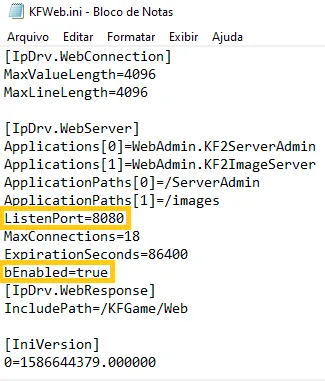 KFWeb.ini holds the WebAdmin port and enable switch.
Updating
Make a shortcut to SteamCMD.exe and add +login anonymous +force_install_dir ./KF2Server +app_update 232130 +exit to its Target field (use an absolute path if needed). Then run it for each update; it closes itself. For beta use app_update 232130 -beta preview, and validate checks files. There is no command to roll back, so back up before a beta.
Several servers
You can run several servers from one install: the config separates by -ConfigSubDir=. For a second server add -ConfigSubDir=Serverhell83 to its .bat, start it once to create KFGame\Config\Serverhell83, then in that folder change Port=7777 to Port=7778 in PCServer-KFEngine.ini and ListenPort=8080 to 8081 in KFWeb.ini, and forward the new ports (7777-7778 UDP game, 27010-27019 UDP query, 8080-8081 TCP WebAdmin, 20560 UDP Steam). The main server needs no switch. To tell servers apart, name each folder and .bat after the WebAdmin port (a tip from -InSane-Lon). Tools: netstat -o -n -a with the PID column in Task Manager shows what uses each port (KFServer.exe should hold 7777 UDP and 8080 TCP), and taskkill -f -t /im KFServer.exe stops it.
Starting with a chosen game mode
Edit the .bat and change the ?Game= part. Each option starts with ?:
 A .bat that starts Endless on Hell on Earth with the medium length.
| Mode | Command |
|---|---|
| Survival | ?Game=KFGameContent.KFGameInfo_Survival |
| Weekly | ?Game=KFGameContent.KFGameInfo_WeeklySurvival |
| Versus | ?Game=KFGameContent.KFGameInfo_VersusSurvival |
| Endless | ?Game=KFGameContent.KFGameInfo_Endless |
| Objective | ?Game=KFGameContent.KFGameInfo_Objective |
Difficulty is ?Difficulty= (0 Normal, 1 Hard, 2 Suicidal, 3 Hell on Earth) and length ?GameLength= (0 short 4 waves, 1 medium 7, 2 long 10). Other URL arguments: AdminName=, AdminPassword=, MaxPlayers=, Port=, QueryPort=, WebAdminPort= (beta), Multihome= (bind to a specific IP), PREFERREDPROCESSOR= (pin to a core) and ConfigSubDir=.
Key files: PCServer-KFGame.ini holds AdminPassword, GamePassword ([Engine.AccessControl]), ServerName and AdminContact ([Engine.GameReplicationInfo]), bUseMapList=True and GameMapCycles=(Maps=("KF-BurningParis","KF-Bioticslab",...)). PCServer-KFEngine.ini has the ports and NetServerMaxTickRate (default 30).
To connect directly, open the console (the key under Esc) and type open <IPv4>:7777; find the IP with ipconfig.
WebAdmin
Open http://<IPv4>:8080. Set AdminPassword= in PCServer-KFGame.ini and ?AdminName= in the .bat. In game, adminlogin <password> from the console.
- Change map: Change Map, pick game type and map, and put mutators or options in ADDITIONAL URL VARIABLES, for example
?Mutator=ClassicScoreboard.ClassicSCMut,DamageDisplay.DmgMut,KFMutator.KFMutator_MaxPlayersV2?MaxPlayers=12?MaxMonsters=32?Difficulty=3?GameLength=1.
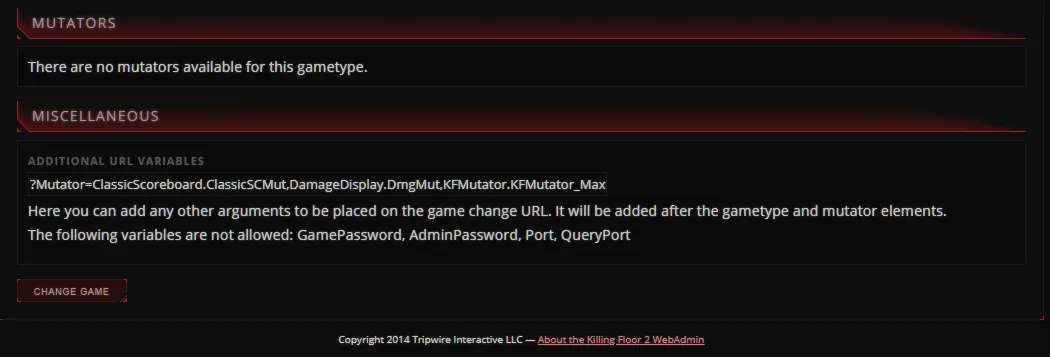 Mutators and difficulty typed into ADDITIONAL URL VARIABLES.
- Welcome screen: the banner must be a .PNG (some report it needs more than 8-bit color; 720x361 is a safe size, hosted on a site such as Imgur and linked directly). It also has a website link, a clan motto and a Message of the Day (use
\nfor new lines, HTML tags like<font color="#B22222" size="24">,<b>,<i>,<u>; the color picker does not work and the#is required).
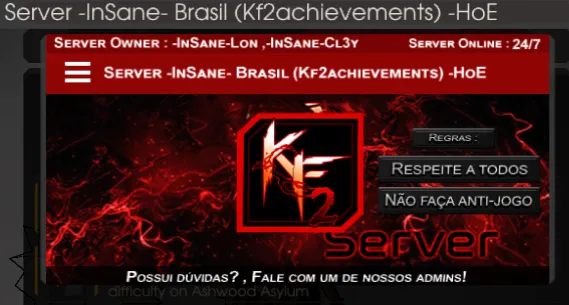 How the welcome screen looks in game.
- Bans: Export saves
server-bans.json; to import, paste the content into a secret GitHub gist, copy the Raw URL and paste it under Import Bans, which also lets many servers share one list. - Chat logging: WEBADMIN SETTINGS, CHAT LOGGING tab (timestamp, unique names, filename placeholders %i, %p, %c, %v); logs are in
KFGame\Logs. - Multiple admins: in
KFWebAdmin.ini, under[WebAdmin.WebAdmin]addAuthenticationClass=WebAdmin.MultiWebAdminAuth. After a restartKFMultiAdmin.iniis created and the login isAdmin(capital A) with your original password. Create administrators in the new Administrators page with Deny/Allow patterns (Access Order Deny,Allow or Allow,Deny); there is no delete button, so remove a section fromKFMultiAdmin.ini. The?AdminName=login in the.batstops working once multi-admin is on.
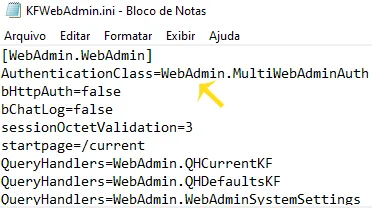 The AuthenticationClass line in KFWebAdmin.ini.
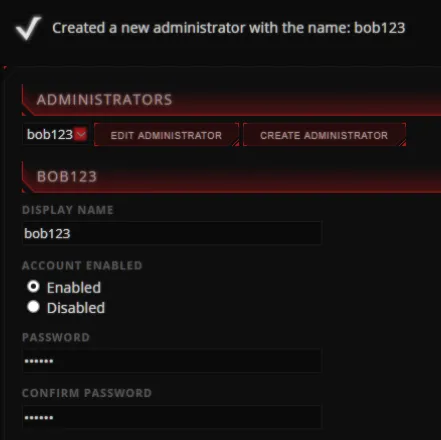 Creating a WebAdmin administrator account.
- "Exceeded login attempts": raise
MaxConnections=18(default) inKFWeb.ini;ExpirationSeconds=86400controls session length. - Map cycle truncated at about 170-180 maps: in
KFWeb.inichangeMaxValueLengthandMaxLineLengthfrom 4096 to 999999 under[IpDrv.WebConnection]. - Show perk levels: edit
KFGame\Web\ServerAdminfilescurrent.html,current_players.html,current_player_row.incandcurrent_players_row.inc(back them up first) to add a Level column using<%player.perk.level%>.
 Perk and level columns after editing.
- Wave counter in Endless: in
gamesummary.increplace the time lines with<dt class="gs_wave">Wave <%wave.num%></dt><dd class="gs_wave"><%wave.monsters.dead%>/<%wave.monsters.total%></dd>, and add the wave tocurrent_rules.inc.
Server icons in the browser: a rank icon means ranked with stats and XP, no mutators or custom settings; "ranked stock" means customized but stats still on (for example allow-listed mutators or friendly fire); unranked means stats disabled by non-allow-listed mods or a custom map with scripts.
Custom maps
Workshop maps download fast, are compressed and update automatically, but must be public on the Workshop; a removed page breaks the map. Redirect hosting gives more control but no auto updates or compression and slower downloads. You can use both at once and the Workshop takes priority. The author recommends the Workshop.
Workshop:
- In
PCServer-KFEngine.ini, under[IpDrv.TcpNetDriver]addDownloadManagers=OnlineSubsystemSteamworks.SteamWorkshopDownload(above other DownloadManagers lines). - At the bottom add
[OnlineSubsystemSteamworks.KFWorkshopSteamworks]andServerSubscribedWorkshopItems=<Workshop ID>(one line per ID, with//comments). - Start the server so it downloads to
KFGame\Cache, then close it. - Add a data store and map cycle entry (below).
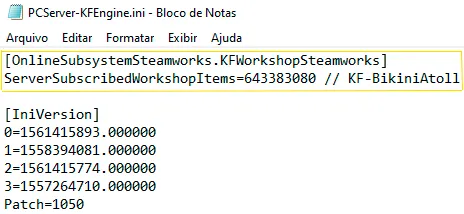 Subscribed Workshop IDs with comments.
Redirect: download the maps (for example from a redirect site), put them in KFGame\BrewedPC\Maps (optionally a CustomMaps subfolder), and set RedirectToURL=<redirect URL> in PCServer-KFEngine.ini. Under [IpDrv.WebServer] set ApplicationPaths[0]=/ServerAdmin, ApplicationPaths[1]=/images, ListenPort=80, a large MaxConnections, a large ExpirationSeconds and bEnabled=True. On Linux redirects use lowercase names and a trailing slash or clients get a 1 KB file. For IIS add the .kfm MIME type. Web servers include HFS, Apache, NGINX and IIS; secure them (a WAF, no stray password files).
Data store and cycle: in PCServer-KFGame.ini add for each map:
[KF-BikiniAtoll KFMapSummary]
MapName=KF-BikiniAtoll(MapAssociation and ScreenshotPathName are unnecessary; redirect map names are case sensitive, Workshop ones are not.) Then add the map to GameMapCycles, or use WebAdmin Map Cycles with "ADD MISSING" to add every map not in the list.
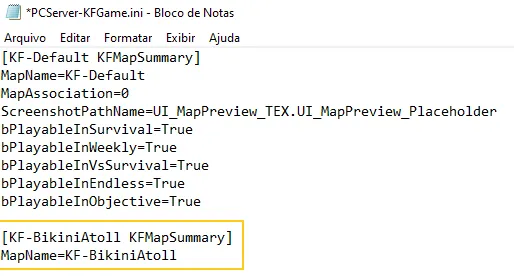 A KFMapSummary entry for a custom map.
 Adding the map to GameMapCycles.
Removing a map: delete it from the Workshop IDs, the data store, the cycle, the Cache folder (named by Workshop ID) or the Maps folder. Organize big lists by commenting IDs, keeping a spreadsheet, sorting alphabetically and adding category separators such as "| =----= Killing Floor 2 Maps =----= |" to GameMapCycles (clicking a separator loads KF-BioticsLab).
Cache folder meaning: numbered folders are Workshop IDs, .uxx files are redirect downloads listed in Cache.ini, and .tmp files are temporary. See also where server downloaded maps are stored.
Item states in the server console: 4 installed and current; 0 not installed, will download; 12 installed but needs an update; 20 not checked or Workshop connection lost (restart); 8 and 36 unclear. Warnings: "Steam does not seem to be working" means no Workshop connection (restart Steam and the server and avoid starting it twice); "could not download item" means the page is private, disabled or the ID is wrong; "attempted to check if item is installed without downloading" is normal and checks Binaries\Win64\steamapps\workshop\content\232090 before copying to KFGame\Cache.
2025 Workshop issue: mods published after 11 July 2025 do not update on the server because the shipped Steam DLLs predate ZSTD-compressed Workshop chunks. A short-term fix is to copy steamclient.dll, steamclient64.dll, tier0_s.dll, tier0_s64.dll, vstdlib_s.dll and vstdlib_s64.dll from SteamCMD into the server's Binaries\Win64 folder.
More than 519 maps in rotation crashes the server when you open Change Map or Map Cycles. The workaround: use MultiAdmin accounts with /current/change and /settings/maplist in the deny patterns, and change maps from the WebAdmin console with switch KF-MapName (extras such as ?Difficulty=3?GameLength=2 work) or restartmap.
Mutators and game types
Mutators and game types disable XP and stats unless allow-listed. To install: put the Workshop ID in ServerSubscribedWorkshopItems, start to download, then add the command line to the .bat or WebAdmin. Always check the author's instructions.
| Mod | Command |
|---|---|
| Unofficial Endless | ?Game=EndlessM.EndlessM_Main |
| Controlled Difficulty | ?Game=ControlledDifficulty.CD_Survival |
| Legs and Backpack | ?Mutator=FPBackPackMut.FPBPBaseMut |
| Infernal Nightmare Difficulty | ?Mutator=NightmareDifficulty.NightmareMutator?Difficulty=4 |
| Server Extension Addons | ?Mutator=ServerExtMut.ServerExtMut |
| Boss Only | ?Mutator=OnlyBossMut.OnlyBossMut |
| Classic Scoreboard | ?Mutator=ClassicScoreboard.ClassicSCMut |
| MaxPlayers | ?Mutator=KFMutator.KFMutator_MaxPlayersV2?MaxPlayers=15?MaxMonsters=64 |
Several mutators are separated by commas, for example ?Mutator=OnlyBossMut.OnlyBossMut,FPBackPackMut.FPBPBaseMut. Some mods need .u or .upk files in KFGame\BrewedPC and .ini files in Config; the MaxPlayers V1 variant needs KFMutator.u copied from Cache to BrewedPC, V2 does not.
To list a custom game type in WebAdmin, add to PCServer-KFGame.ini under the other KFGameInfoSummary entries:
[Controlled_Difficulty.CD_Survival KFGameInfoSummary]
ClassName=Controlled_Difficulty.CD_Survival
MapPrefix=KF
then pick it in Change Map and add its command line in ADDITIONAL URL VARIABLES.
Server settings
Settings that do not make a server custom: ReadyUpDelay=90, GameStartDelay=4 (never 0), TimeBetweenFailedVotes=10, VoteTime=60.0, MaxSpectators=2, KickVotePercentage=0.66, bDisableTeamCollision, bEnableDeadToVOIP, bAdminCanPause (adminpause), bDisableVOIP, bDisablePublicTextChat, bDisableMapVote, MaxIdleTime (max 300), bDisableKickVote, bSilentAdminLogin, bPartitionSpectators, bUsedForTakeover (on by default; lets players change difficulty and length via matchmaking; consider disabling) and bEnableMapObjectives (set in Survival or Endless sections, not [KFGame.KFGameInfo]). Settings that make a server "ranked stock": bDisablePickups and FriendlyFireScale.
Tips
- Admins cannot be kicked, even via WebAdmin.
- A session ban lasts until the next map; use it with a kick.
- If nobody votes after a game, the server loads the next map in the cycle, not a random one.
- The admin password also works as a game password and logs you in as admin.
- Bind
adminlogin <password>to a key inKFInput.inior withbind l adminlogin 123. - Disable team collision to stop door blockers.
- Stop Windows auto-restarts for 24/7 servers.
- Keep notes in WebAdmin of what difficulty and length numbers mean.
- Software such as Microsoft Visual Studio can conflict with the server and cause random crashes.
- If players vote for a map the server cannot find it loads BioticsLab;
ServerLocalMap=inPCServer-KFEngine.inimay not fix it.
FAQ
- Which ports does a KF2 server need?
- Game port 7777 UDP, query port 27015 UDP, WebAdmin 8080 TCP, Steam port 20560 UDP and, for Weekly mode, NTP port 123 UDP.
- What is the dedicated server app ID?
- 232130 in SteamCMD (app_update 232130 validate). The game itself is 232090.
- How many custom maps can a server hold?
- No more than 519 maps in rotation; beyond that WebAdmin map pages crash the server, so change maps from the console with switch KF-MapName.
- Does this work for Epic Games players?
- Yes, the server is cross-platform, so one server serves both Steam and Epic players.
