
KF2 Controlled Difficulty (CD) Beginner Guide
Controlled Difficulty (CD) is a mod that adjusts how hard Killing Floor 2 is. This guide covers the basic knowledge needed to join "high difficulty" servers: servers that run only Precision perks at a level harder than the official Hell on Earth. It is written from the Precision-perk point of view (Commando, Support, Gunslinger, Sharp Shooter, SWAT). Berserker, Demolitionist, Firebug and Survivalist are usually not allowed on such servers.
 Cover art of the original guide.
What is CD
CD can make the game easier, but it is generally used to push it beyond Hell on Earth. Some servers have fixed settings; others let players change difficulty with chat commands. Three builds are common:
- Eternal Edition v4.1: popular; needs a scoreboard-replacing mod such as Yet Another Scoreboard.
- Chokepoints: has unique touches, such as slightly changed skills.
- Combined Edition: many convenience functions and only Precision perks allowed (test mode allows all perks). Recommended for practice.
Glossary
- HoE - Hell on Earth; Medic - Field Medic; GS - Gunslinger; SS - Sharp Shooter.
- SC - Scrake; FP - Fleshpound; QP - Quarter-Pound. These three are the "Large ZEDs".
- Medium ZEDs: Husk, Bloat, Siren, E.D.A.R. Small ZEDs: Cyst, Alpha Clot, Slasher, Stalker, Crawler, Gorefast.
- 6PHP - enemy HP set to the value for 6 players.
- Zed-Time - the monochrome slow-motion period.
- Rage - Scrakes and Fleshpounds walk slowly until damaged enough, then sprint. An enraged FP calms down as soon as it lands a hit.
- Kiting - keeping an enemy chasing you while staying out of its reach.
Are you ready to join?
If you are comfortable with vanilla Hell on Earth on a Precision perk, you can try. If you do not know how to beat Large ZEDs, search for "Killing Floor 2 takedowns" videos. If you are unsure whether you can, practice on a test map with enemy HP at 6 players and aim to kill a Scrake within 1.5 times and a Fleshpound within 2 times the required bullet count. If you have questions during play, ask in chat; people usually answer.
Before you join
Back up and edit KFEngine.ini (normally in Documents\My Games\KillingFloor2\KFGame\Config) or the game may crash on heavy servers. Change:
MaxObjectsNotConsideredByGC=179220  ->  33476
SizeOfPermanentObjectPool=179220    ->  0
On the server browser, a special mark in front of the server name often indicates a high difficulty server. Read the rules shown on joining; each server differs.
Chat commands
During trader time, type !ot to open the trader and !cdr when ready.
| Command | Meaning |
|---|---|
| !cdinfo | Show current CD settings |
| !ot | Open trader |
| !cdr / !cdur | Ready / unready |
| !cdpt / !cdupt | Pause / unpause trader time |
| !rpwinfo | (Combined) restricted perks, levels, skills, weapons |
| !cdm | (Combined) menu, e.g. stop others picking up your weapons |
| !cdsca | (Combined) analyse a spawn cycle, e.g. !cdsca ts_mig_v2 wave10 wsf12 |
| !cdfs / !cdfs fal | (Combined) fill ammo of your dropped weapons / dropped FALs |
| !mv | Map vote |
Binding the frequent ones is handy, for example in the console: Setbind F8 "say !ot".
Adjusting difficulty
On servers where players set difficulty, give a value after the command, e.g. !cdsc albino_heavy, !cdmm 32, !cdwsf 12.
| Command | Option | Notes |
|---|---|---|
| !cdfm | FakesMode | Whether real players are added to fake-player values; "ignore_humans" is common |
| !cdbhpf | BossHPFakes | Boss HP |
| !cdahpf | AllHPFake | HP of everything except the boss |
| !cdsc | SpawnCycle | Preset ZED spawn order |
| !cdmm | MaxMonsters | Max monsters on the map |
| !cdwsf | WaveSizeFakes | Total enemies per wave |
| !cdcs | CohortSize | Max ZEDs spawned at once (default 4) |
| !cdsm | SpawnMod | Spawn speed (default 1, HoE 0.75, fastest 0) |
| !cdsp | SpawnPoll | Spawn interval in seconds (default 1, fastest 0.1) |
The settings that change difficulty most are AllHPFake, SpawnCycle, MaxMonsters and WaveSizeFakes; CohortSize, SpawnMod and SpawnPoll are for fine tuning. AllHPFake and SpawnMod are normally left at !cdahpf 6 and !cdsm 0.
Spawn cycles by skill level
| Level | Large ZEDs in last wave | Cycles (harder to the left) |
|---|---|---|
| Advanced | 23-27% | asp_v3, ts_mig_v3, dtf_pm_plus_fx, asp_v2, doom_v2_plus_rmk, ts_mig_v2 |
| Intermediate | 15-20% | nt_v2, ebr_hh_v1, osffi_v1, dtf_pm, ts_mig_v1, bl_v2, doom_v1, asl_v3 |
| Elementary | 7-14% | asl_v1, nam_pro_v5_plus, nam_pro_v5, nam_pro_v3 |
| Basic | 5% | unmodded, albino_heavy, basic_heavy |
Some of these include Quarter-Pounds, and a few exist only in the Combined Edition. Newcomers are advised to start with nam_pro_v5 (or the easier nam_pro_v3); bl_v2 suits regulars.
Typical other values:
- MaxMonsters: 6 players 46 (48 with a Medic), 5P 38 (40), 4P 30 (32), 3P 24, 2P 20, 1P 16. For six players 48-56 is often used, up to 64.
- WaveSizeFakes: twice the player count, e.g.
!cdwsf 12for six. - CohortSize:
!cdcs 7is common; 4 or 12 are good for fine tuning. - SpawnPoll: 1, or 0.7 for slightly harder.
Practicing alone
Subscribe to Controlled Difficulty - Combined Edition and the KF-Corridor map, restart KF2, open the console and enter:
Open KF-Corridor?Game=CombinedCD2.CD_Survival?Difficulty=3?GameLength=0Difficulty 0-3 is Normal to HoE; GameLength 0-2 is Short to Long. KF-Corridor is used because on regular maps you can run in circles and clear high settings that would be impossible in a team. AllHPFake cannot be set on the command line, so type !cdahpf 6 in chat.
 The KF-Corridor practice map.
Add ?MaxMonsters=..?CohortSize=4?WaveSizeFakes=2?SpawnMod=0?SpawnPoll=1?SpawnCycle=.. to the line. For Sharp Shooter and Gunslinger (with !cdahpf 6): Basic uses MaxMonsters 10 and unmodded; Elementary MaxMonsters 8 and nam_pro_v3; Lower intermediate MaxMonsters 10 and nam_pro_v5. For Commando (with !cdahpf 1) the goal is killing small and medium ZEDs fast, extending Zed-Time by at least 10 seconds each time, with albino_heavy and MaxMonsters 16 / 22 / 28 for the three levels. Clearing the Elementary level means you can barely keep up on a high difficulty server.
Unspoken rules (elementary)
Breaking these is the most common reason to be kicked.
 Zed-Time extension is the Commando's core job.
- Let the Commando extend Zed-Time. Each Commando kill extends Zed-Time by 3 seconds, up to 6 times (the first extension can come from any perk, so 5 real extensions). The extensions do not stack; the time counts from the last kill. If a torso remains it must be killed to count. Do not steal the Commando's targets; shoot Large ZEDs and Bloats during Zed-Time, and kill only 1-2 ZEDs within a second after an extension if there are too many.
- No second Commando. Two do not allow more than 6 extensions, and Zed-Time ends quickly.
- Never sell other people's weapons. Ammo is tight; spare weapons are on the ground on purpose. Return weapons dropped by dead teammates.
- Do not anger several SCs and FPs at once. The basic rule is 1 vs 1. Damaging grenades in a crowd of them cause wipes.
- Wait a moment after an enraged FP hits a teammate. A Sharp Shooter may be about to freeze it or took the hit on purpose to reload; shooting early re-enrages it.
- Do not block allies' view by strafing in front of them; stop and shoot when you can.
- Know your position. The Japanese CD wiki has map-specific position strategies.
- Ammo skills trick: pick the ammo-increasing skill during trade time, fill up, drop the weapon, switch skills, and pick it up again to keep the extra ammo. Taking an ammo box resets the bonus.
Intermediate tips
- Reload types: constant speed; faster when the magazine is empty; faster when ammo remains (probably only the Tommy Gun). Usually reload after emptying the magazine, and with guns such as dual AF it can be faster to fire off the remaining ammo first.
- Reload cancel: start the reload, let the magazine fill, then press bash to cancel the rest of the animation and shoot sooner. The fastest version holds fire while reloading and taps bash right as the magazine is full.
- Look around while reloading; spawns of Large ZEDs can be uneven and you may be first to notice a pinch.
- Bash interrupts enemy actions (e.g. a Siren scream at close range), kills Cysts, Alpha Clots, Slashers, Crawlers and Elite Crawlers with a head hit, and stops a pursuing enraged FP after being hit. Husk explosions and FP swings cannot be cancelled.
- Stomping an enemy knocks it down, buying reload time against a Crawler.
- Money: if the Commando earns too much in Wave 1, the Sharp Shooter may be unable to afford weapons in Wave 2. Check the scoreboard and hand over cash.
- Hitboxes: the Scrake head is long with a hitbox extending below the chin; the Fleshpound head is round with a tight hitbox. When an enraged FP guards its lower face with its arms, aim at the forehead.
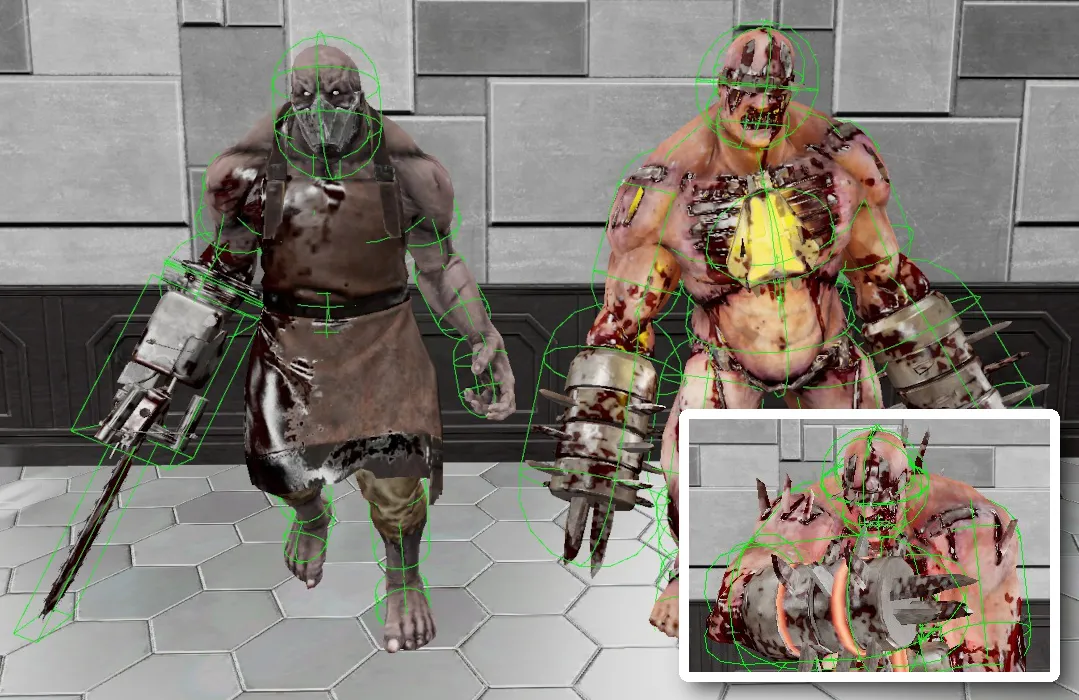 Scrake and Fleshpound head hitboxes compared.
Advanced techniques
- Dropping a weapon lets you swap instantly; you can also drop one, pick up another from the ground and fire it.
- Leave the Commando a Bloat or Scrake with known remaining HP for Zed-Time extension.
- If a safe moment arises, step between a downed or dying teammate and an enraged FP to take the hit.
- If an FP's rage animation gets skipped, bashing cancels its attack and it then performs the rage animation normally.
- FP juke: pass an enraged FP and circle behind it so it loses sight of you.
- Corner kiting: show yourself near a corner, and when the enemy begins its attack, duck behind the corner so it hits the wall.
Bullets needed for Large ZEDs
The original guide lists, per perk and skill selection, how many bullets each weapon needs to kill a Scrake and a Fleshpound at 6-player HP, with and without the Medic's 20% damage buff. The buff changes the counts noticeably, which shows why a Medic matters.
FAQ
- What is CD in Killing Floor 2?
- CD stands for Controlled Difficulty, a mod that lets a server tune enemy HP, spawn order, wave size and spawn speed. It is mostly used to make games harder than Hell on Earth.
- How do I start the trader countdown on a CD server?
- Open the trader with !ot, buy your gear, then type !cdr to declare ready. The countdown proceeds once everyone is ready.
- Which spawn cycle should a newcomer start with?
- nam_pro_v5 is a common first choice for people who just joined CD servers; nam_pro_v3 is easier, and bl_v2 suits players who are used to CD.
