
KF2 Controlled Difficulty: Parameters and Chat Commands (CN)
This is a translation and paraphrase of a Chinese Steam guide about the Controlled Difficulty (CD) plugin, the tool most "multiplier" servers use to make Killing Floor 2 harder than the official Hell on Earth settings. The author notes the guide is no longer updated and that every value and command is based on CD builds up to version 1064, so treat it as a reference rather than the final word. For a gentler English introduction see the beginner CD guide.
What CD is
"Multiplier" difficulty means anything harder than the stock game, and it can be reached with several plugins. CD is simply the most popular because it is powerful and convenient. It lets you change the shop, add to the total ZED count, speed up spawning and control the composition of every wave. There are two lines of the plugin: the original by blackout, and a newer fork by Tiger that adds convenience features.
Plugins come in two types: game modes (only one per match) and mutators (any number at once). CD is a game mode, so it cannot be combined with another game-mode plugin.
Starting CD
Solo: subscribe on the Workshop, start KF2, open the console with the ` or ~ key and type the following. Replace KF-Outpost with any map from your Maps folder.
open KF-Outpost?game=ControlledDifficulty.CD_Survival
The console command that launches a solo CD game.
Dedicated server: copy the plugin into the BrewedPC folder, add the Workshop redirect line to the PCServer-KFEngine file (the same basic step used for any plugin or custom map), then add ?game=ControlledDifficulty.CD_Survival to the KFServer launch parameters. Parameters can be set in the config file or appended to the URL with ?, for example:
open KF-Hillside-B4?game=ControlledDifficulty.CD_Survival?CohortSize=8?SpawnPoll=2.0?WaveSizeFakes=2Configuration
Run the server once so the plugin writes its settings, then open PCServer-KFGame and find the [ControlledDifficulty.CD_Survival] section. Changes need a restart, though authorized players can change most of them live through chat commands.
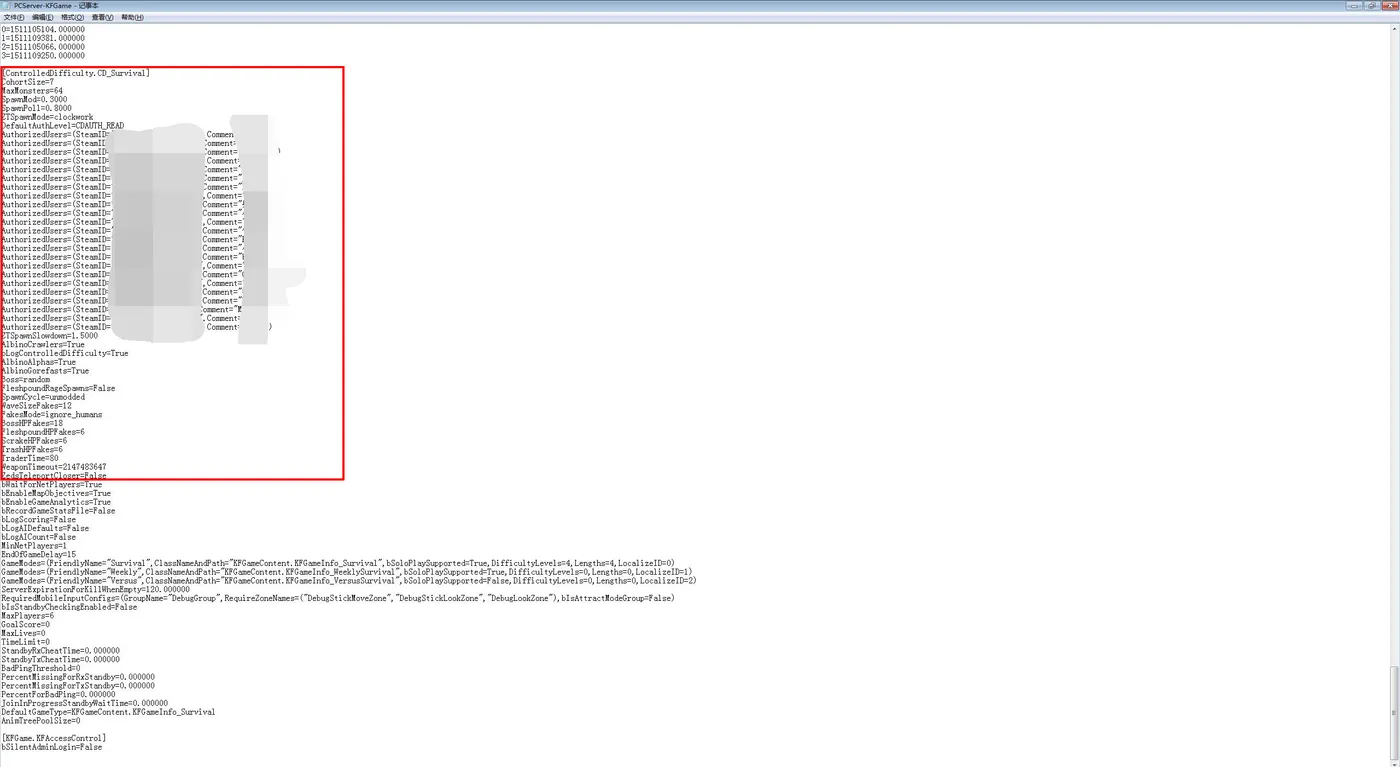
The difficulty-related parameters live in this block of PCServer-KFGame.
The key idea is the SpawnManager, which plays the role of the stock GameConductor. Every time it runs, it checks the state of the map and decides whether to spawn.
Spawn rate parameters
- CohortSize: the maximum number of ZEDs spawned in one manager run. If it is 0, the whole available wave is spawned at once; the map-wide limit still applies.
- MaxMonsters: how many ZEDs may be alive at the same time. For reference, the stock Hell on Earth defaults are 32 for a full team, 18 for two players and 12 solo (the Halloween update lowered the solo and duo values by 25% and 43%).
- SpawnMod: the lag factor that slows spawning after the manager has run. Stock Hell on Earth floats between roughly 0.57 and 0.76 depending on player count and how the fight is going. Setting it to 0 removes all throttling.
- SpawnPoll: the interval between manager runs. The official game uses 1 second; the minimum allowed is 0.1.
- ZTSpawnMode:
unmoddedresets the manager timer every time Zed Time resets;clockworkkeeps the timer independent of Zed Time resets. - ZTSpawnSlowdown: used only in clockwork mode. A value of 1 makes the manager immune to Zed Time; a higher value slows the manager's perception of time by that factor during Zed Time.
Types and order of ZEDs
- AlbinoCrawlers, AlbinoAlphas, AlbinoGorefasts: true or false. They also gate whether the elite variants appear in a spawn cycle.
- Boss: force a boss.
hansorvoltergives Hans,pat,pattyorpatriarchgives the Patriarch, andrandomorunmoddedkeeps the random pick. The King Fleshpound and King Bloat cannot be forced yet. - SpawnCycle: the name of the spawn sequence (the boss wave is excluded).
unmoddeduses the stock one,iniuses a custom one.
Fake players
- FakesMode:
add_with_humansadds the fake count to the real players;ignore_humansreplaces the real count with the fakes. - WaveSizeFakes: how many ZEDs per wave (does not change health).
- BossHPFakes, FleshpoundHPFakes, ScrakeHPFakes, TrashHPFakes: the player count used to scale the health of the boss, Fleshpounds, Scrakes and the small and medium ZEDs.
With ignore_humans these five values lock the wave size and health regardless of how many people join.
Miscellaneous
- TraderTime: trader time in seconds; 0 or a negative value keeps the difficulty default.
- WeaponTimeout: how long dropped weapons stay on the ground. Negative uses the game default (5 minutes),
maxmakes it practically permanent. - ZedsTeleportCloser: whether ZEDs can teleport near players as in the stock game. Stuck ZEDs may still teleport.
- bLogControlledDifficulty: write the plugin's details to the log.
- FleshpoundRageSpawns: true keeps the stock chance of Fleshpounds spawning enraged; false makes them behave like older versions.
Chat permissions and commands
DefaultAuthLevel set to CDAUTH_READ means only listed players can change settings; CDAUTH_WRITE lets anyone do it. Authorized players are listed with their 32-bit Steam ID:
AuthorizedUsers=(SteamID="STEAM_0:1:113644118",Comment="313")Authorized players type commands into all-chat (not team chat) in the form !cd<parameter> <value>. Anyone can view settings with !cdinfo (common ones, in chat) or !cdinfo full (everything, in the console). Passing no value to a command prints the current setting.
| Command | Short form | Effect |
|---|---|---|
| !cdmaxmonsters | !cdmm | Maximum ZEDs alive |
| !cdcohortsize | !cdcs | Spawn batch size |
| !cdspawnmod | !cdsm | Lag factor |
| !cdspawnpoll | !cdsp | Spawn interval |
| !cdwavesizefakes | !cdwsf | Wave size in fake players |
| !cdbosshpfakes, !cdfleshpoundhpfakes, !cdscrakehpfakes, !cdtrashhpfakes | Health scaling per class | |
| !cdspawncycle | Switch the spawn cycle | |
| !cdpausetrader / !cdunpausetrader | !cdpt / !cdupt | Pause or resume trader time |
Dynamic parameters
Most numeric parameters (CohortSize, MaxMonsters, SpawnMod, SpawnPoll, WaveSizeFakes, ZTSpawnSlowdown and the four HP fakes) can vary by wave and by player count. Two ways are supported: a matrix, or a linear formula (credited to Machine).
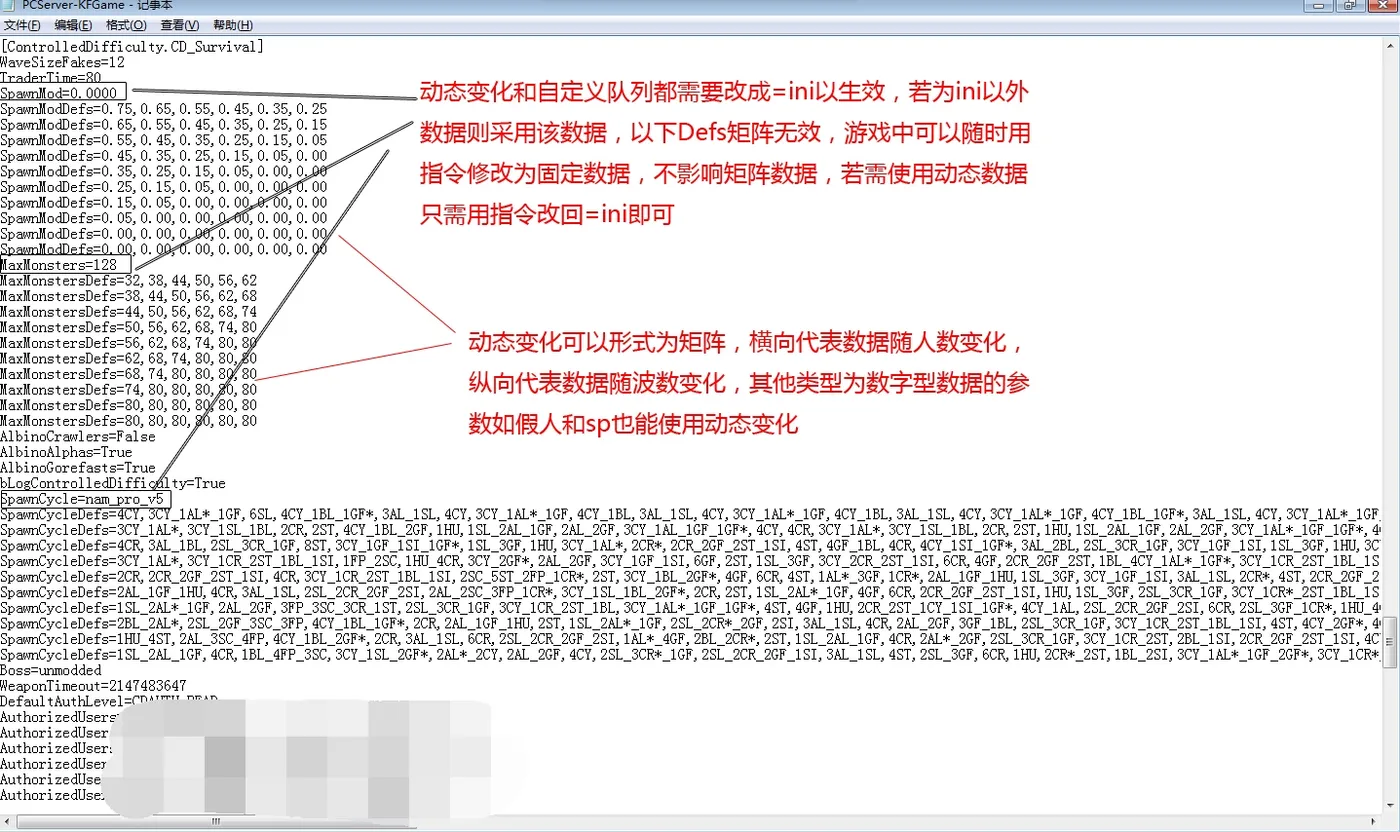
Matrix style dynamic parameters.
The formula is A_B*X_Y[P/W][,Zmax], which equals Min(Lerp(A,B,PlayerAlpha) * Lerp(X,Y,WaveAlpha), Z). PlayerAlpha and WaveAlpha are (current - 1) divided by (maximum - 1); the boss wave counts as the last wave. Results are rounded to integers.
Example: MaxMonsters=bilinear;16_32*1_1.5,44max gives 16 ZEDs on wave 1 with one player and 32 with six players, never above 44. Another: SpawnPoll=bilinear;1_0.75P*1.5_0.75W in a four-wave solo game yields 1.5, 1.25, 1.0 and 0.75 for waves 1 to 4, and 0.75 for the boss.
Spawn cycles
With a spawn cycle active, CD bypasses KF2's own random queue and spawns ZEDs in a predictable order. Presets in the build covered by the guide:
- albino_heavy, basic_moderate, basic_heavy: solo queues (basic_moderate has fewer crawlers and stalkers than basic_heavy)
- dtf_v1: easy for six waves, then a sharp jump; from wave 8 large ZEDs are around a fifth of the total
- nam_poundemonium: many Fleshpounds and mini Fleshpounds
- nam_pro_v1 to v5: balanced, harder with each version; mini Fleshpounds appear from v4
- nam_semi_pro and nam_semi_pro_v2: for players new to CD
- rd_sam, rd_odt, rd_kta: added in v1063
For a custom queue set SpawnCycle=ini and write one SpawnCycleDefs= line per wave. Commas separate squads, underscores separate ZEDs within a squad.
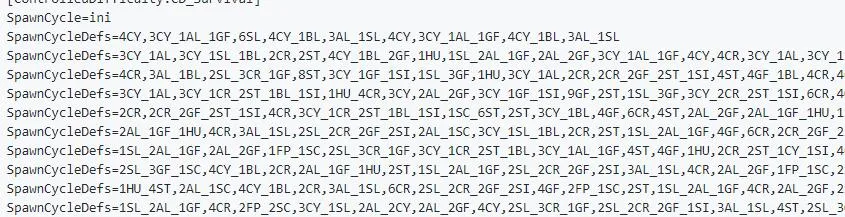
Custom spawn cycle lines.
Codes: AL alpha clot, BL bloat, CR crawler, CY cyst clot, FP Fleshpound, GF Gorefast, HU Husk, KFP King Fleshpound, MFP mini Fleshpound, SC Scrake, SI Siren, SL slasher, ST Stalker. Add * for the elite version and ! after FP for a Fleshpound that spawns enraged.
Forked builds (Tiger, Dark, Akathiiro313)
The forks add orange chat output, extra sequences (nam_pro_v5_plus, gso_v1, ASL_v1, mig_v1 and others), an auto-pause for trader time and a ready system (!cdready, !cdunready). They improve !cdwho, add !cdmystats (money earned, healing, damage dealt and taken, accuracy, headshot rate, large ZED kills), !cdallhpfakes, !cdquarterpoundhpfakes, !cdwaveendsummaries and a choice of how headshot rate is counted. The Akathiiro313 build adds toggles for elite Gorefasts, Alphas, Crawlers and the robot Stalker and Husk. If a player disconnects while everyone else is ready, the trader countdown will not start by itself.
Credits in the original go to Machine for the linear formula and the ZT slowdown explanation, Kore for spawn volume and albino answers, and Tiger for the !cdwho details.
FAQ
- What is Controlled Difficulty?
- A Workshop game-mode plugin that replaces the stock spawn logic so server owners can raise the number of ZEDs, their health and the spawn rate, and even dictate the order of every wave.
- How do I start a solo game with CD?
- Open the console and enter open KF-Outpost?game=ControlledDifficulty.CD_Survival, replacing KF-Outpost with any map name.
- Can CD be combined with other game-mode plugins?
- No. CD is a game-mode type plugin, and only one game mode can run per match. Mutators can be stacked, game modes cannot.
