
Steam Workshop Guide: Mods, Maps & Custom Content
Steam Workshop makes it incredibly easy to add custom content to Killing Floor. With thousands of mods, maps, and custom content available, Workshop is the best way to expand your game. This guide will teach you everything about using Steam Workshop with Killing Floor.
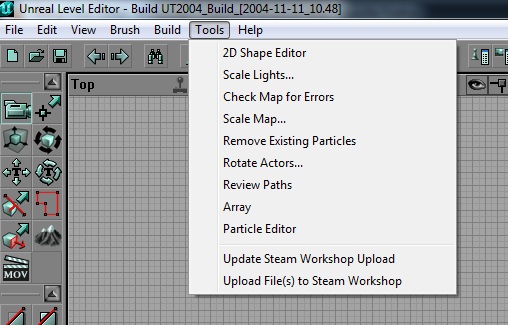 The KF Editor Tools menu: Check Map for Errors and the Steam Workshop upload entries.
What is Steam Workshop?
Overview
- Content platform — Community-created content
- Easy installation — One-click subscribe system
- Auto-updates — Content updates automatically
- Steam integration — Built into Steam
- Free content — Most content is free
What's Available
- Custom maps — Community-created levels
- Mutators — Gameplay modifications
- Weapons — Custom weapon mods
- Characters — Custom character skins
- Various mods — All kinds of content
How to Use Workshop
Accessing Workshop
- Open Steam — Launch Steam client
- Go to Library — Find Killing Floor
- Click Workshop — Open Workshop page
- Browse content — Explore available content
- Subscribe — Click subscribe to install
Subscribing to Content
- One-click install — Just click subscribe
- Automatic download — Content downloads automatically
- Ready to use — Available immediately
- No manual install — Everything automatic
- Easy management — Simple to use
Managing Subscriptions
- View subscribed — See what you have
- Unsubscribe — Remove content easily
- Update status — See update information
- Organize — Manage your content
- Favorites — Save favorites
Finding Good Content
Browsing Workshop
- Sort by popularity — Most downloaded
- Sort by rating — Highest rated
- Sort by date — Newest content
- Search — Find specific content
- Filter — Narrow down results
Content Categories
- Maps — Custom levels
- Mutators — Gameplay mods
- Weapons — Weapon mods
- Characters — Character mods
- Other — Various content
Quality Indicators
- High ratings — Community approval
- Many subscribers — Popular content
- Recent updates — Active maintenance
- Good screenshots — Visual preview
- Positive comments — Community feedback
Popular Workshop Content
Best Maps
- Community favorites — Most popular maps
- Well-designed — Quality layouts
- Fun gameplay — Enjoyable experiences
- Regular updates — Maintained content
- High ratings — Community approved
Best Mutators
- Gameplay enhancements — Improve experience
- Balance mods — Fix issues
- Quality of life — Convenience mods
- Fun additions — Entertaining content
- Community favorites — Popular choices
Best Weapons
- Custom weapons — New arsenal
- Balanced — Well-designed
- Fun to use — Enjoyable
- Quality models — Good visuals
- Community approved — Popular choices
Installation Process
Automatic Installation
- Subscribe — Click subscribe button
- Wait for download — Let it download
- Launch game — Start Killing Floor
- Content available — Ready to use
- No configuration — Works automatically
Details
From the "Steam Workshop for Killing Floor" thread (killingfloor.ru forum):
- Owners of the Steam version have had the Workshop since patch 1039.
- To get there, select Killing Floor in the Steam client (without launching it) and open its Workshop page. On the right you can filter content, for example maps only or whitelisted mutators only.
- Subscribing does not install the item right away: download and installation start the next time you launch the game, and the status (downloading / installed) is shown in the top right corner of the main menu.
- Installed mutators and other items update automatically.
- Collections are lists of Workshop items that others can subscribe to in one click. Create one with the "Create collection" button on the left of the content page: give it a name and description and upload a logo, then save and publish it. You can only add items that are in your favourites; a subscription alone is not enough.
- You can also follow an author: open their profile from an item page and subscribe on the left to get notified about their new uploads.
Manual Management
- Workshop folder — Find installed content
- Manual removal — Delete if needed
- File location — Know where files are
- Backup — Save favorites
- Organization — Manage content
Troubleshooting
Common Issues
- Content not appearing — Check subscription
- Download problems — Check internet
- Game not loading — Verify files
- Conflicts — Mod conflicts
- Updates — Content updates
Solutions
- Verify subscription — Make sure subscribed
- Check internet — Connection issues
- Verify game files — Steam verify
- Disable conflicting mods — Remove conflicts
- Update content — Get latest versions
Best Practices
Content Management
- Don't over-subscribe — Too many mods cause issues
- Test individually — Try mods one at a time
- Read descriptions — Understand what mods do
- Check compatibility — Ensure mods work together
- Backup saves — Protect your progress
Quality Control
- Read reviews — See what others say
- Check ratings — Look at scores
- Test carefully — Try before committing
- Report issues — Help community
- Support creators — Rate and comment
Workshop Etiquette
For Users
- Rate content — Help others find good content
- Leave comments — Provide feedback
- Report issues — Help fix problems
- Be respectful — Polite feedback
- Support creators — Appreciate their work
For Creators
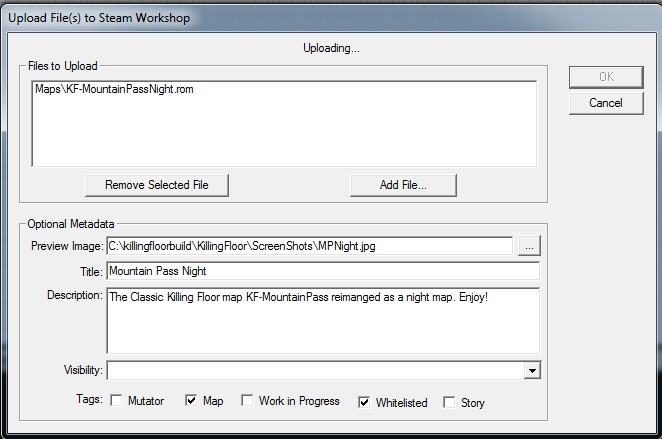 The Workshop upload dialog: files, preview image, title, description and tags such as Whitelisted.
- Update regularly — Maintain content
- Respond to feedback — Engage with community
- Fix bugs — Address issues
- Improve content — Enhance over time
- Be active — Stay engaged
Conclusion
Steam Workshop is the easiest and best way to add custom content to Killing Floor. With thousands of maps, mods, and custom content available, Workshop expands the game significantly. Take advantage of the one-click subscribe system, explore the vast library of content, and enhance your Killing Floor experience. Remember to rate and comment on content you enjoy—it helps the community and supports creators.
