
KF2 FPS Guide: -dx10 Launch Option and Texture Streaming
This short Early Access era guide collects the quickest FPS gains for Killing Floor 2: forcing DirectX 10, switching off a few costly options, and two more drastic steps for weak PCs. It is a companion to the DX10 launch option article, with the extra settings below.
Use DirectX 10 instead of 11
The author calls this the best part of the guide: DirectX 10 gains many frames per second with practically no loss of visible quality.
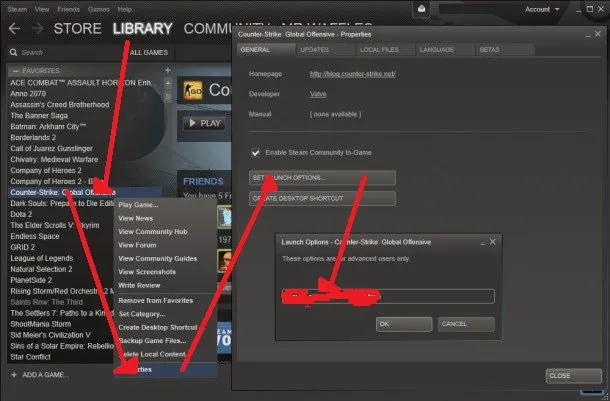 Steam properties window with the launch option field.
- Open your Steam library and right-click Killing Floor 2.
- Choose Properties, then Set launch options.
- Type
-dx10and press OK.
HBAO+ is not available in DX10. To see which DirectX version you run, start KF2, minimize it and hold the mouse over its taskbar icon: the title shows something like (64bit, DX11).
Options to turn down
- Ambient Occlusion off (the shadows look better with it, but it hurts performance noticeably).
- Realtime reflections off (the author keeps them for looks, but disabling gives many FPS).
- Shadows on Medium.
- Anisotropic filtering x4 instead of x16, or Trilinear.
- Motion blur and Depth of Field off (they may not cost much, but the author prefers the game without them).
Keep testing other settings if you still need more FPS.
Try disabling texture streaming
Some players removed stutter this way, although the author had not tested it personally.
- Go to
C:\Users\<your-user>\Documents\My Games\KillingFloor2\KFGame\Configand openKFEngine.iniin Notepad. - Press Ctrl+F, search for
bUseTextureStreaming, change True to False and save.
You may need to repeat this after game updates. The tweak is meant for PCs with plenty of RAM and VRAM; with under about 1 GB of VRAM or under 4 GB of RAM (and probably 8 GB to feel a difference) it should not help. You can test it and undo it if results are poor.
Last resort for low-end PCs
Turn gore down: in Options, Gameplay menu (the author also recommends maxing the FOV there), drag the gore slider to the left.
FAQ
- How do I run Killing Floor 2 in DirectX 10?
- In your Steam library, right-click Killing Floor 2, open Properties, Set launch options and type -dx10.
- What do I lose with DX10?
- HBAO+ is not available. The author noticed no major visual changes otherwise.
- How can I check which DirectX the game uses?
- Run the game, minimize it and hover over its taskbar icon until the window title shows something like (64bit, DX11).
