
KF2 on a Potato PC: Low-Spec Config Files and 800x600 Window
This guide, originally in Spanish, shares edited configuration files meant to make Killing Floor 2 run on almost any 64-bit PC, based on an English guide by another author that the writer credits. The cost is visual: many particles disappear and the game looks poor and dark. For similar tweaks see low-end PC optimization and graphics ini minimal visuals.
What the author changed
Compared with the original files:
- The path to the Trader is enabled (with the original files it was not visible).
- The lighting is removed, which improves FPS.
- The resolution is set to the minimum, just so you can launch and verify quickly that it works; you can change it later.
- A few lines were corrected: in the original many things were disabled, which for the author caused errors and drops to 7 FPS. After the fixes they get 15-20 FPS on a very weak PC.
Things to keep in mind
For new KF2 users, the files apparently start out named "default.*" (the author still wanted confirmation). If so, rename the downloaded files to match yours so they can replace them. Users of the author's older version (before 20 May 2019) are advised to download the files again and test.
Instructions
- Download the configuration archive linked in the original guide (Google Drive), right-click it and extract here. The result should be a folder called
My Games.
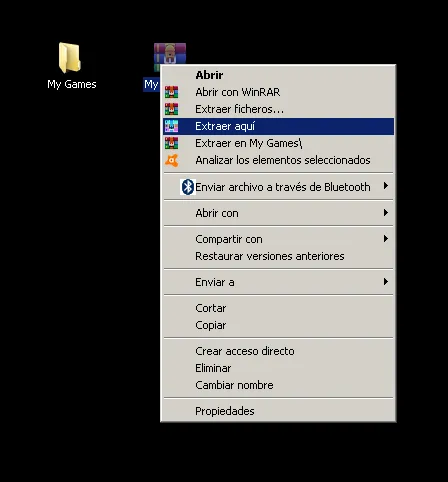 The extracted My Games folder.
- Move that folder into your Documents, replacing the existing one. Say yes to all prompts: it asks to replace about two folders and then about six files.
Optional: 800x600 windowed
Open C:\Users\<you>\Documents\My Games\KillingFloor2\KFGame\Config.
- Right-click
KFSystemSettings, open Properties and untick "Read-only", then Apply and OK.
 Clearing the read-only attribute.
- Open the file and use Find (F3) for
Fullscreen; set the first one toFalse, then use Find Next to set everyFullscreenline to False.
 Setting Fullscreen to False.
- Search for
ResX=andResY=and set ResX to 800 and ResY to 600. Starting at 800x600 makes the game launch faster so you can check performance; change the resolution in-game afterwards.
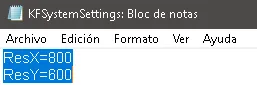 ResX and ResY set to 800x600.
- Save and close, then set the file back to Read-only in Properties, Apply, OK.
Final notes
- To revert, delete all the replaced files in the Config folder and start KF2: they will be recreated.
- If it still does not work, try the "Extra Option" in the author's other guide, which adds launch parameters.
- Check your FPS with the console command
stat fps, before and after. - To verify that the edited files are active, the in-game video settings should display the low configuration the author shows.
- The author plays on a very weak PC and gets 17-20 FPS with these files.
FAQ
- What is required for this method?
- A 64-bit PC. The author says that if the game still does not run smoothly after this, nothing will.
- What is the downside?
- Many particles disappear and the game looks bad and very dark, but it is the way to make it run on a PC below the minimum requirements.
- How do I revert the changes?
- Delete all the files that you replaced in the Config folder and start KF2; they will be created again.
