
KF2 Keybind: Cycle Rock and Stone Chat Salutes
Killing Floor 2 supports complex keybinds. This guide maps a single key (V by default) so that each press sends the next Deep Rock Galactic salute to team chat, cycling through 21 lines. It is easier than the voice comm wheel, and unlike emotes it does not stop you from running or shooting. It only writes text to chat. For more bind tricks see SetBind chat binds and multi-toss dosh.
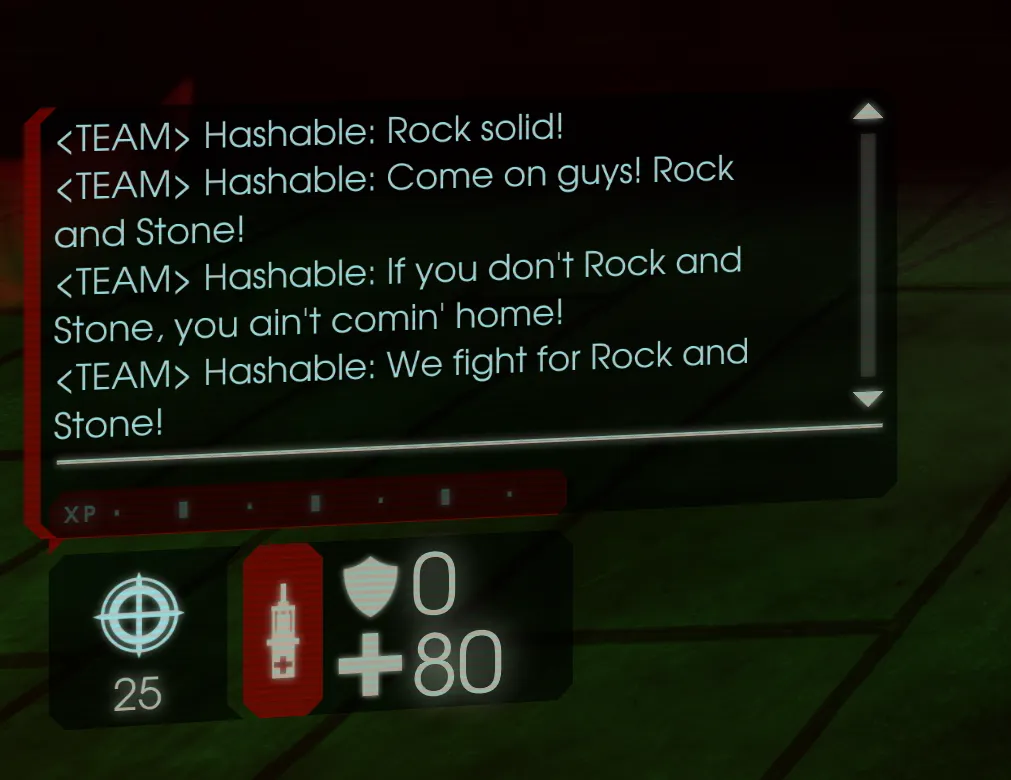 Each line in team chat was sent by pressing V once.
Find the file
Open Documents\My Games\KillingFloor2\KFGame\Config\KFInput.ini in any text editor (Notepad works; Notepad++, VS Code or Sublime Text are nicer). Close Killing Floor 2 first: if you edit the file while the game is running, it is overwritten when the game exits.
Install the code
Scroll to the section that begins with [KFGame.KFPlayerInput] and avoid the similar-looking [ServerExt.ExtPlayerInput] section. At the bottom of the existing Bindings=(Name="..." lines paste the following. Each salute sets the V key to the next one, and the last one loops back to the first:
Bindings=(Name="salute_1",Command="TeamSay Rock on! | SetBind V salute_2",Control=False,Shift=False,Alt=False,bIgnoreCtrl=False,bIgnoreShift=False,bIgnoreAlt=False)
Bindings=(Name="salute_2",Command="TeamSay Rock and Stone... Yeeaaahhh! | SetBind V salute_3",Control=False,Shift=False,Alt=False,bIgnoreCtrl=False,bIgnoreShift=False,bIgnoreAlt=False)
Bindings=(Name="salute_3",Command="TeamSay Rock and Stone forever! | SetBind V salute_4",Control=False,Shift=False,Alt=False,bIgnoreCtrl=False,bIgnoreShift=False,bIgnoreAlt=False)
Bindings=(Name="salute_4",Command="TeamSay ROCK... AND... STONE! | SetBind V salute_5",Control=False,Shift=False,Alt=False,bIgnoreCtrl=False,bIgnoreShift=False,bIgnoreAlt=False)
Bindings=(Name="salute_5",Command="TeamSay Rock and Stone! | SetBind V salute_6",Control=False,Shift=False,Alt=False,bIgnoreCtrl=False,bIgnoreShift=False,bIgnoreAlt=False)
Bindings=(Name="salute_6",Command="TeamSay For Rock and Stone! | SetBind V salute_7",Control=False,Shift=False,Alt=False,bIgnoreCtrl=False,bIgnoreShift=False,bIgnoreAlt=False)
Bindings=(Name="salute_7",Command="TeamSay We are unbreakable! | SetBind V salute_8",Control=False,Shift=False,Alt=False,bIgnoreCtrl=False,bIgnoreShift=False,bIgnoreAlt=False)
Bindings=(Name="salute_8",Command="TeamSay Rock and roll! | SetBind V salute_9",Control=False,Shift=False,Alt=False,bIgnoreCtrl=False,bIgnoreShift=False,bIgnoreAlt=False)
Bindings=(Name="salute_9",Command="TeamSay Rock and roll and stone! | SetBind V salute_10",Control=False,Shift=False,Alt=False,bIgnoreCtrl=False,bIgnoreShift=False,bIgnoreAlt=False)
Bindings=(Name="salute_10",Command="TeamSay That's it lads! Rock and Stone! | SetBind V salute_11",Control=False,Shift=False,Alt=False,bIgnoreCtrl=False,bIgnoreShift=False,bIgnoreAlt=False)
Bindings=(Name="salute_11",Command="TeamSay Like that! Rock and Stone! | SetBind V salute_12",Control=False,Shift=False,Alt=False,bIgnoreCtrl=False,bIgnoreShift=False,bIgnoreAlt=False)
Bindings=(Name="salute_12",Command="TeamSay Yeaahhh! Rock and Stone! | SetBind V salute_13",Control=False,Shift=False,Alt=False,bIgnoreCtrl=False,bIgnoreShift=False,bIgnoreAlt=False)
Bindings=(Name="salute_13",Command="TeamSay None can stand before us! | SetBind V salute_14",Control=False,Shift=False,Alt=False,bIgnoreCtrl=False,bIgnoreShift=False,bIgnoreAlt=False)
Bindings=(Name="salute_14",Command="TeamSay Rock solid! | SetBind V salute_15",Control=False,Shift=False,Alt=False,bIgnoreCtrl=False,bIgnoreShift=False,bIgnoreAlt=False)
Bindings=(Name="salute_15",Command="TeamSay Come on guys! Rock and Stone! | SetBind V salute_16",Control=False,Shift=False,Alt=False,bIgnoreCtrl=False,bIgnoreShift=False,bIgnoreAlt=False)
Bindings=(Name="salute_16",Command="TeamSay If you don't Rock and Stone, you ain't comin' home! | SetBind V salute_17",Control=False,Shift=False,Alt=False,bIgnoreCtrl=False,bIgnoreShift=False,bIgnoreAlt=False)
Bindings=(Name="salute_17",Command="TeamSay We fight for Rock and Stone! | SetBind V salute_18",Control=False,Shift=False,Alt=False,bIgnoreCtrl=False,bIgnoreShift=False,bIgnoreAlt=False)
Bindings=(Name="salute_18",Command="TeamSay We rock! | SetBind V salute_19",Control=False,Shift=False,Alt=False,bIgnoreCtrl=False,bIgnoreShift=False,bIgnoreAlt=False)
Bindings=(Name="salute_19",Command="TeamSay Rock and Stone everyone! | SetBind V salute_20",Control=False,Shift=False,Alt=False,bIgnoreCtrl=False,bIgnoreShift=False,bIgnoreAlt=False)
Bindings=(Name="salute_20",Command="TeamSay Rock and Stone in the heart! | SetBind V salute_21",Control=False,Shift=False,Alt=False,bIgnoreCtrl=False,bIgnoreShift=False,bIgnoreAlt=False)
Bindings=(Name="salute_21",Command="TeamSay Did I hear a Rock and Stone? | SetBind V salute_1",Control=False,Shift=False,Alt=False,bIgnoreCtrl=False,bIgnoreShift=False,bIgnoreAlt=False)
Bindings=(Name="V",Command="salute_1",Control=False,Shift=False,Alt=False,bIgnoreCtrl=False,bIgnoreShift=False,bIgnoreAlt=False)
Save the file.
Test it
Start the game and press V. The salutes cycle in order, and the position is kept across matches and game restarts.
Customize
- Different key: change
Name="V"in the last line and everySetBind Vin the salute lines (20+ places) to the key you want. - Different text or more lines: edit the text after
TeamSay, and add or remove lines. Keep thesalute_Nnumbers linked so the last one loops back tosalute_1.
FAQ
- Which file do I edit for the Rock and Stone bind?
- KFInput.ini in Documents\My Games\KillingFloor2\KFGame\Config, in the [KFGame.KFPlayerInput] section.
- Why must KF2 be closed while editing?
- If the file is edited while the game runs, the game overwrites it on exit and your changes are lost.
- How do I use a different key than V?
- Change Name="V" in the last binding and every SetBind V in the salute lines to your chosen key.
