
KF2 Won't Launch: MSVCR110.dll Is Missing Error Fix
This short Russian-language community guide shows the error a player sees when Killing Floor 2 refuses to start: a Windows dialog saying that the program cannot start because MSVCR110.dll is missing from the computer, and suggesting a reinstall.
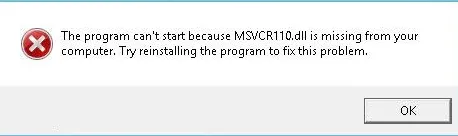 The error message shown when the runtime library is missing.
Why it happens
msvcr110.dll is part of the Microsoft Visual C++ 2012 runtime. Killing Floor 2 and its launcher components rely on it. On a fresh Windows install, or after a cleanup tool removed older runtimes, the file may be absent and the game cannot start.
How to fix it
- Download the Visual C++ Redistributable for Visual Studio 2012 from Microsoft.
- Install it. On 64-bit Windows, install both the x86 and x64 packages, because some game components are 32-bit.
- Restart the PC if the installer asks for it, then start the game again.
- If the message persists, use Steam's "Verify integrity of game files" for Killing Floor 2.
Do not download the DLL from random websites; the official redistributable installs it safely. Readers in the comments reported that this fix worked for them, while one reported the error remained, in which case check for other missing runtimes or verify the files again.
If the game starts but crashes later, see the main menu crash fix.
FAQ
- What does the MSVCR110.dll error mean?
- Windows cannot find the Microsoft Visual C++ 2012 runtime library that the game executable needs. It is not a Killing Floor 2 file; it comes from the Visual C++ Redistributable package.
- Which package should I install?
- Visual C++ Redistributable for Visual Studio 2012 (msvcr110.dll belongs to it). On 64-bit Windows, installing both the x86 and x64 versions is the safe choice.
