
KF2 Server: Ban a Player by IP with iptables (No Webadmin Ban)
Since the update of 8 December 2020, the guide says, the only built-in way to kick or ban a rule-breaker on a Killing Floor 2 server was to join the server yourself. When you cannot do that but must remove a troll right now, a firewall IP ban works. This page covers Debian-based Linux; the procedure is similar on other distributions.
Requirements
- You know how to use KF2 webadmin to see players' data, including their IP.
- You have basic Linux knowledge and sudo rights.
- For a remote server, an SSH client such as PuTTY.
Steps
- In webadmin, identify the troublemaker and note the IP address.
- Open a terminal on the server, or connect with PuTTY by entering the server IP and SSH port.
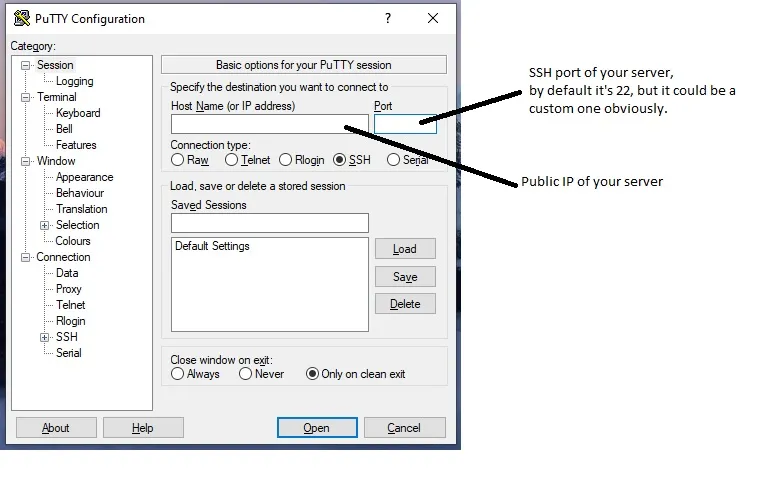 PuTTY: enter the remote server's IP and SSH port.
- Log in with sudo privileges (if you are not root) and run:
iptables -A INPUT -s <player IP> -j DROP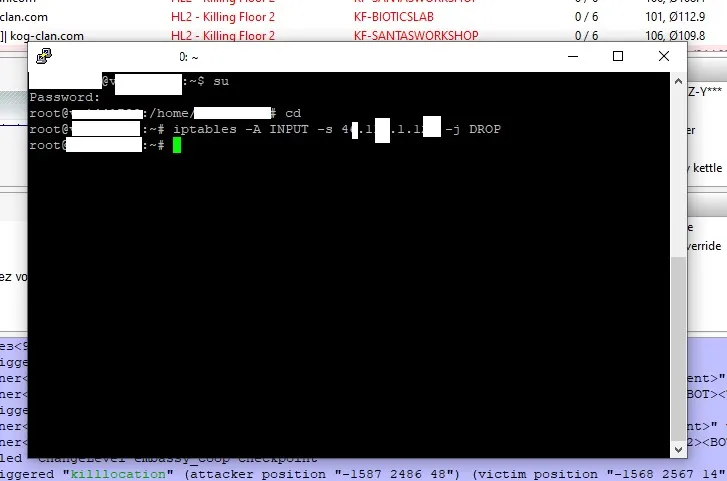 The iptables command that drops all packets from the chosen IP.
- Close the terminal. The player should be gone and unable to reconnect from that IP.
Notes
- The ban lasts until the operating system restarts. For a permanent ban, save your iptables rules to a file and load that file at boot with a script, with the bad IP listed in it.
- On a Windows server, use the Windows firewall instead: connect remotely (Remote Desktop) and add a blocking rule for the IP.
- Players with dynamic IPs may return from a new address, and shared IPs can block innocent people, so use this sparingly.
For a general server setup see the dedicated server page.
FAQ
- Why use an IP ban for a KF2 server?
- The guide says that after the December 2020 update the usual way to kick or ban someone was to join your own server. If you cannot do that, blocking the player's IP at the firewall is a fallback.
- Which command bans an IP?
- iptables -A INPUT -s <player IP> -j DROP, run with sudo on the server.
- Is the ban permanent?
- No. It lasts until the OS restarts. To make it permanent, save the rules and load the saved iptables file at boot.
