
KF2 Mute Tool: Silence Traders, Narrators and Menu Music
This short guide presents a small community tool, KF2-Mute, that patches your Killing Floor 2 audio so that chosen trader voices, narrators and the main menu music are silent. It fits players who find the repeating trader lines or menu theme annoying. For a related audio tool that replaces songs see KF2 custom music tool.
Installing the mod
- Download the latest version of KF2-Mute from its GitHub page.
- Run the app and select which traders or audio you want to mute. Anything left unchecked is not muted.
- Click Next and the patch completes.
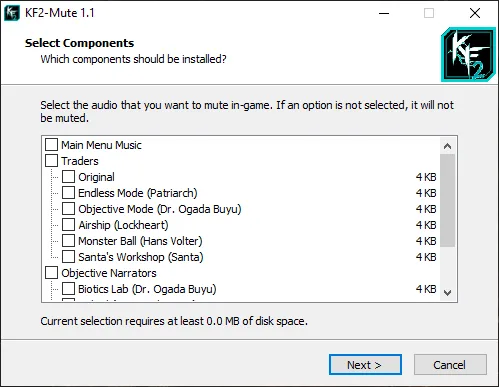 The KF2-Mute window where you tick the traders and audio to silence.
Notes
- The patcher changes game audio files, so after a game update or a Steam file verification you may need to run it again.
- Close the game before patching. Take care to download the tool only from the project's GitHub page.
- If you want different music instead of silence, the custom music tool linked above can replace the songs.
FAQ
- How do I mute only some traders?
- Run the KF2-Mute app and tick only the traders or audio entries you want silenced; anything left unchecked is not muted.
- Does it affect other players?
- It patches the audio files on your own installation, so it is a local change that affects what you hear.
- How can I undo it?
- The guide does not describe an undo step. Verifying the game's files in Steam is the usual way to restore original audio files.
