
KF2 BrazukaCD Guide: Commands, Spawn Cycles and Presets
BrazukaCD is a Controlled Difficulty (CD) based game mode for Killing Floor 2 that lets the group tune a match through chat commands. This page condenses a community guide to what each function does and how to set up a match. If you are new to CD start with the Controlled Difficulty beginner guide. The mod is built on an open-source CD version by Asp1020.
When you vote for BrazukaCD as the game mode, extra information appears on the starting HUD.
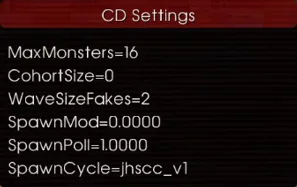 The extra CD values shown on the HUD after voting for BrazukaCD.
Core match functions
- MaxMonsters (!cdmm): the maximum number of ZEDs alive at the same time. It is the main difficulty dial. Solo, 12-16 is sensible; two players 20-24; experienced teams often use 56 or more.
- CohortSize (!cdcs): how many ZEDs can spawn at once in spawn volumes, which controls how fast MaxMonsters is reached. Experienced players use 7-9, beginners 3-7. At 0 the vanilla cohort logic takes over.
- WaveSizeFakes (!cdwsf): the total number of ZEDs per wave, expressed as a number of players. 1 gives a solo-sized wave, 2 a two-player wave. Experienced teams of six often use 12.
- SpawnMod (!cdsm) and SpawnPoll (!cdsp): leave them at the defaults (0.0000 and 1.0000). SpawnMod 0 means the manager tries to spawn on every update, and SpawnPoll controls how often that update runs.
- SpawnCycle (!cdsc): probably the most important difficulty setting, because it defines how many large, medium and small ZEDs appear. Match it to a realistic MaxMonsters: an easy cycle with a huge MaxMonsters makes little sense.
SpawnCycle difficulty preview
The author compared the final wave with WaveSizeFakes 12 (fewer players means fewer larges).
| SpawnCycle | Difficulty | Larges | Mediums |
|---|---|---|---|
| nam_pro_v3 | Friendly | 27 | 37 |
| nam_pro_v4 | Friendly | 26 | 38 |
| nam_pro_v5 | Friendly | 37 | 38 |
| asl_v1 | Friendly | 56 | 52 |
| asl_v2 | Friendly | 62 | 56 |
| asl_v3 | Intermediate | 62 | 56 |
| gores_v1 | Intermediate | 56 | 26 |
| gores_v2 | Intermediate | 62 | 35 |
| k2_v0 | Intermediate | 58 | 80 |
| k2_v1_lh | Difficult | 84 | 80 |
| jhhc_v1 | Difficult | 84 | 88 |
| ts_mig_v1 | Difficult | 72 | 72 |
| osffi_v1_ms | Very difficult | 80 | 91 |
| jhscc_v1 | Very difficult | 104 | 64 |
| jhscc_v2 | Very difficult | 116 | 64 |
| ts_mig_v2 | Very difficult | 96 | 88 |
| ts_mig_v3 | Very difficult | 112 | 76 |
During a game the number of larges and mediums of the current wave is displayed at the top left (SC for Scrakes, FP for Fleshpounds).
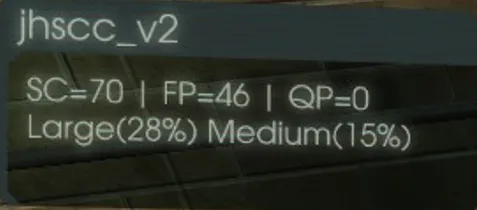 Wave composition counters in the upper left corner.
Even a light cycle can be hard thanks to RNG in spawn locations and squad order, so treat this as a rough guide only.
Boss and special ZEDs
!cddb 0or!cddb 1disables or enables the boss wave.!cdboss random,hans,pat,abom,kfpormatselects Hans Volter, Patriarch, Abomination, King Fleshpound or Matriarch (random allows any).!cdaa,!cdag,!cdacwith 0 or 1 disable or enable Rioters, Gorefiends and Elite Crawlers.
Trader, ready status and HP
After wave one the trader time is static and only counts down once everybody is ready. !ot opens the trader menu from anywhere, !cdr and !cdur set or remove ready status (visible on TAB), and !cdtt sets the seconds before the wave starts after everyone is ready.
ZED health is normally set for six players but can be changed: !cdahpf for all ZEDs, !cdfphpf for Fleshpounds, !cdschpf for Scrakes, !cdthpf for trash ZEDs (Clot, Cyst, Stalker, Crawler, Gorefast and Gorefiend, Rioter, Slasher) and !cdbhpf for the boss. For example !cdahpf 1 gives one-player health.
Headless ZEDs
In vanilla, Scrakes and Fleshpounds survive many shots after their heads are removed. BrazukaCD lets you raise the damage multiplier of headless ZEDs: !cdschd, !cdfphd and !cdmhd (Husks, Sirens and Bloats). The suggested values are 18 for Scrake, 22 for Fleshpound and 12 for mediums, so they fall to one or two body shots after losing the head. Do not leave them at 1.
Wave control and map vote
!rw restarts the wave with the trader time frozen (useful when the team is about to wipe; if everyone is already dead the match probably ends anyway). !sw <number> jumps to a chosen wave. !mv opens the map vote: choose the mode in the bottom right first, then the map.
Presets
All presets use !cdsm 0.0000, !cdsp 1.0000 and !cdwsf 12 (about twice the player count).
| Level | MaxMonsters | CohortSize | SpawnCycle |
|---|---|---|---|
| Friendly | 32 / 48 / 56 | 5 / 7 | nam_pro_v3, nam_pro_v5, asl_v1, asl_v2 |
| Intermediate | 32 / 48 / 56 | 5 / 7 | asl_v3, gores_v2, k2_v0 |
| Hard | 32 / 48 / 56 | 5 / 7 | k2_v1_lh |
| Very hard | 56 / 64 / 72 | 7 | ts_mig_v3, jhscc_v2, ts_mig_v2, osffi_v1_ms |
ZED types (!cdzt)
vanilla: Tripwire's original ZEDs.kflavor: mostly vanilla with notable changes; the Fleshpound is cyan.hzkflavor: buffed ZEDs with more damage and speed and longer-ranged mediums; green Fleshpound.hzjflavor: even stronger larges, plus tankier and harder-hitting Gorefiends and Gorefasts; white Fleshpound.classic: ZEDs similar to Killing Floor 1: slower, with more body health and big damage, though larges are very fast when enraged; yellow Fleshpound. A good choice for small maps.
Vanilla and kflavor suit beginners, while the buffed types give experienced players more challenge.
Vampirism and AutoZedTime
!cdvp 1 or 0 enables or disables vampirism, so players heal when killing ZEDs, a useful substitute for a Medic. !cdvpr sets the level: 1 gives 2 HP per trash kill and 5 per large, 2 gives 3 and 7, 3 gives 4 and 9.
!cdazt 1 or 0 toggles AutoZedTime, which keeps resetting Zed Time up to the maximum of five resets, roughly 21 seconds. If most players type !skip, the auto-reset is interrupted, and !cdsrv <value> changes how many votes are needed.
Spawners and pathnodes
Open the console and type debugv to display spawn volumes with their numbers, then disable one in chat with !cdds 21 or several with !cdds 21,20,22 (commas, no spaces). Typing debugv again hides them. !cdvs 0 or 1 disables or enables vent spawners, which spawn only trash ZEDs. !cdnsb creates a new spawn box where you stand.
Pathnodes guide ZEDs that have not seen a player yet. debugnav shows them and !cddnp 10,11,12 disables numbered nodes. The guide's example is practicing a single hold in the main lane: disable the pathnodes of the adjacent lane a little past the door so ZEDs do not come through it, but remember they still come if they get line of sight. Combine that with debugv and !cdds to remove backspawns.
Custom crosshair and CD menu
Type xhairtoggle in the console to enable a custom crosshair, and turn off the default one under Options - Gameplay. Further options are xhairsize, xhairgap, xhairtshaped, xhairdot and xhairhideonads; colors are set as RGBA values.
!cdm opens the CD menu: lock your dropped weapons (Drop Locked), stop picking up teammates' drops (Pickup Others), and disable custom and death sounds.
Credits
Thanks go to Asp1020 (the open-source CD version this mod is based on), duna, S|Kaio, Jary, Palmira, Vypx, Wen and phanta (CustomWeapons). Source: Steam community guide "BrazukaCD - Guide" by Keyes and a collaborator.
FAQ
- How do I set how many ZEDs are alive at once?
- Type !cdmm followed by a number in chat, for example !cdmm 16. About 12-16 suits solo play, 20-24 two players, while experienced teams use 56 or more.
- How do I choose the boss?
- Use !cdboss with random, hans, pat, abom, kfp or mat, and !cddb 0 or 1 to disable or enable the boss wave.
- How do I open the trader menu without walking to the trader?
- Type !ot in chat. The trader timer in BrazukaCD only counts down once everyone is ready (!cdr).
