
KF2: Restore the KF1 Patriarch Theme (Abandon All) with a .wem Swap
This guide shows KF1 fans how to bring back the classic Patriarch music, Abandon All and the rarer Abandon All V3 by zYnthetic, in Killing Floor 2 by replacing one audio file. Unlike KF1, which used .ogg files, KF2 uses Wwise .wem files, so making new tracks is harder, but the author prepared the converted tracks so that installing them takes about two minutes. For other music mods see KF2 custom music Wwise WEM guide and BAMF Zynthetic KF1 soundtrack swap. The original download links were hosted on Mega and may no longer work, so they are not repeated here.
About the tracks
- Abandon All: the classic KF1 Patriarch theme.
- Abandon All V3: the rare theme heard only in the KFO-Transit Twin Patriarch finale in KF1.
Only one of them can be active at a time, because KF2 accepts a single instance of the Patriarch theme.
Installation
Step 1: rename. The prepared files are named 655856778 [ABANDON ALL].wem or 655856778 [ABANDON ALL V3].wem. Rename the one you want to exactly 655856778.wem, with no spaces. The same number is used for both tracks.
Step 2: replace. Go to:
C:\Program Files (x86)\Steam\steamapps\common\killingfloor2\KFGame\BrewedPC\WwiseAudio\Windows
The path may differ on your system, but everything from \steamapps\ onward is the same. Drag the renamed file into this folder and choose Yes when asked to replace.
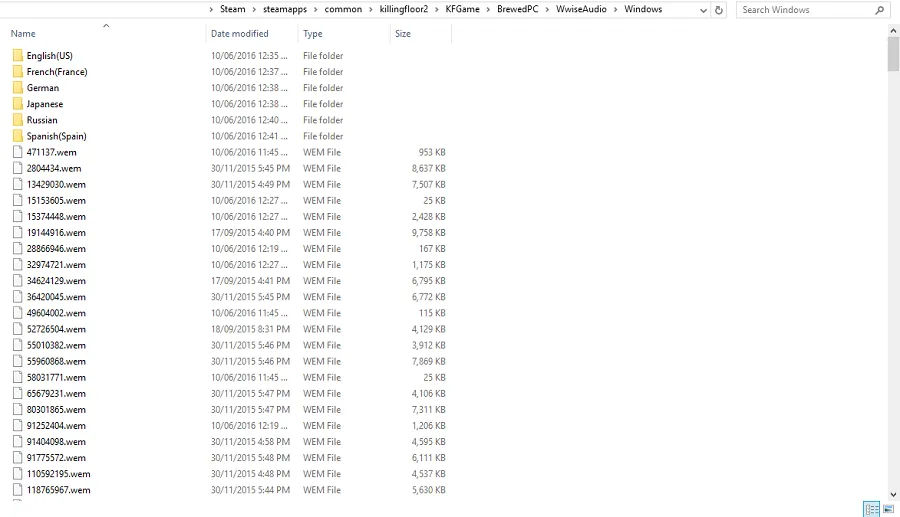
The WwiseAudio folder, full of numbered .wem files. Drop the renamed file here.
Important notes
- Do not make the change while Killing Floor 2 is running (Steam may be open).
- The tracks work online in multiplayer.
- The custom track is slightly shorter than the original, so you may hear a short gap of silence before it loops. This cannot be fixed without breaking online functionality.
- The on-screen track name will not appear, for the same reason.
- To switch between the two tracks, rename the other file the same way and replace again.
- For Hans Volter's boss fight, use the same steps but name the file
666327332.wem. The same song can be used for both bosses. - KF2 updates may reset the sound files to vanilla, so keep copies of your .wem files to re-apply them.
- The author notes that sound modding was uncommon compared to skin modding and that he is not an expert on KF2's audio system.
Result
Start Killing Floor 2 and play until the Patriarch wave: the chosen track will play as the boss theme.
FAQ
- Which file do I replace to change the Patriarch theme?
- Rename your custom track to 655856778.wem and copy it over the existing file in KFGame\BrewedPC\WwiseAudio\Windows inside the killingfloor2 folder. To change Hans Volter's music instead, name it 666327332.wem.
- Can I use both Abandon All and Abandon All V3?
- No. The game accepts only one Patriarch theme file at a time. To switch, rename the other track to the same file name and replace it again.
- Does it work online?
- Yes. The guide states the tracks work in multiplayer. Side effects: a short silence after the track ends because it is shorter than the original, and no track title is displayed.
