
KF2: How to Mute the Trader Pod by Renaming One File
Plenty of players dislike the Trader Pod, whether for the French-sounding accent or the smug tone of the software. This short guide paraphrases a way to mute the Trader completely with a single file rename. For related options see muting traders and narrators and the trader voice mods list.
Locating the file
Open your game's Steam directory. It is often C:\Program Files (x86)\Steam\steamapps\common\killingfloor2. You can also right-click Killing Floor 2 in the Steam library, choose Properties, then Local Files, then Browse Local Files.
From there open the folders in this order: KFGame, BrewedPC, Packages, Audio, Voice.
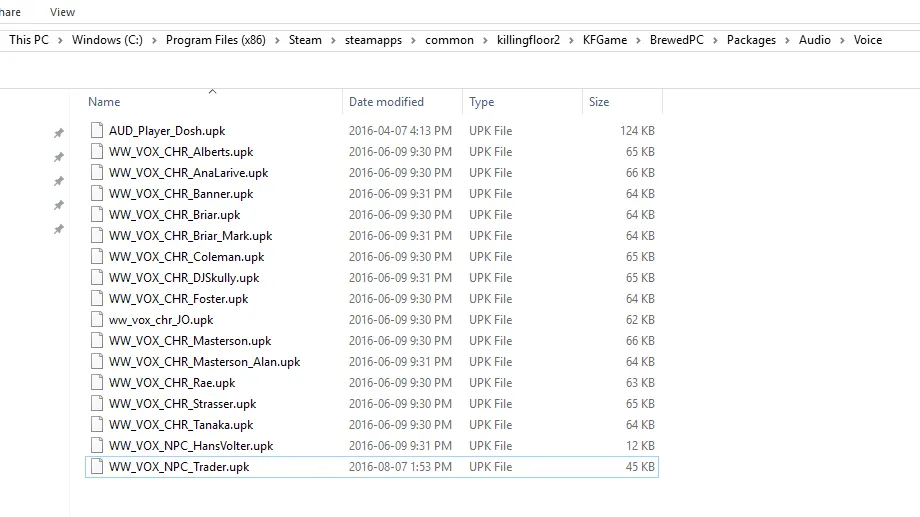
The Voice folder with the trader package inside.
Muting the Trader
Rename WW_VOX_NPC_Trader.upk to something else, for example WW_VOX_NPC_Trader_Moved.upk, or simply delete it. To restore the voice later, rename it back (or verify game files in Steam if you deleted it).
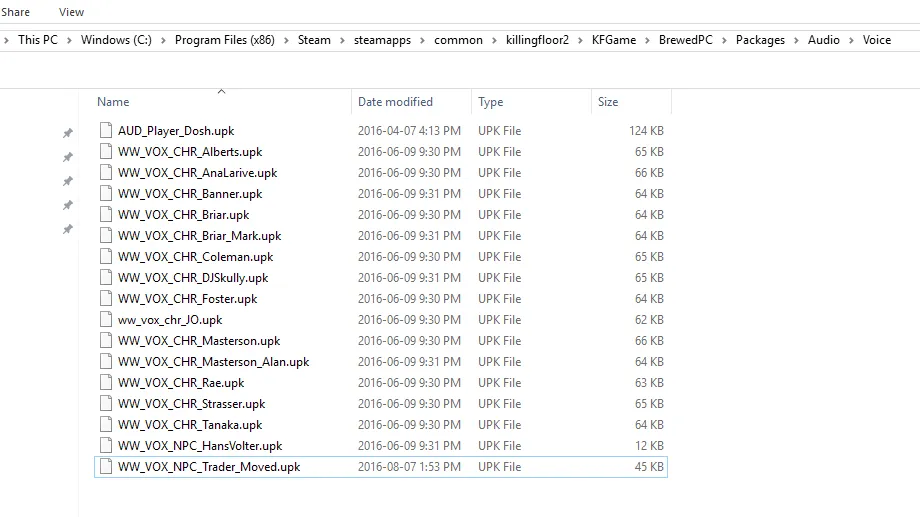
The trader package after renaming.
FAQ
Hasn't a replacement file for the Trader already been released? The author used one for a long time, but it eventually prevented joining online games. Modified files can cause a mismatch with servers, so renaming is the safer route.
Can I remove only the bad lines? The author does not know a way to remove specific audio lines, though a replacement pack that does so may exist.
FAQ
- Which file silences the Trader?
- WW_VOX_NPC_Trader.upk in KFGame\BrewedPC\Packages\Audio\Voice. Rename or delete it.
- Can I remove only specific Trader lines?
- The author does not know of a way to do that, but suggests a replacement pack probably exists.
