
L2 Walker: Party Settings (PARTY Chapter)
Party Setting, Party Buffs, Party Heal, Control Setting
The PARTY chapter of the L2 Walker settings window covers party play: invites and loot distribution, following a "Leader", buffing and healing party members, and exchanging requests between several bots. General information about the program is in L2 Walker for Dummies: overview.
Party Setting
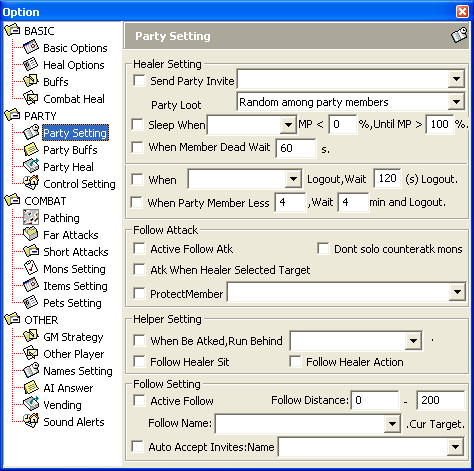
Healer Setting
| Parameter | Description |
|---|---|
Send Party Invite | In the drop-down list you check the characters the bot automatically invites to the party when they come within reach. |
Party Loot | How loot and spoil are distributed - same as the in-game settings. |
Sleep When | The bot stops or resumes activity according to the MP < and MP > conditions. In the drop-down list you check the characters to monitor. Activity means not only farming but also crafting. |
MP < | If the MP of at least one of the checked characters is below MP <, the bot stops its activity and waits for the MP > condition to be met. |
MP > | If the MP of all checked characters is above MP >, the bot returns to its activity. |
When Member Dead Wait | If all checked characters die, the bot pauses its activity for Sec seconds. |
When Logout, Wait, Logout | If all characters checked in the list leave the game, the bot logs out automatically too. Wait is the delay before logging out, in seconds. |
When Party Member Less, Wait, Logout | If, besides the bot, there are fewer characters in the party than Less, the bot automatically logs out. Wait is the delay before logging out (the program window shows it in minutes). |
Less | The minimum number of characters in the party for the bot to stay in the game. |
Follow Attack
| Parameter | Description |
|---|---|
Active Follow Atk | In "Follower" mode, the bot automatically attacks the target the "Leader" is attacking. |
Atk When Healer Selected Target | The bot attacks the target selected by the healer/buffer. |
Protect Member | The bot protects the specified characters: even if it is already attacking a target, it switches to the monsters attacking those characters. |
Dont solo counteratk mobs | The bot does not attack monsters with the Colony flag alone (see Mons Setting in combat settings). If the monsters are aggressive and the Atk Aggros First rule is enabled in Mons Setting, this setting is ignored. |
Helper Setting
| Parameter | Description |
|---|---|
When Be Atked, Run Behind | In the drop-down list you check the characters the bot runs to for protection when it is attacked. |
Follow Healer Sit | In "Follower" mode, the bot sits down and stands up along with the "Leader". |
Follow Healer Action | In "Follower" mode, the bot repeats the "Leader's" social actions. |
Follow Setting
| Parameter | Description |
|---|---|
Active Follow | Enables "Follower" mode. |
Follow Distance | Minimum and maximum distance from the character in the Follow Name list within which the bot tries to stay. |
Follow Name | In the drop-down list you select the character (the "Leader") the bot follows according to Follow Distance. |
.Cur Target. | Sets the current target as the "Leader" in the Follow Name list. |
Auto Accept Invites | In the drop-down list you check the characters whose party invites the bot accepts automatically. |
Party Buffs
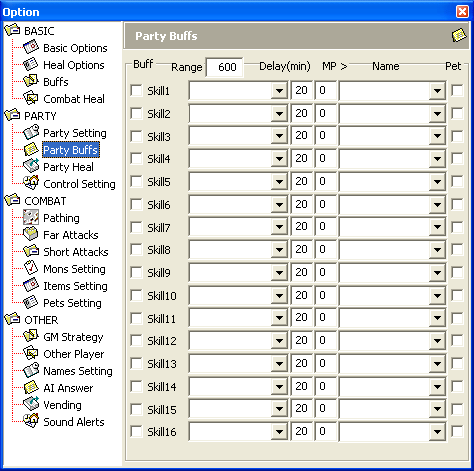
| Parameter | Description |
|---|---|
Skill | The bot casts buffs according to the Range, Delay, MP, Name and Pet conditions. The window has 16 rows, Skill1-Skill16. |
Skill (list) | The selected skill or spell. |
Range | The bot checks the distance to a party member: if it is greater than the given value, no buffs are cast on that member. |
Delay | Delay between repeated uses of Skill, in minutes. |
MP > | Skill is used only if the bot's MP is above the given value. |
Name | In the drop-down list you check the characters the bot casts Skill on. |
Pet | The selected Skill is also cast on party members' pets. |
Party Heal
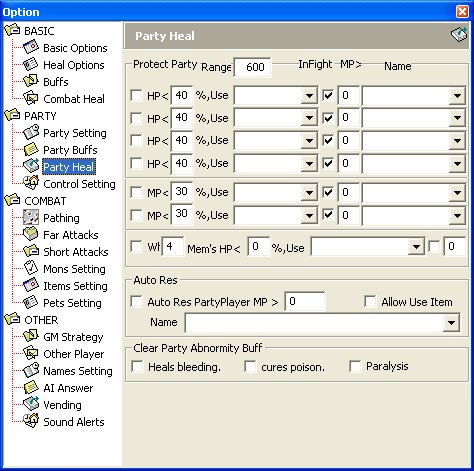
Protect Party
Healer mode: according to the given conditions, the bot automatically restores party members' HP and MP.
| Parameter | Description |
|---|---|
Range | The bot checks the distance to a party member: if it is greater than the given value, no spells are used on that member. |
HP | The bot uses the selected Use if the HP of the characters in the Name list is below the given percentage of maximum, according to the InFight and MP > conditions. |
MP | The bot uses the selected Use if the MP of the characters in the Name list is below the given percentage of maximum, according to the InFight and MP > conditions. |
When Mem's HP | The bot uses the selected Use if several party members have HP below the given percentage at once, according to the InFight and MP > conditions. |
Mem's | The minimum number of party members whose HP must be below the given percentage. |
Use | The spell the bot casts on the party member. |
InFight | Use Use during combat. |
MP > | If the bot's MP is below this value, it will not cast the spell. |
Name | In the drop-down list you check the characters the spell is cast on. |
Auto Res
| Parameter | Description |
|---|---|
Auto Res PartyPlayer | Automatically resurrects dead party members according to the MP >, Allow Use Item and Name conditions. |
Name | In the drop-down list you check the characters the bot will resurrect. |
MP > | The bot resurrects party members only if its MP is above the given value. |
Allow Use Item | If the bot has no resurrection spell, its MP is below MP > or the spell has not cooled down yet, the bot uses a resurrection scroll (if it has one). |
Clear Party Abnormity Buff
The bot automatically tries to remove the effect of a "bad" spell from a party member if it has a suitable spell of a high enough level.
| Parameter | Description |
|---|---|
Heals Bleeding | Tries to remove the Bleeding effect. |
Cures poison | Tries to remove the Poison effect. |
Cures paralysis | Tries to remove the Paralysis effect. |
Control Setting
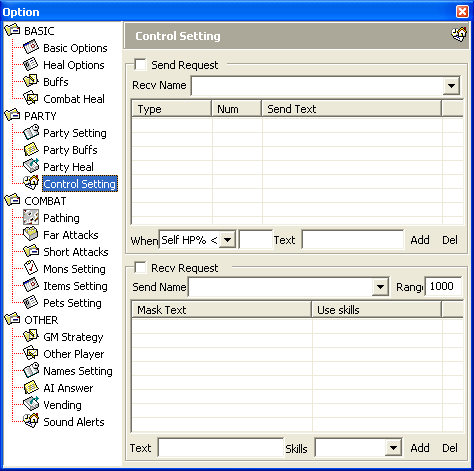
Control Setting lets several bots coordinate with each other: one bot sends a text request in a certain situation, and another responds to it with spells.
Send Request
| Parameter | Description |
|---|---|
Send Request | Enables "request by situation" mode. |
Recv Name | In the drop-down list you check the characters the bot sends requests to. These bot characters must be configured accordingly. |
| Table | List of requests: Type - situation type, Num - control value, Send Text - the request sent. |
When | Situation type: Self HP% < or Self MP% <. |
Num | Control value of HP or MP as a percentage of maximum at which the request is sent. |
Text | Request text - any string that will be sent to the characters in the list. |
Add | Add a new request with the given parameters to the list. |
Del | Remove the selected request from the list. |
Recv Request
| Parameter | Description |
|---|---|
Recv Request | Enables the mode of responding to "requests by situation". |
Send Name | In the drop-down list you check the characters whose requests the bot responds to. |
Range | Maximum distance from which the bot responds to requests. |
| Table | List of responses: Mask Text - the request text that makes the bot cast the spells, Use Skills - the list of those spells. |
Text | The request text that makes the bot cast the specified spells. |
Skills | In the drop-down list you specify the spells the bot casts on the character who sent the request. |
Add | Add a new response with the given parameters to the list. |
Del | Remove the selected response from the list. |
Note: messages are case-sensitive - it matters a lot whether you type a capital or a small letter. To the bot, Heal and heal are not the same thing!