
L2 Walker: Combat Settings (COMBAT Chapter)
Pathing, Far Attacks, Short Attacks, Mons Setting, Items Setting, Pets Setting
The COMBAT chapter of the L2 Walker settings window defines where and how the bot fights: the combat zone and route, ranged and melee attacks, how it treats different monsters, item pickup and pet behavior. Only the Pathing section was described in detail in the guide; the authors never finished the other sections, so they are shown with screenshots of their windows and a list of the fields visible on them. General information about the program is in L2 Walker for Dummies: overview.
Pathing
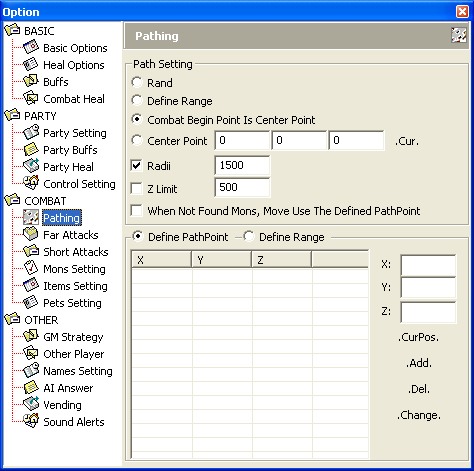
Path Setting
| Parameter | Description |
|---|---|
Rand | The bot attacks the nearest target. The combat zone is unlimited. Using this mode is strongly discouraged unless you follow the third commandment of a botter. |
Define Range | The bot attacks the nearest target if it is inside the defined polygonal combat zone. Recommended everywhere. |
Combat Begin Point is Center Point | The bot attacks the nearest target if it is inside a square with a side of 2 x Radii centered on the point where combat began. |
Center Point | The bot attacks the nearest target if it is inside a square with a side of 2 x Radii centered on the specified point. |
.Cur. | Sets the bot's current coordinates as the Center Point. |
Radii | Defines the square zone the bot will not leave in the Combat Begin Point is Center Point and Center Point modes. |
Z limit | Limits target selection by height (up and down) in the Combat Begin Point is Center Point and Center Point modes. Recommended in multi-level buildings (for example, Cruma Tower) and on uneven open terrain - we don't want our little bot to fall and break a leg. |
When Not Found Mons | If there are no monsters in the defined zone, the bot moves along the defined path. |
Route points and the polygonal combat zone
| Parameter | Description |
|---|---|
Define Path Point | In the table below, you enter the path coordinates for the When Not Found Mons mode in order. |
Define Range | In the table below, you enter the coordinates of the polygonal zone's vertices for the Define Range mode in order. |
X: Y: Z: | Point coordinates. Can be entered manually. |
.CurPos. | Fills X, Y, Z with the bot's current coordinates. |
.Add. | Adds a row with the given coordinates to the table. |
.Del. | Removes the selected row from the table. |
.Change. | Replaces the selected table row with a row with the given coordinates. |
Notes on Define Path Point:
- If a monster appears in the defined zone while the bot is moving along the path, the bot interrupts its movement and attacks it.
- The combat zone can be made much larger than the monsters' visibility range. Then
Define Path Pointmakes sense: after killing all the monsters, the bot will not stand idle but will run to another part of the combat zone. - The author's comment: in practice this situation rarely came up, and when it did, it was a sure sign it was time to change "spots".
Note on Define Range: it is best to set the polygon's vertices by running to each of them and pressing .CurPos., then adjust them manually during combat.
Far Attacks
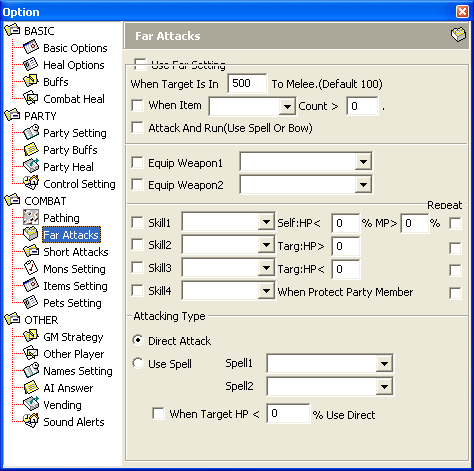
The guide never got a description of this section. The screenshot shows these fields:
Use Far Setting;When Target Is In ... To Melee (Default 100);When Item ... Count >;Attack And Run (Use Spell Or Bow).Equip Weapon1,Equip Weapon2.Skill1-Skill4with the conditionsSelf:HP <,MP >,Targ:HP >, aRepeatcheckbox and theWhen Protect Party Memberoption.Attacking Type:Direct AttackorUse Spell(Spell1,Spell2,When Target HP < ... % Use Direct).
Short Attacks
The page for this section in the guide was left empty - no description and no screenshot.
Mons Setting
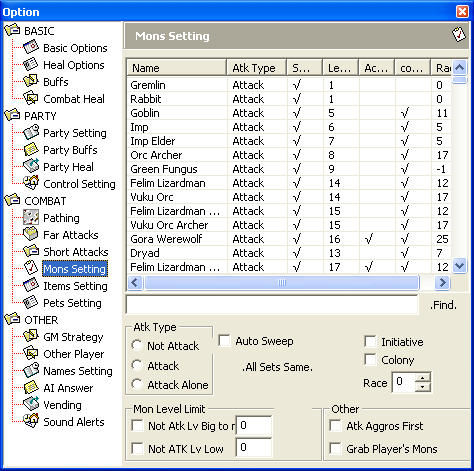
The guide never got a description of this section. The screenshot shows a monster table (Name, Atk Type, level and other columns) with a .Find. search, and these fields:
Atk Type:Not Attack,Attack,Attack Alone;Auto Sweep;.All Sets Same..Initiative,Colony,Race.Mon Level Limit:Not Atk Lv Big to ...,Not ATK Lv Low.Other:Atk Aggros First,Grab Player's Mons.
The Colony flag and the Atk Aggros First rule are mentioned in the description of the Dont solo counteratk mobs option in party settings.
Items Setting
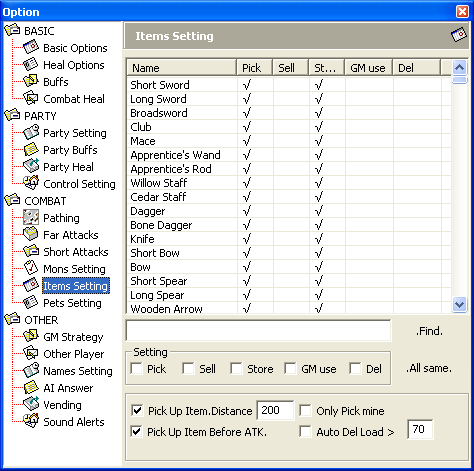
The guide never got a description of this section. The screenshot shows an item table with the columns Name, Pick, Sell, Store, GM use, Del and a .Find. search, plus these fields:
Setting:Pick,Sell,Store,GM use,Del;.All same..Pick Up Item.Distance(200 by default),Only Pick mine,Pick Up Item Before ATK.,Auto Del Load >(70 by default).
Pets Setting
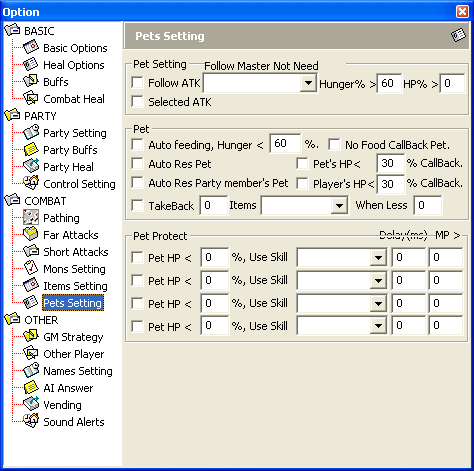
The guide never got a description of this section. The screenshot shows these fields:
Pet Setting:Follow ATK,Selected ATK,Follow Master Not Needwith the conditionsHunger% >andHP% >.Pet:Auto feeding, Hunger < ... %,No Food CallBack Pet,Auto Res Pet,Pet's HP < ... % CallBack,Auto Res Party member's Pet,Player's HP < ... % CallBack,TakeBack ... Items ... When Less.Pet Protect: four rowsPet HP < ... %, Use SkillwithDelay(ms)andMP >fields.