The first chapter of the L2 Walker settings window - BASIC - covers connecting to the server, behavior after death, resting, potion use, self-buffs and shot consumption in combat. General information about the program and the other chapters are in L2 Walker for Dummies: overview.
| Parameter | Description |
|---|
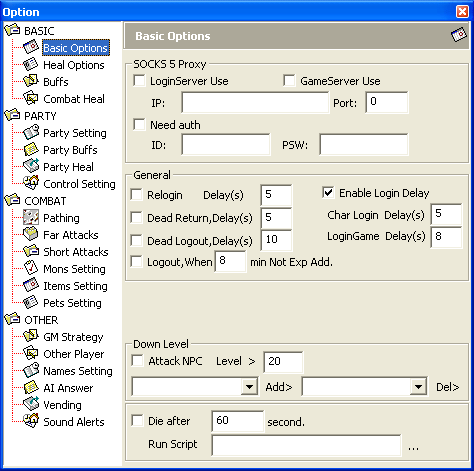
LoginServer Use | Connect to the login server through a proxy server. |
GameServer Use | Connect to the game server through a proxy server. |
IP | IP address of the proxy server. |
Port | Port of the proxy server. |
Need Auth | The proxy server requires authentication. |
ID | User name for the proxy server. |
PSW | Password of that user for the proxy server. |
| Parameter | Description |
|---|
Relogin | After being disconnected from the server, the bot tries to reconnect after the specified Delay (in seconds). |
Dead Return | After death, the bot returns to town after Delay seconds. |
Dead logout | After death, the bot disconnects from the server after Delay seconds. |
Enable login delay | Use delays when connecting to the server. Useful if the server lags often and/or heavily. |
Login Game Delay | Delay when connecting to the server, in seconds. |
Char Login Delay | Delay when selecting the character, in seconds. |
Logout, When Not Exp Add | The bot disconnects from the server if it has not gained a single experience point within the specified number of minutes Min. |
| Parameter | Description |
|---|
Attack NPC | Enables delevel mode: the bot will automatically attack the guards in towns. |
Level > | The level to delevel down to. |
Add> | Purpose unknown. |
Del> | Purpose unknown. |
| Parameter | Description |
|---|
Die after | Run a script the specified number of seconds Sec after the bot dies. |
Run Script | Path to the script file. |
Note: the script is usually used to take the bot to a specific place after death. It also serves as protection against bot hunters (Bot-Hunter).
| Parameter | Description |
|---|
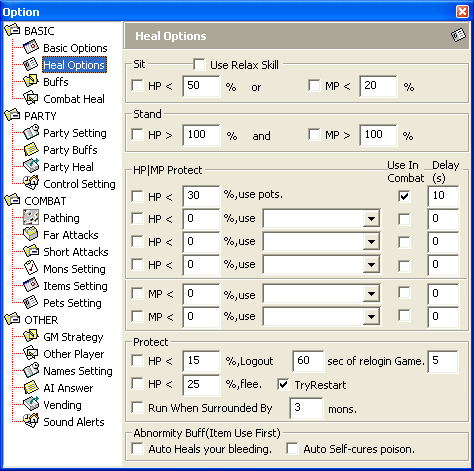
Use Relax Skill | The bot uses the Relax skill if it has one; otherwise it simply sits down. Used together with the HP < condition. |
HP < | The bot automatically sits down if HP is below the given percentage of maximum. |
MP < | The bot automatically sits down if MP is below the given percentage of maximum. |
HP Or MP | If both options (HP and MP) are checked, an OR condition is used - one of them being met is enough. |
| Parameter | Description |
|---|
HP > | The bot automatically stands up if HP is above the given percentage of maximum. |
MP > | The bot automatically stands up if MP is above the given percentage of maximum. |
HP And MP | If both options (HP and MP) are checked, an AND condition is used - both must be met at the same time. |
Note: with Use Relax Skill enabled, using the MP > condition is not recommended.
| Parameter | Description |
|---|
HP < | If HP drops below the given percentage, the bot automatically applies Use according to the Use in Combat and Delay conditions. |
Use (pots) | The selected skill, spell or potion. |
MP < | If MP drops below the given percentage, the bot automatically applies Use according to the Use in Combat and Delay conditions. |
Use | The selected skill or spell. |
Use in Combat | Apply Use during combat. |
Delay | Delay between uses of Use, in seconds. |
Notes: several HP < rows let you set different danger levels. The two MP < rows exist solely to set skill use in combat and out of combat.
| Parameter | Description |
|---|
HP < Logout | If HP is below the given percentage, the bot automatically disconnects from the server for the time set in sec of relogin Game. |
sec of relogin Game | Delay before entering the game after an emergency logout. |
HP < Flee | If HP is below the given percentage, the bot automatically tries to run away. |
Run when surrounded | If more monsters than set in Mobs attack the bot at once, it will try to run away. |
Mobs | Number of monsters. |
Try restart | While fleeing, the bot automatically tries to restart the game, saving itself from certain death. |
Notes: what the second number in HP < Logout is for is not known for sure - one guess is that it instantly kicks the bot out of the game. As for fleeing, it is doubtful the bot will manage to get away: it constantly gets stuck on any obstacle - trees, corners and other stuck bots. And in general, Russian bots are not afraid of monsters - they destroy them!
| Parameter | Description |
|---|
Auto Heals your bleeding | Automatically removes the Bleed effect. Items are used first, then skills and spells. |
Auto Self-cures poison | Automatically removes the Poison effect. Items are used first, then skills and spells. |
| Parameter | Description |
|---|
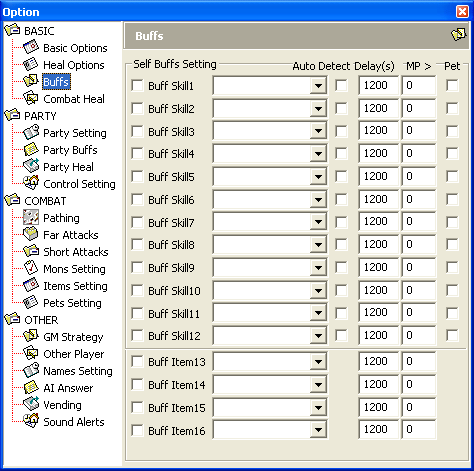
Buff Skill | Uses Skill according to the Auto Detect, Delay, MP and Pet conditions. |
Skill | The selected skill or spell. |
Auto Detect | The bot checks the buffs on itself: if the selected buff is still active, it does not cast it, and when the buff wears off it renews it automatically. The Delay condition is ignored. |
Delay | Delay between repeated uses of Skill, in seconds. |
MP > | Skill is used only if the bot's MP is above the given value. |
Pet | The selected Skill is also cast on the pet. |
Buff Item | Uses Item according to the Delay and MP conditions. |
Item | The selected item (scroll or potion). |
Delay (for Buff Item) | Delay between repeated uses of Item, in seconds. |
MP > (for Buff Item) | Item is used only if the bot's MP is above the given value. |
| Parameter | Description |
|---|
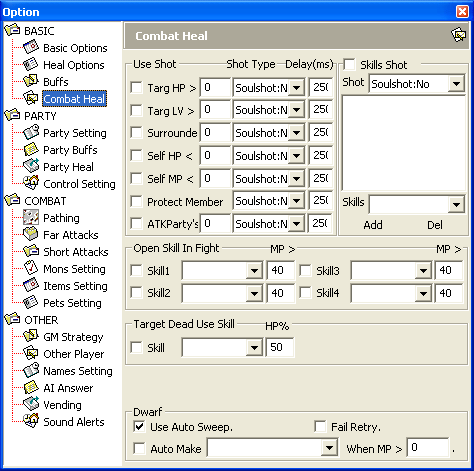
Delay | Delay between repeated uses of SS/SpS/BSpS, in milliseconds. |
Shot Type | Type and grade of the shots (SS) to use. |
Target HP > | Uses Shot Type every Delay if the selected target's HP is above the given value. |
Target LV > | Uses Shot Type every Delay if the selected target's level is above the given value. |
Surrounded | Uses Shot Type every Delay if more monsters than the given number attack the bot at once. |
Self HP < | Uses Shot Type every Delay if the bot's HP is below the given value. |
Self MP < | Uses Shot Type every Delay if the bot's MP is below the given value. |
Protect Member | Uses Shot Type every Delay if a party member is attacked by monsters. Mostly used to protect the buffer-healer when they pull aggro. |
ATK Party's | This function was new to the author, so there is no description. |
Recommended condition values for constant shot use and for economy mode:
| Condition | Constant use | Economy mode |
|---|
Target HP > | 0 | Usually your average damage without SS. A higher value is useful mainly for archers and mages. |
Target LV > | 0 | Usually 10-20 levels below your current level. |
Surrounded | 0 | Usually 2-3, depending on the character's abilities. |
Self HP < | Above maximum HP | Usually 1/3 of maximum HP. |
Self MP < | Above maximum MP | Usually 1/3 of maximum MP. |
| Parameter | Description |
|---|
Skills Shot | Shots (SS) are used when using the skills in the Skills list. |
Shot | Type and grade of the shots to use. |
Skills | List of skills and spells for which shots are used. |
Add | Add a skill or spell to the list. |
Del | Remove a skill or spell from the list. |
| Parameter | Description |
|---|
Skill | The selected skill (aura) is switched on before combat and switched off after it ends. |
MP > | If the bot's current MP is below this value, Skill will not be switched on. |
| Parameter | Description |
|---|
Skill | Skill or spell used on a corpse if the bot's HP is below the given HP %. |
HP % | HP level as a percentage of maximum. |
| Parameter | Description |
|---|
Use Auto Sweep | The bot automatically tries to use Sweep on a monster if it was previously Spoiled. The bot does not distinguish its own Spoil from someone else's. |
Auto Make | Automatically crafts an item using the specified recipe. |
When MP | Crafting starts when MP rises above the given value. Otherwise the bot drinks tea and munches on crackers. |
Fail Retry | Automatically retry crafting or spoiling after a failure message. |
Notes:
- It is recommended to set
When MP to the amount of MP needed to craft the item plus 1. This cuts off the needless spam "I am a craft bot, BAN ME!".
- Crafting stops and does not resume if there are not enough materials in the inventory.
Fail Retry is recommended only while the bot is busy spoiling; otherwise GMs will notice the same "I am a craft bot, BAN ME!" spam.
