
L2 Walker: Other Settings (OTHER Chapter)
GM Strategy, Other Player, Names Setting, AI Answer, Vending, Sound Alerts
The last chapter of the L2 Walker settings window - OTHER - covers everything not directly related to combat: reacting to GMs and other people's characters, name lists, the auto-responder, private store trading and sound alerts. The guide's authors never finished the GM Strategy, Other Player and Names Setting sections, so they are shown with screenshots of their windows and a list of the fields visible on them. General information about the program and the "10 commandments of a botter" are in L2 Walker for Dummies: overview.
GM Strategy
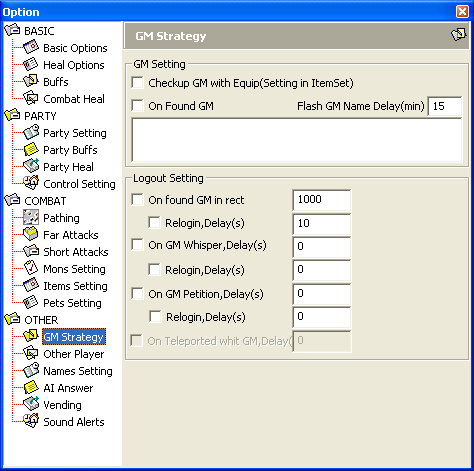
The guide never got a description of this section. The screenshot shows these fields:
GM Setting:Checkup GM with Equip(Setting in ItemSet),On Found GM,Flash GM Name Delay(min)(15 by default) and a list of names.Logout Setting:On found GM in rect(1000 by default),On GM Whisper,Delay(s),On GM Petition,Delay(s),On Teleported whit GM,Delay- each condition has its ownRelogin,Delay(s)option.
Other Player
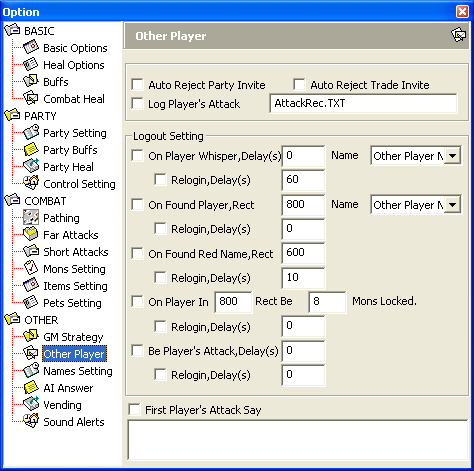
The guide never got a description of this section. The screenshot shows these fields:
Auto Reject Party Invite,Auto Reject Trade Invite,Log Player's Attack(fileAttackRec.TXT).Logout Setting:On Player Whisper,Delay(s),On Found Player,Rect(800),On Found Red Name,Rect(600),On Player In ... Rect Be ... Mons Locked.(800 and 8),Be Player's Attack,Delay(s)- each condition has its ownRelogin,Delay(s)option.First Player's Attack Saywith a text field.
Names Setting
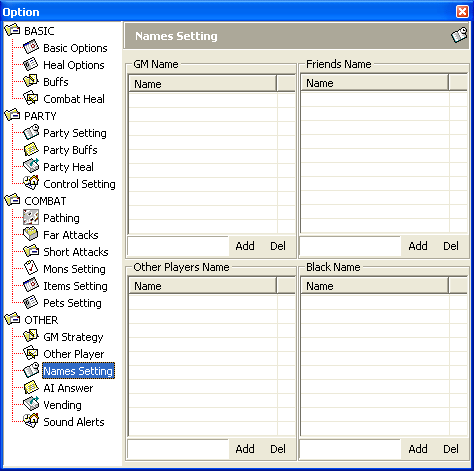
The guide never got a description of this section. The window has four lists with Add and Del buttons: GM Name, Friends Name, Other Players Name and Black Name. From the Sound Alerts section we know that GM names for alerts are taken from the GM Name list, and "other players" means any characters not in the Friends Name list.
AI Answer
Artificial intelligence. Watched too much of "The Matrix" and came to believe in artificial intelligence? If you feel like telling everyone that you are using a bot, this section is perfect for the purpose.
Vending
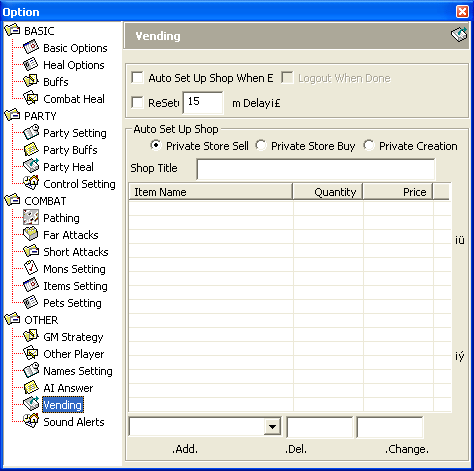
Vending
| Parameter | Description |
|---|---|
Auto Set Up Shop When Enter Game | The bot opens its store (selling, buying or crafting) right after entering the game. |
Logout When Done | The bot automatically logs out once it has sold or bought everything. It is recommended to disable the Relogin option in Basic Options. |
ReSetup | Every Delay the bot re-lists the items it is selling or buying. |
Delay | Store re-listing interval, in minutes. |
Note: you can buy no more than 4-5 and sell no more than 3-4 items at once, so ReSetup is very useful. Each time the store is re-listed, if the bot has already sold or bought an item completely, the next item from the trade list takes its place.
Auto Set Up Shop
| Parameter | Description |
|---|---|
Private Store Buy | Buying mode: the bot automatically buys the items in the trade list. |
Private Store Sell | Selling mode: the bot automatically sells the items in the trade list. |
Private Store Craft | Crafting mode (Private Creation in the program window): the bot automatically sells crafting from the craft list. |
Trade list
The list specifies which items are put up in the store and in what order.
| Parameter | Description |
|---|---|
Item Name | Item name. |
Quantity | Number of items. |
Price | Price per item. If the total exceeds the adena in the inventory, the store will not be set up. |
Up arrow (iu) | Move the item up the list. |
Down arrow (iy) | Move the item down the list. |
Notes on buying:
- The inventory must hold at least 1 identical item, otherwise that item will not be bought.
- The bot counts how many identical items are already in the character's inventory and puts up for purchase the difference between the desired quantity and the quantity on hand.
Filling in the trade list
| Parameter | Description |
|---|---|
Item Name | In the drop-down list you choose an item from those in the inventory. |
Quantity | Number of items. |
Price | Price per item. |
.Add. | Add the item from the input row to the end of the trade list. |
.Del. | Remove the selected item from the trade list. |
.Change. | Replace the selected item in the trade list with the item from the input row. |
Sound Alerts
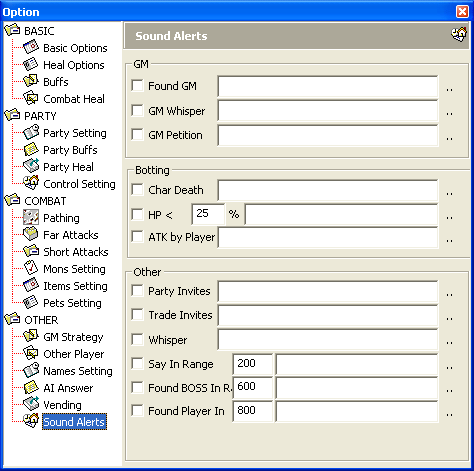
You can assign a separate sound to each case (the .. button next to the field). The sound file must be in wav format; the alert repeats every 5 seconds, and at the same time the bot window starts flashing. "GM from the list" means the names in the GM Name list of the Names Setting section, and "other players" means any characters not in that section's Friends Name list.
GM
| Parameter | Description |
|---|---|
Found GM | Alert if a GM from the list is in the game. |
GM Whisper | Alert if a private message from a GM in the list arrives. |
GM Petition | Alert if a conversation with a GM through the petition system has started. |
Botting
| Parameter | Description |
|---|---|
Char Death | Alert if the character has died. |
HP < | Alert if the bot's HP is below the given percentage of maximum. |
ATK by Player | Alert if the bot is attacked by another player's character. |
Other
| Parameter | Description |
|---|---|
Party Invites | Alert on a party invitation. |
Trade Invites | Alert on a trade request. |
Whisper | Alert if a private message from another player's character arrives. |
Say in Range | Alert if someone writes in the general chat (General, white) within the given radius of the bot. Default radius: 200. |
Found BOSS in Range | Alert if a boss or sub-boss is found within the given radius of the bot. Default radius: 600. |
Found Player in Range | Alert if another player's character is found within the given radius of the bot. Default radius: 800. |