
KF2 Gore Settings: KFGoreManager Values in DefaultGame.ini
Killing Floor 2 hides a lot of its blood and gore tuning in an ini file. This Early Access era guide walks through the [KFGame.KFGoreManager] section of DefaultGame.ini, explains what each variable most likely does and shows how to confirm your changes are active. Treat the descriptions as informed guesses, not official documentation.
Before you edit
KF2 is well optimized, but your PC still has a finite budget for rendering gibs, decals and effects. Do not push the body limit to extreme values unless you accept stutter or crashes. Raise values step by step, play, and raise again.
- In the in-game graphics settings, reach a smooth FPS above your target (for example 60). The author plays around High, but drops to roughly Medium when raising gore, and turns light shafts and shaders low or off.
- In the Advanced section set Character detail and FX to Ultra, and set Gore intensity in the game settings to the gory option. This lets the ini file override these values after you change them.
Where to edit
Open your killingfloor2 install folder (for example Steam/steamapps/common/killingfloor2) and edit KFGame/Config/DefaultGame.ini. Scroll down to the [KFGame.KFGoreManager] section.
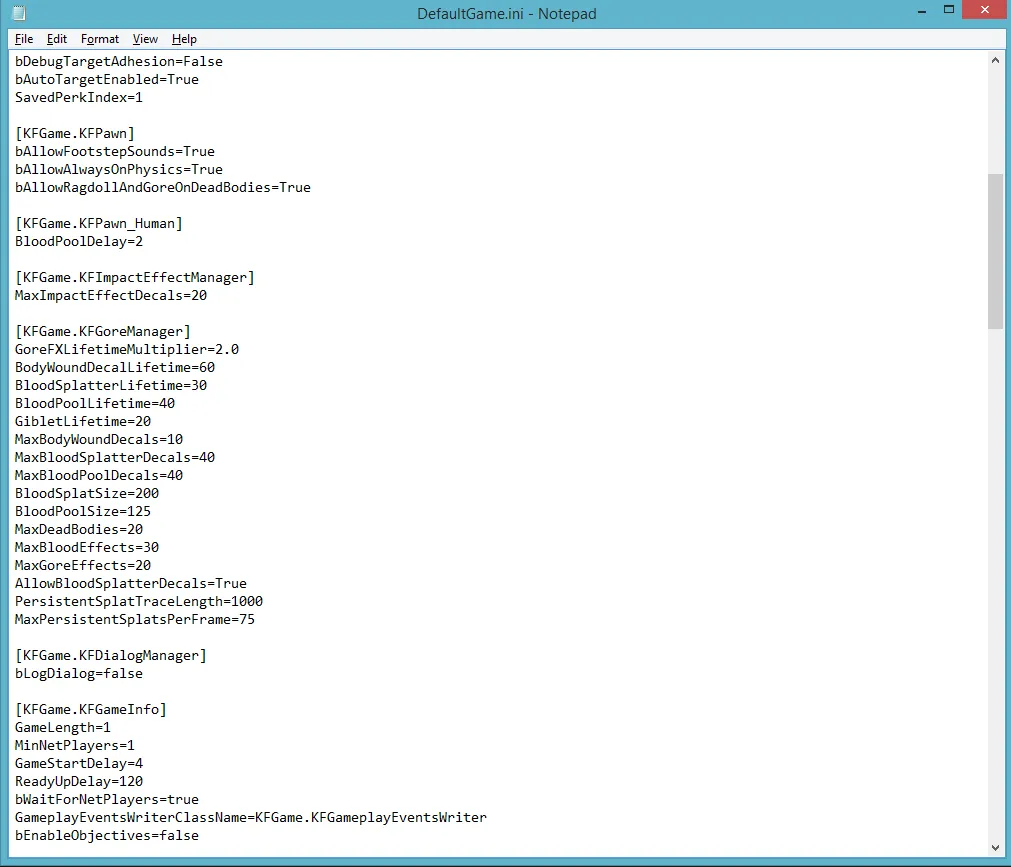 The
[KFGame.KFGoreManager] block in DefaultGame.ini.
What the variables do
Anything with "Lifetime" probably counts in seconds.
| Variable | Probable meaning |
|---|---|
| GoreFXLifetimeMultiplier | How long animated blood spurts and gore explosions stay visible |
| BodyWoundDecalLifetime | Lifetime of bullet holes and chunks shot off Zeds |
| BloodSplatterLifetime | Lifetime of splatters on floor and walls (they often last almost the whole game) |
| BloodPoolLifetime | Lifetime of blood pools, which are more detailed than splatters and appear after a Zed falls |
| GibletLifetime | How long small giblets remain before disappearing |
| MaxBodyWoundDecals | How many wounds a single Zed can show before generation stops |
| MaxBloodSplatterDecals | Limit on splatters (they seem to keep generating, so it may count individual decals) |
| MaxBloodPoolDecals | How many blood pools can exist at once |
| BloodSplatSize | Size of splatters; too high looks cartoonish and stretches the texture |
| BloodPoolSize | Size of blood pools; same warning |
| MaxDeadBodies | The favourite setting to tweak; Ultra default is 12 |
| MaxBloodEffects | Probably how many bloody impacts show on screen or on one Zed |
| MaxGoreEffects | Probably how many chunks of split Zeds are rendered |
| AllowBloodSplatterDecals | Leave at True |
| PersistentSplatTraceLength | Uncertain, probably tied to rendered splats |
| MaxPersistentSplatsPerFrame | Possibly splats updated per frame |
The author is not a programmer or FX artist, and says these are experienced guesses based on ini files from other games.
Impact effects
Just above the gore block sits [KFGame.KFImpactEffectManager], which lets you increase impact effects such as bullet holes and melee slashes.
Check that it works
Go back into the advanced graphics menu: if Character detail and FX detail both show INI OVERRIDE instead of ULTRA, your edits are active.
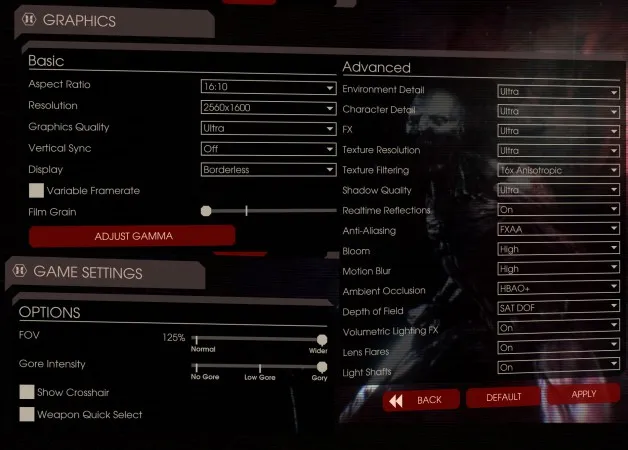 Look for INI OVERRIDE next to FX and Character detail.
If the game lags with your values, try toggling variable frame rate, run fullscreen when desktop and game resolution match, or lower other graphics options.
Examples in game
- A shot Bloat head shows damage textures, which count as a body wound decal.
- Animated splatters are lengthened by GoreFXLifetimeMultiplier, although Zed Time seems to override them.
- A Crawler giblet lasts longer if you raise GibletLifetime.
- A Cyst shows a small gore effect.
For more performance-oriented ini edits see KF2 ini tweaks for render distance, gore and audio.
FAQ
- Which setting keeps dead bodies on screen longer?
- MaxDeadBodies. The Ultra default is 12; depending on your PC you can double or triple it without a large FPS loss. Raise it in small steps.
- How do I know my gore edits are applied?
- Open the advanced graphics menu again. FX detail and Character detail should read INI OVERRIDE instead of ULTRA.
- Can this crash the game?
- Yes, if you set very high values. Increase numbers gradually and test after every change.
