
KF2: Remove the 62 FPS Lock with MaxSmoothedFrameRate
Killing Floor 2 caps frame rate through the smoothing setting, which you can raise in under a minute. For other performance tweaks see KF2 FPS ini tweaks for large servers and low-end PC optimization.
Steps
- Close the game and make sure it is not running in the background.
- Open the config folder: paste
C:\Users\<Username>\Documents\My Games\KillingFloor2\KFGame\Configinto the Windows search bar (replace the username with yours), or go through Documents, My Games, KillingFloor2, KFGame, Config in File Explorer.
 The Config folder.
- Open
KFGame.iniand/orKFEngine.iniin a text editor such as Notepad++. - Press Ctrl+F and search for
MaxSmoothedFrameRate. You should seeMaxSmoothedFrameRate=62.000000.
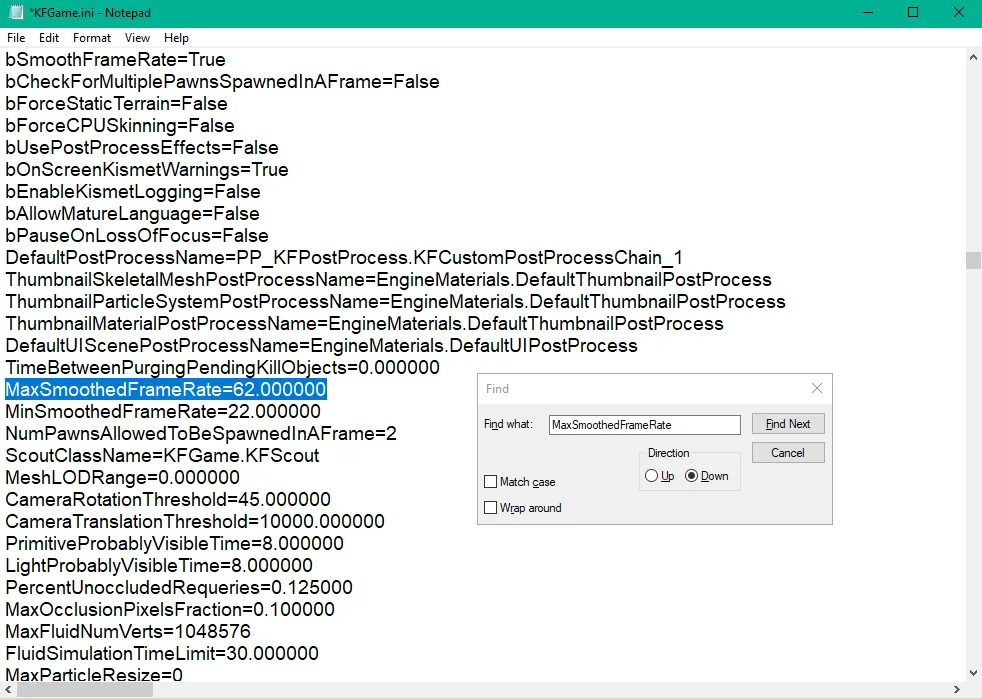 The highlighted line.
- Replace 62 with your target frame rate, save, close, and relaunch the game from Steam. To go back, set it to 62 again.
Extras: MinSmoothedFrameRate
The line right under it, MinSmoothedFrameRate, can be raised (for example to 60 or more if your hardware can handle it) for a steadier frame rate. Do not set it very close to your target frame rate, because that can cause crashes or poor performance when many things happen at once. Examples of heavy moments the author lists:
- A Demolitionist spamming explosives during Zed-Time (HRG Tommyboom, HX25 Grenade Pistol, Kaboomstick, Husk Cannon).
- Another player burning lots of ZEDs in front of you with ground fire.
- Dragonblaze and dual Spitfire spam during Zed-Time.
- Late waves in endless mode, especially in 6-player Hell on Earth lobbies with 300+ ZEDs, which can make the game laggy and eventually crash. This mostly matters on small maps like Elysium, Crash, Farmhouse, Containment Station and Biolapse.
FAQ
- How do I remove the FPS cap in Killing Floor 2?
- Close the game, open KFGame.ini or KFEngine.ini in the Config folder, search for MaxSmoothedFrameRate=62.000000 and replace 62 with your target frame rate.
- How do I revert the change?
- Set the value back to 62 in the config file.
