
Extract KF2 Audio: BNK to WEM to OGG Scripts
Killing Floor 2 stores its sound effects and music in Wwise containers: .bnk banks that hold .wem streams. This article rewrites a community guide that bundles the community's known extraction tools into a set of scripts, so you can right-click a bank and get playable .ogg files. It is about extracting only, not replacing; for replacement see custom music with Wwise and WEM and swapping music with Wwise and Audacity.
An easier option first
The author added a note that Ravioli Tools is easier: it has a full user interface, can convert to other formats including WAV and lets you choose the export location. If the script kit feels too long, try that first.
What the kit uses
- bnk extractor (bnkextr) to unpack
.bnkfiles. - ww2ogg (v0.24) to convert Wwise
.wemfiles to.ogg. - revorb to fix the generated
.oggfiles so players handle them correctly.
The method is built on a well-known "how to extract game audio files" guide and simplified into scripts. The author also supplies a documentation page and a long video (the video is outdated as of 2021; the documentation is the better source).
Installation
- From the download archive, extract the
kf2_sdkfolder anywhere, or toC:\. - If it is not at
C:\kf2_sdk, run_set_location_for_context_menu_reg_files.cmd. - Open the
context_menu_entriesfolder and run the.regfiles to add Explorer context-menu entries. - Run
_generate_sendto_shortcuts.cmdto create shortcuts in the Send To menu, which can be used for batch conversion via right-click, Send To.
You can also drag and drop input files straight onto the scripts.
Uninstallation
- Run the
*_remove.regfiles in theremovefolder. - Run
_delete_sendto_shortcuts.cmd(or delete the shortcuts manually). - Delete the files.
What the scripts do
bnk_to_ogg.cmd for .bnk input:
- Copies the file into a new subfolder of the same name.
- Extracts the
.wemfiles (bnkextr.exe). - Deletes the duplicate
.bnkcopy. - Converts the
.wemfiles to.ogg(ww2ogg.exe). - Runs revorb on the
.oggfiles. - Deletes the intermediate
.wemfiles.
wem_to_ogg.cmd converts .wem input to .ogg and revorbs it. If the input is a folder, it converts every .wem in it. It does not delete the original .wem files unless the del_wem variable is set to true.
Screenshots
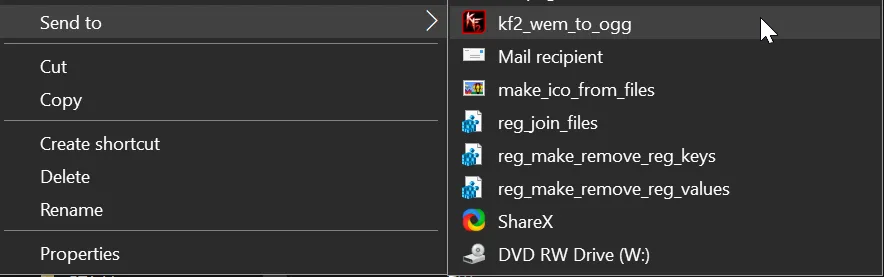 Send To entries for batch conversion.
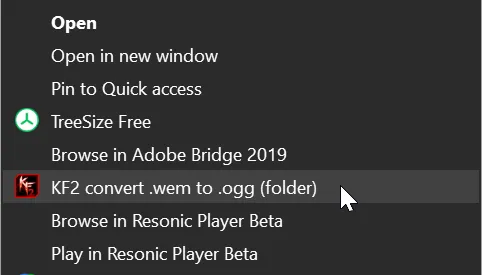 The folder context-menu entry.
 The .bnk file context-menu entry.
Notes
- Explorer may behave sluggishly after a large extraction, probably due to heavy file writes and indexing.
- The author likes Resonic Player for browsing sound files and music.
FAQ
- Which tools does the kit use?
- bnkextr to unpack .bnk files, ww2ogg to turn .wem into .ogg, and revorb to fix the resulting .ogg files.
- Is there an easier alternative?
- The author suggests Ravioli Tools, which has a graphical interface, export-location choice and conversion to formats such as WAV.
- Does this replace game audio?
- No. It only extracts sounds for listening or reuse. For replacing audio see the custom music guides.
