
KF2 Advanced Keybinds: SetBind Tricks (JP Guide)
Keybinds that are not available in the options menu are set either with a console command or by editing the ini file directly. This guide, translated from Japanese, collects useful tricks.
Basics
The command syntax is:
SetBind <Key> "Command"
SetBind End "say !cdr"
The file KFInput.ini is by default in Documents\My Games\KillingFloor2\KFGame\Config. Inside the [KFGame.KFPlayerInput] section, copy an existing line and fill it in. Some keys have special spellings (for example the plus key is written "Add"); an English guide to key names is linked from the original.
Simple tricks
|chains commands:"TossMoney | TossMoney | TossMoney".OnReleaseruns a command when the key is released:"GBA_QuickHeal | OnRelease GBA_LastWeapon".- Recommended:
"say !ot | OpenTraderMenu"opens the trader on the same key whether you use Controlled Difficulty, the RPW mod or only cheats. - Recommended:
"DoEmote | TossMoney | TossMoney | TossMoney | TossMoney | TossMoney"throws 250 Dosh at once while emoting.
More complex tricks
A key that changes each time it is pressed
Bindings=(Name="my_phrase1",Command="say !cdstats accuracy | SetBind Delete my_phrase2", ...
Bindings=(Name="my_phrase2",Command="say !cdstats damagedealt | SetBind Delete my_phrase3", ...
Bindings=(Name="my_phrase3",Command="say !cdstats healsgiven | SetBind Delete my_phrase1", ...
Bindings=(Name="Delete",Command="my_phrase2", ...
Each phrase sends a chat line and then rebinds Delete to the next phrase, so repeated presses cycle through three Controlled Difficulty stats commands.
Reload-cancel bash on one key
"GBA_TertiaryFire | OnRelease CustomStartFire 2 | OnRelease CustomStopFire 2"Pressing the key does a bash; releasing it reloads.
Thanks radio call
The options menu lacks a "thank you" radio chat, but this bind provides it:
"PlayVoiceCommsDialog 9"Chat in Japanese
Edit the ini and put Japanese text into say. To avoid garbage characters, open the ini in an editor that lets you set encoding (such as Notepad++) and change from UTF-8 to UCS-2 LE BOM.
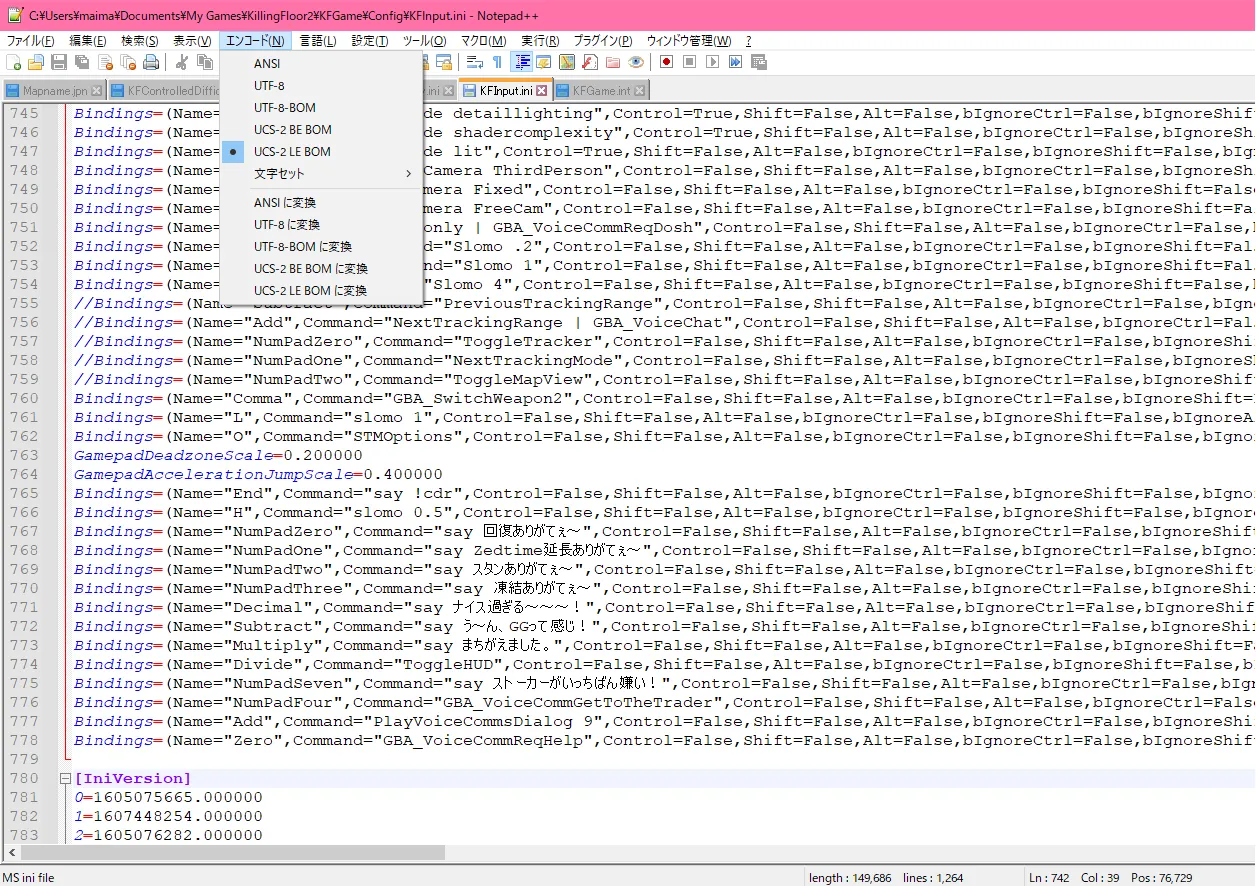 Setting the file encoding in Notepad++.
Switch between Japanese and English phrases
If you use Japanese chat but also play on foreign servers, bind a toggle key. The idea builds on the rotating bind above:
Bindings=(Name="JPNComment1",Command="Say (Japanese text)" ...
Bindings=(Name="INTComment1",Command="Say (English text)" ...
Bindings=(Name="JPNSET",Command="SetBind NumPadZero JPNComment1 | SetBind End INTSET" ...
Bindings=(Name="INTSET",Command="SetBind NumPadZero INTComment1 | SetBind End JPNSET" ...
Bindings=(Name="End",Command="JPNSET")
Pressing End swaps what NumPadZero says between the two languages.
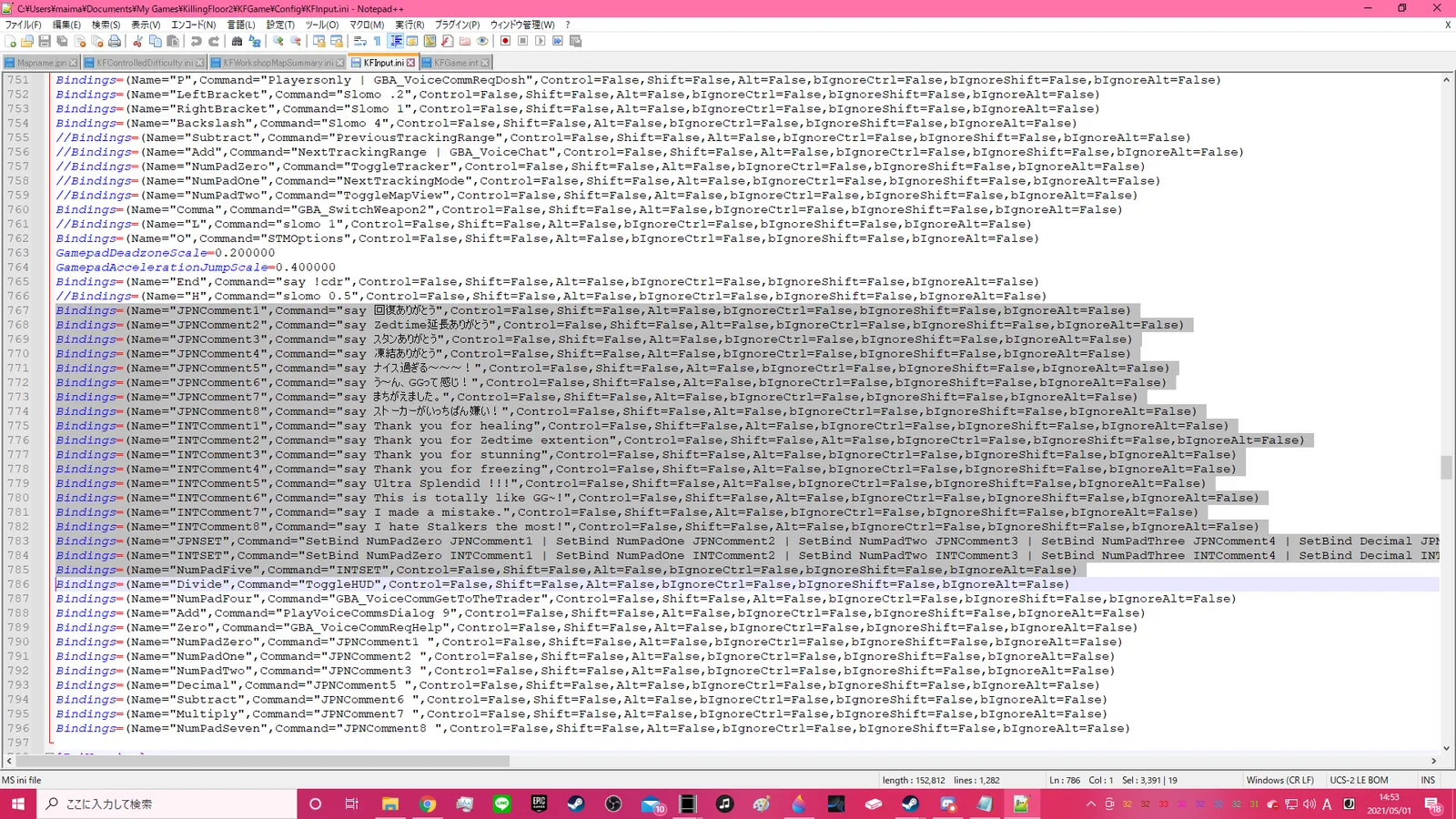 The author's own setup.
Related pages: /en/gamedb/killingfloor2/config/setbind-keybinding-guide/, /en/gamedb/killingfloor2/config/setbind-chat-binds-multi-toss-dosh-suicide/.
FAQ
- How do I bind a key from the console?
- Use SetBind <Key> "Command", for example SetBind End "say !cdr".
- Where is the bind file?
- KFInput.ini in Documents\My Games\KillingFloor2\KFGame\Config, in the [KFGame.KFPlayerInput] section.
- Why does Japanese chat text show garbage?
- Save the ini file with UCS-2 LE BOM encoding (in Notepad++) instead of plain UTF-8.
