
KF2: How to Mute One Character's Voice (Voice File Trick)
If you want one character to stop talking without muting everyone, this community trick removes a single voice file. It is a file-level change, so it affects only your own game.
Steps
- Open the game files and go to
C:\Program Files (x86)\Steam\steamapps\common\killingfloor2\KFGame\BrewedPC\Packages\Audio\Voice(adjust for your Steam library location). - Delete or rename the file belonging to the character you want silenced. For instance, if you cannot stand the Trader's voice, rename or delete the Trader file.
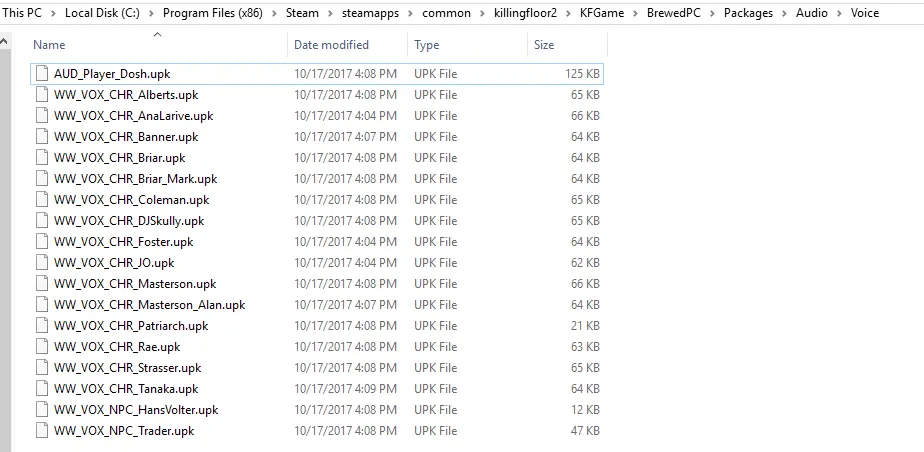 The Audio\Voice folder with one file per character.
Some file names are not obvious:
- Coleman is Donovan Neal.
- Masterson_Alan is Classic Masterson.
- Briar_Mark is Classic Briar.
- JO is Oisten Jaegerhorn.
Every other character should be easy to identify from the file name.
Bonus: give a character another character's lines
To change which lines a character speaks, copy the file with the lines you want to give, then rename it (or cut and paste) so it takes the name of the file you want to replace.
Caveats from the comments
- Several players said the line-swap bonus did not work for them, and one said that attempts to swap restored the original lines when playing online. Another confirmed that the trick at least makes Rae stay silent.
- The author said they did not know how to mute the announcer on the Airship map or how to create new lines from audio files such as MP3s.
For related audio tricks see muting the trader pod by renaming a package and swapping character voice lines.
FAQ
- Where are the KF2 character voice files?
- In the game folder under KFGame\BrewedPC\Packages\Audio\Voice, for example C:\Program Files (x86)\Steam\steamapps\common\killingfloor2\KFGame\BrewedPC\Packages\Audio\Voice.
- How do I mute only the Trader?
- Delete or rename the Trader's voice file in that folder; the other characters keep talking.
- Does swapping voice lines between characters work?
- The guide describes copying one character's file over another's name, but several commenters reported it did not work or that lines were restored when playing online.
