
How to Skip the Killing Floor 2 Intro Videos (-nostartupmovies)
This is a translation of a short Spanish and Portuguese guide that explains how to remove the intro videos so the game starts faster. The trick is a single Steam launch option. For other launch and config tweaks see KF2 FPS unlock and nostartupmovies guide and KF2 replace menu intro videos.
Steps
- Open your Steam library, find Killing Floor 2, right-click it and choose Properties.
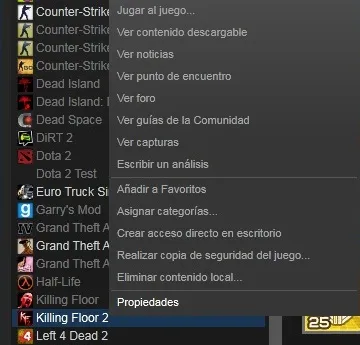
Right-click the game and open Properties.
- On the General tab click the button to set launch options.
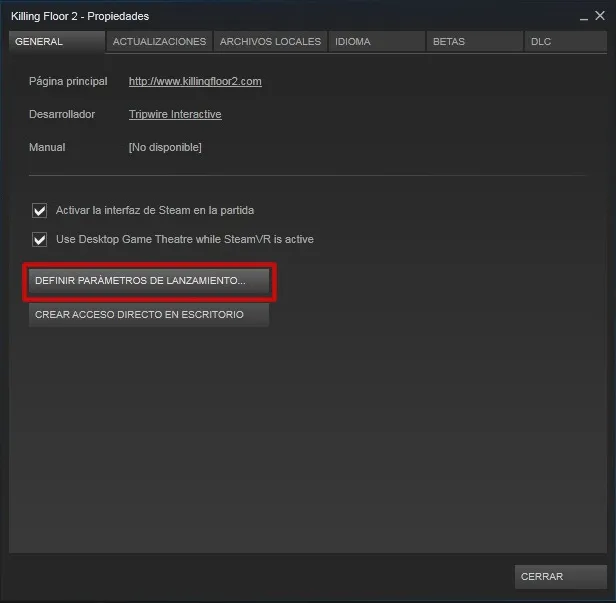
The Set Launch Options button on the General tab.
- In the window that appears type
-nostartupmovies(without quotes).
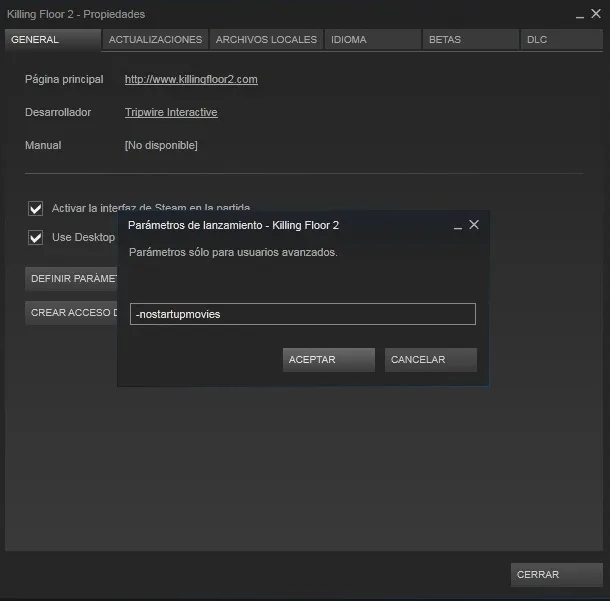
Enter the command and confirm.
That is all: the next time you start the game the intro movies are skipped.
Notes
- If the game has other launch options set, add the command separated by a space.
- The same steps apply in the Portuguese version of the Steam client, where the button is called "Definir opcoes de arranque".
FAQ
- What launch option removes the KF2 intro?
- Add -nostartupmovies (without quotes) to the game's Steam launch options.
- Where do I set launch options for Killing Floor 2?
- In your Steam library right-click Killing Floor 2, choose Properties, and on the General tab click Set Launch Options, then type the command.
- Does it still work?
- The guide was written for the 2016 era. One commenter in 2025 reported that it no longer worked for them, so test it on your install.
