
KF2 Zoom Sensitivity: Match Aim Down Sights to Hipfire (1:1)
In Killing Floor 2 your hipfire and aim-down-sights sensitivity are not the same, because aiming is scaled by the Zoom Sensitivity slider in the options. Getting a true 1:1 ratio is trickier than it seems: a value of 100 actually increases your sensitivity when you aim, and the right value is somewhere between 70 and 90. This guide shows how to find it. If you only want to remove mouse acceleration, see mouse settings fix in KFInput.ini.
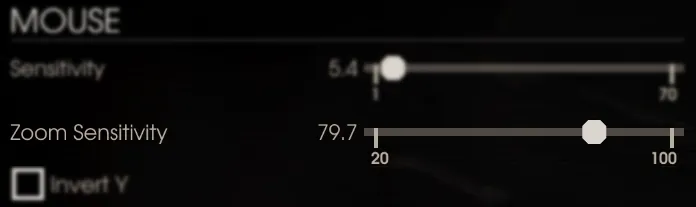 The Mouse section of the options, with the Zoom Sensitivity slider (79.7 in this example).
The problem
The slider value depends on FOV, and most weapons have their own zoom FOV. So you can set 1:1 for only one weapon type, preferably handguns, which have the second largest zoom FOV (flamethrowers have the largest). Everything else will aim slower. The author mentions a community tool that changes the ratio with hotkeys, but thinks it is too much work.
Two methods are offered: Method 1 is faster with fixed FOV values for 16:9; Method 2 lets you find the values yourself.
Method 1: fast, 16:9 displays only
Launch the game at least once after the latest patch, then close it. Choose a preset from the table:
| FOV value (in options) | Hor+ equivalent | Zoom sensitivity |
|---|---|---|
| 1.00 | 90 | 0.974270 |
| 1.144444 | 103 | 0.851500 |
| 1.180669 | 106.26 | 0.825460 |
| 1.222222 | 110 | 0.797210 |
| 1.25 | 112.5 | 0.779490 |
- Open
%UserProfile%\Documents\My Games\KillingFloor2\KFGame\Config\in Explorer. - In
KFInput.inifind and replace these lines:
LookRightScale=0
LookUpScale=0
bEnableMouseSmoothing=False
bViewAccelerationEnabled=False
ZoomedSensitivityScale=<zoom sensitivity from the table>- In
KFGame.inifind and replaceFOVOptionsPercentageValue=<FOV value from the table>. - Save both files.
- Optional: so the game does not reset changes every patch, edit the same lines in
BaseInput.iniandBaseGame.iniinSteam\steamapps\common\killingfloor2\Engine\Config\.
Method 2: custom zoom sensitivity (needs your mouse DPI)
- Launch the game once after the latest patch, check your desired mouse sensitivity and FOV, and close it.
- In
KFInput.iniset the same four lines as above (LookRightScale=0,LookUpScale=0,bEnableMouseSmoothing=False,bViewAccelerationEnabled=False), and copy yourMouseSensitivityvalue.
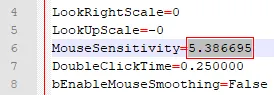 The MouseSensitivity value to copy (5.386695 here).
- On the mouse-sensitivity.com calculator, in the Input section, enter Sensitivity 1 (the value you copied), your DPI, and Aim set to Hipfire. A commenter notes you should choose Hipfire in the Aim drop-down rather than All.
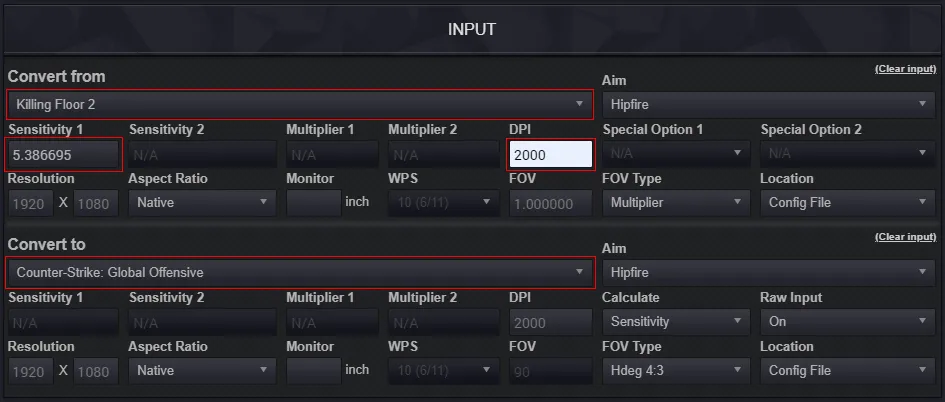 Input fields filled for Killing Floor 2 to CS:GO.
- In the Calculations section copy the CS:GO sensitivity value.
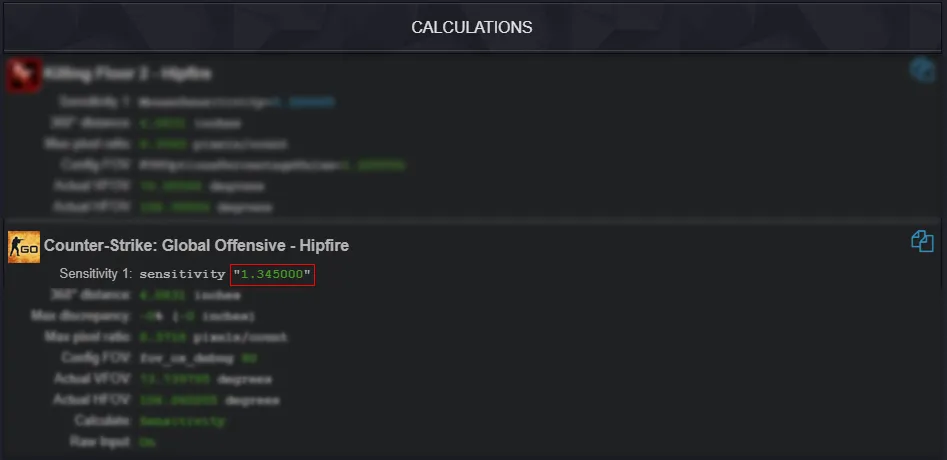 The calculated CS:GO sensitivity.
- Download and start the Sensitivity Matcher tool (version 1.5). Choose Quake/Source from the preset list and paste the CS:GO value.
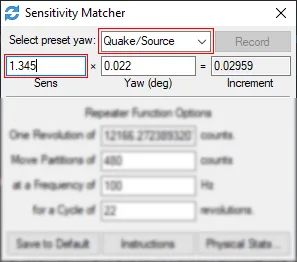 Sensitivity Matcher set to Quake/Source with the pasted sensitivity.
- Start a solo offline game and ready up. Open the console and type
EnableCheatsandToggleZedsIgnoreMeto stop ZEDs bothering you. - Place your crosshair against a high-contrast object and press Alt+Backspace to make a consistent rotation. If the CS:GO value is right you should get a perfect full rotation while hipfiring.
- Aim down sights with the pistol and adjust the Zoom Sensitivity value in the options until you get a close to perfect rotation (or a smaller one) while aiming.
Other weapon types still have different sensitivities, but since handguns have the second largest zoom FOV, everything else will be slower.
Optional: make it permanent
Close the game and edit BaseInput.ini in Steam\steamapps\common\killingfloor2\Engine\Config\ with the same lines and ZoomedSensitivityScale=<your value>, and BaseGame.ini with FOVOptionsPercentageValue=<your FOV>. Get precise values from KFInput.ini and KFGame.ini in your Documents config folder. If a line is missing, add it.
Reader notes
- Config values give more precision with decimals than the vague in-game slider; the in-game values are the same, just visually rounded.
- If you want 1:1 for handguns only, use FOV 1.222222 with zoom sensitivity 0.797210.
- If mouse-sensitivity.com asks for a subscription when converting, select Hipfire in the Aim list instead of All.
- Sensitivity Matcher needs a numeric keypad section, which some laptop layouts do not have.
FAQ
- Why is aiming slower or faster than hipfire in KF2?
- Aim-down-sights sensitivity is adjusted by the Zoom Sensitivity slider. The slider value depends on FOV and each weapon has its own zoom FOV, so one value cannot be 1:1 for every weapon.
- What value gives 1:1?
- A slider value of 100 actually raises sensitivity when aiming. The right value lies somewhere between 70 and 90.
- Do the config values differ from the in-game slider?
- No. The in-game values are the same as the config ones, just rounded visually. The config simply allows more decimal precision.
