
KF2 CD Combined Edition: Commands, Spawn Cycles, Admin Tools
This page rewrites the reference guide for the Combined Edition of Controlled Difficulty (CD), a mod build maintained for the Japanese CD community and based on the Blackout Edition. For the basics of CD see the controlled difficulty beginner guide and the BrazukaCD guide.
Avoid the bug splat crash
Open KFEngine.ini (in Documents\My Games\KillingFloor2\KFGame\Config), find MaxObjectsNotConsideredByGC=179220 and SizeOfPermanentObjectPool=179220, and change them to MaxObjectsNotConsideredByGC=33476 and SizeOfPermanentObjectPool=0.
Game settings
Conventional settings (some slightly modified):
| Option | Command | Meaning |
|---|---|---|
| AlbinoAlphas | !cdaa | Rioters can spawn |
| AlbinoCrawlers | !cdac | Elite Crawlers can spawn |
| AlbinoGorefasts | !cdag | Gorefiends can spawn |
| AutoPause | !cdap | Trader time pauses automatically |
| Boss | !cdboss | random, hans, pat, abom, kfp, mat, all, cy |
| BossHPFakes | !cdbhpf | Boss HP multiplier |
| CohortSize | !cdcs | Max Zeds spawned simultaneously |
| CountHeadshotsPerPellet | !cdchspp | Count headshots per pellet |
| EnableReadySystem | !cders | Use ready system to unpause the trader |
| FleshpoundHPFakes | !cdfphpf | Fleshpound HP |
| FleshpoundRageSpawns | !cdfprs | Fleshpounds can spawn raged |
| MaxMonsters | !cdmm | Max Zeds on the map at once |
| QuarterpoundHPFakes | !cdqphpf | Quarterpound HP |
| ScrakeHPFakes | !cdschpf | Scrake HP |
| SpawnCycle | !cdsc | Preset for the spawn order |
| SpawnMod | !cdsm | Forced spawn modifier |
| SpawnPoll | !cdsp | Spawn timer interval in seconds |
| TraderTime | !cdtt | Trader time |
| TrashHPFakes | !cdthpf | Trash Zed HP |
| WaveSizeFakes | !cdwsf | Decides the amount of Zeds |
| ZedsTeleportCloser | !cdztc | Zeds teleport closer |
| ZTSpawnMode | !cdztsm | "unmodded" or "clockwork" (enables ZTSpawnSlowdown) |
| ZTSpawnSlowdown | !cdztss | Above 1 slows spawns in Zed Time (clockwork only) |
The edition dropped "AlbinoStalkers" and "AlbinoHusks"; FakesMode is always "ignore_humans", wave end summaries always show on the HUD and WeaponTimeout is always at maximum.
Additional settings:
| Option | Command | Meaning |
|---|---|---|
| BossDifficulty | !cdbd | 0 to 3 sets boss difficulty from Normal to HoE |
| DisableBoss | !cddb | Skip the boss wave |
| DisableBossMinions | !cddbm | Also disable Abomination Spawn |
| DisableRobots | !cddr | No EDARs |
| DisableSpawners | !cdds | Spawner means vents |
| StartingWeaponTier | !cdswt | Change starting weapon by tier |
| StartwithFullAmmo / Armor / Grenade | !cdswfa / !cdswfar / !cdswfg | Start with full resources |
Chat commands
Information:
!cdinfoshows game settings (parameters: full, basic, dynamic, boss, albino, start).!cdwhoopens the participants menu.!cdsshows player stats (parameters such as larg large kills, hu husk kills, acc accuracy, hsacc headshot accuracy, healsg/healsr heals given/received, dmgd/dmgt damage dealt/taken, hs headshots, dosh earned, shotsf/shotsh shots fired/hit).!cdmsshows your stats.!cdscpopens the menu of installed spawn cycles.!cdpishows all players' skills and weapons.!rpwinfoshows restrictions (perk, level, skill, weapon).!cdscaanalyzes a spawn cycle, for example!cdsca ts_mig_v2 wave10 wsf12.!cdhgives hints (ini, cdr).!cdalshows your authority level.
Server:
!cdptand!cduptpause and unpause the trader.!cdrand!cdurset ready and unready.!cdahpfcontrols all HP fakes except the boss.!cdrsresets settings to default.!cdfs falfills ammo for dropped FALs (Commando).!cdmuccontrols the max upgrade count (admin).!mvopens the map vote.!cdaoccontrols AntiOvercap (admin).!cdsrswitches between player and spectator.
Client:
!otopens the trader.!cdfsfills ammo for your dropped weapons.!cdmopens the client menu.!mropens the match result.!tddtoggles picking up dual pistols.!xrareceives ammo from a Support remotely.!cdatbuys your registered loadout automatically.
Extra: !cdsz spawns a Zed without AI, !cdsa with AI, !cdkz kills Zeds, and !cddosh (drone) plays with a Dosh gun or Dosh drone. Zed codes: cy Cyst, al Alpha Clot, sl Slasher, gf Gorefast, cr Crawler, st Stalker, bl Bloat, si Siren, hu Husk, de EDAR Trapper, dl EDAR Blaster, dr EDAR Bomber, qp Quarterpound, sc Scrake, fp Fleshpound, hans, pat, kfp King Fleshpound, abom Abomination, mat Matriarch, as Abomination Spawn, hc Hans Clot. A trailing * means Albino (al* is a Rioter), ! means raged (fp!) and a vs prefix means Versus.
Console commands
Everyone: ClientOption opens the client menu, CycleOption the cycle control menu, SwitchSkill [0-4] switches skills.
Admins or offline: EndCurrentWave, SetWave [int], WinMatch, AdminMenu, ImAdmin, AddAuthorityInfo, ShowPathNodesNum, AddCustomStart, RemoveCustomStart, ClearCustomStart, CheckCustomStart and SetExtraCommand [string].
UTM only: ToggleCollectibles shows where collectibles are.
Installed spawn cycles
All long cycles are used for medium and short games, extracting waves 1-2-4-6-7-9-10 for medium and 1-4-7-10 for short; medium cycles also work for short games using waves 1-3-5-7.
Conventional: albino_heavy, basic_light, basic_moderate, basic_heavy, dtf_v1, nam_poundemonium, nam_pro_v1 to v5 (and v5_plus), nam_semi_pro and v2, rd_kta, rd_odt, rd_sam, asl_v1 to v3, pubs_v1, ts_mig_v1 (and _p), ts_lk313_stg, doom_v1, doom_v2 (plus, plus short variants), grand_v1, bl_v1, bl_v2, osffi_v1, doomsday_v1, fpp_v1, ts_mig_v2, ts_mig_v3, pro6, pro6_plus and pro_short.
Additional cycles (large counts at WaveSizeFakes=12, SC Scrakes and FP Fleshpounds in wave 10):
| Cycle | Wave 10 SC / FP | Notes |
|---|---|---|
| doom_v2_plus_rmk | 59 / 45 | Balanced doom_v2_plus, no Elite Crawlers or QP |
| machine_solo | short cycle (wave 4: 19 / 12) | Short, no Albino or QP |
| osffi_v1_ms | 42 / 38 | osffi_v1 with more Sirens, no Rioters, Elite Crawlers or QP |
| mko_v1 | 100 / 32 | Lots of Scrakes, no QP |
| bl_light | 29 / 23 | Easier bl_v2 for CD beginners |
| su_v1 | 25 / 29 | Easier early waves than bl_light |
| asp_v1 | 26 / 30 | asl_v1 without QP, heavy larges rush |
| asp_v2 | 47 / 48 | Heavier asp_v1, intense even early |
| asp_v3 | 51 / 54 | Heavier still, no Cysts |
| asp_fp_v1 | 4 / 44 | fpp_v1 without QP |
| asp_fp_v2 | 4 / 87 | Heavier asp_fp_v1 |
| dtf_pm | 50 / 34 | dtf_v1 with intense early waves, no Albino |
| dtf_pm_plus | 56 / 44 | More FP and Albino, none in waves 1 to 6 |
| dtf_pm_plus_fx | More Albino and Husks (waves 7 to 10), balanced larges | |
| who_v1 | 50 / 30 | QP only in waves 4 to 7, FP from wave 3, small squads |
| who_v2 | 53 / 34 | Harder who_v1 |
| nt_v2 | 44 / 38 | No Rioter in waves 3 to 10 |
| ebr_hh_v1 | 42 / 43 | Similar to dtf_pm with more mediums |
| jhhc_v1 | 68 / 44 | Heavy Husk cycle, more mediums than dtf_pm |
| jhscc_v1 | by Jary | |
| poopro_v1 | 68 / 44 | Waves 4 to 10 copied from the final waves of other cycles (fpp_v1, ts_mig_v1, osffi_v1, dtf_v1, ts_mig_v2, doom_v2_plus_rmk, ts_mig_v3) |
Admin settings
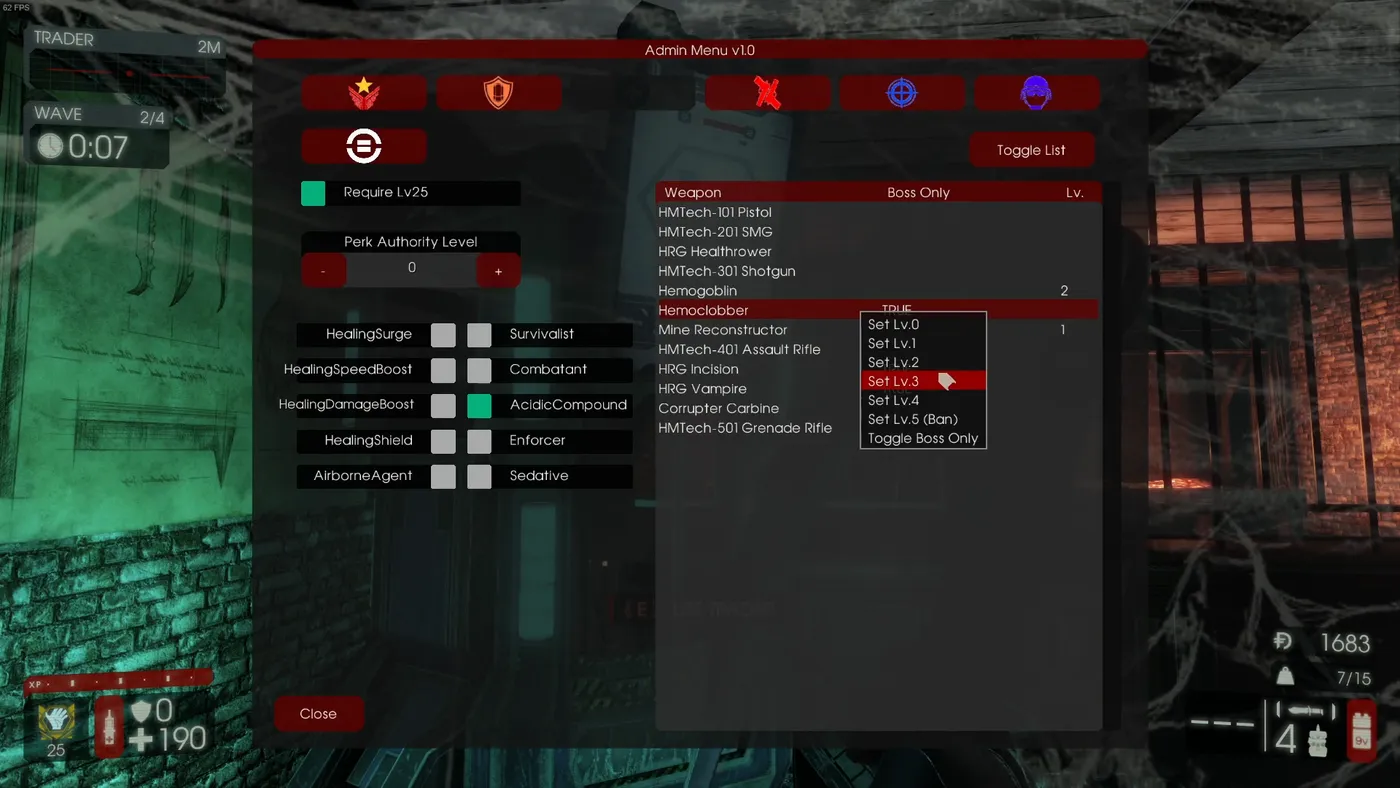 The admin menu opened with the AdminMenu console command.
Admin login. Log in as usual with AdminLogin [Password], then run ImAdmin to register your ID; your authority level becomes 4 (Admin), and later ImAdmin alone logs you in. Once registered (or offline) AdminMenu opens the admin menu.
Authority handler. Authority levels 0 to 4 can be set in three ways: the console command AddAuthorityInfo [SteamID] [Level] [UserName], the "Toggle List" button in the admin menu, or editing KFCombinedCD.ini ([CombinedCD2.CD_AuthorityHandler] with AuthorityInfo=(UserName=...,SteamID=...,AuthorityLevel=4)).
Restrictions (menu or config): per-perk required authority level; requiring perk level 25; banned skills (automatically switched); per-weapon authority levels (can allow weapons only on the boss wave; banned weapons are hidden in the trader and sold automatically); max weapon upgrades via !cdmuc; and Anti Overcap, which disables magazine overcapacity and resets ammo at each wave start. Config example:
[CombinedCD.CD_Survival]
MaxUpgrade=1
[CombinedCD2.CD_AuthorityHandler]
PerkRestrictions=(Perk=Class'KFGame.KFPerk_Support',RequiredLevel=1)
bRequireLv25=True
SkillRestrictions=(Perk=Class'KFGame.KFPerk_FieldMedic',Skill=5)
WeaponRestrictions=(WeapDef=Class'KFGame.KFWeapDef_RailGun',RequiredLevel=0,bOnlyForBoss=True,bNotInTrader=False)
Custom player start. Use ShowPathNodesNum to see path node numbers, AddCustomStart [index] to register a start point, and the Remove/Clear/Check commands to manage them. In KFxMapVote.ini: [CombinedCD2.xVotingHandler] CustomStarts=(MapName="KF-Nuked",NodeIndex=(509,372,500,354,498,556)).
CD records condition. Edit RecordConditions=(MinMM=(16,24,32,36,40,44),MinWSF=(2,3,5,6,8,9),MinHPFakes=6,MaxSP=1.000000,MaxSM=0.000000,MinCS=4) under [CombinedCD2.CD_Recorder].
Server default CD settings. DefaultCDSettings=(AlbinoAlphas=True,...,HPFakes=6) under [CombinedCD2.CD_Survival] alerts connecting players if the settings differ from the default.
Static features
Custom scoreboard and post-game menu, pickup info HUD during trader time, auto trader, custom weapons (High Mag Minigun, Mac 9 without burning, a stronger Beta1 Disrupter, Detoxified Hemogoblin without bleeding), drop all weapons on death, trader dash, no weapon despawn, unlimited perk switching, infinite flashlight, three times the late-arrival starting dosh, no trader dialog, a custom extra chat command system, Skip Trader replaced with CD Ready, team talk forced to all talk and removal of the chat tags.
Client settings (!cdm)
| Setting | Recommended |
|---|---|
| Pick Up Others (pick up others' weapons) | OFF |
| Drop Locked (lock your dropped weapons) | ON |
| Pick Up Low Ammo (weapons under a quarter ammo) | OFF |
Other options: Large Kill Sound, Player Death Sound, Disable Meow Sound, Trader Hide Dual, Drop Item, Large Kill Ticker, Hide Trader Path, Wave End Stats, Alert Unusual Settings, Display CD Tips and Show Pickup Info.
Credits
Localization: Japanese and English by Asapippi1020, Portuguese by S|Kaio, Thai by milk tea / N9, Chinese by Xiaoxixi. Main language of the community is Japanese with English as secondary.
FAQ
- What is the Combined Edition?
- A build of the Controlled Difficulty mod developed mainly for Japanese CD players, based on the Blackout Edition, adding stats, admin authority levels, restrictions and many extra spawn cycles.
- How do I become an admin on a Combined CD server?
- Log in with AdminLogin and the password, then run the console command ImAdmin once to register your ID; afterwards ImAdmin alone logs you in at authority level 4.
- How do I avoid the bug splat crash?
- In KFEngine.ini set MaxObjectsNotConsideredByGC=33476 and SizeOfPermanentObjectPool=0 instead of the default 179220 values.
